tutorial · 2026-06-12
UE5 Card Game Reveal Effect: Suit-Flip Particle Flair
Add a satisfying particle flourish to every card flip and suit reveal in your UE5 card game, using ready-made Niagara glyph effects.
Where suit VFX earn their keep in a card game
A card game lives or dies on the moment of the reveal. The deal, the flip, the turn of the river card — these are the beats your players actually feel, and a flat instant texture swap leaves all of that drama on the table. If you are searching for a UE5 card game reveal effect with some particle flair, what you really want is a way to punctuate that flip without hand-authoring bespoke Niagara for four suits and two colourways.
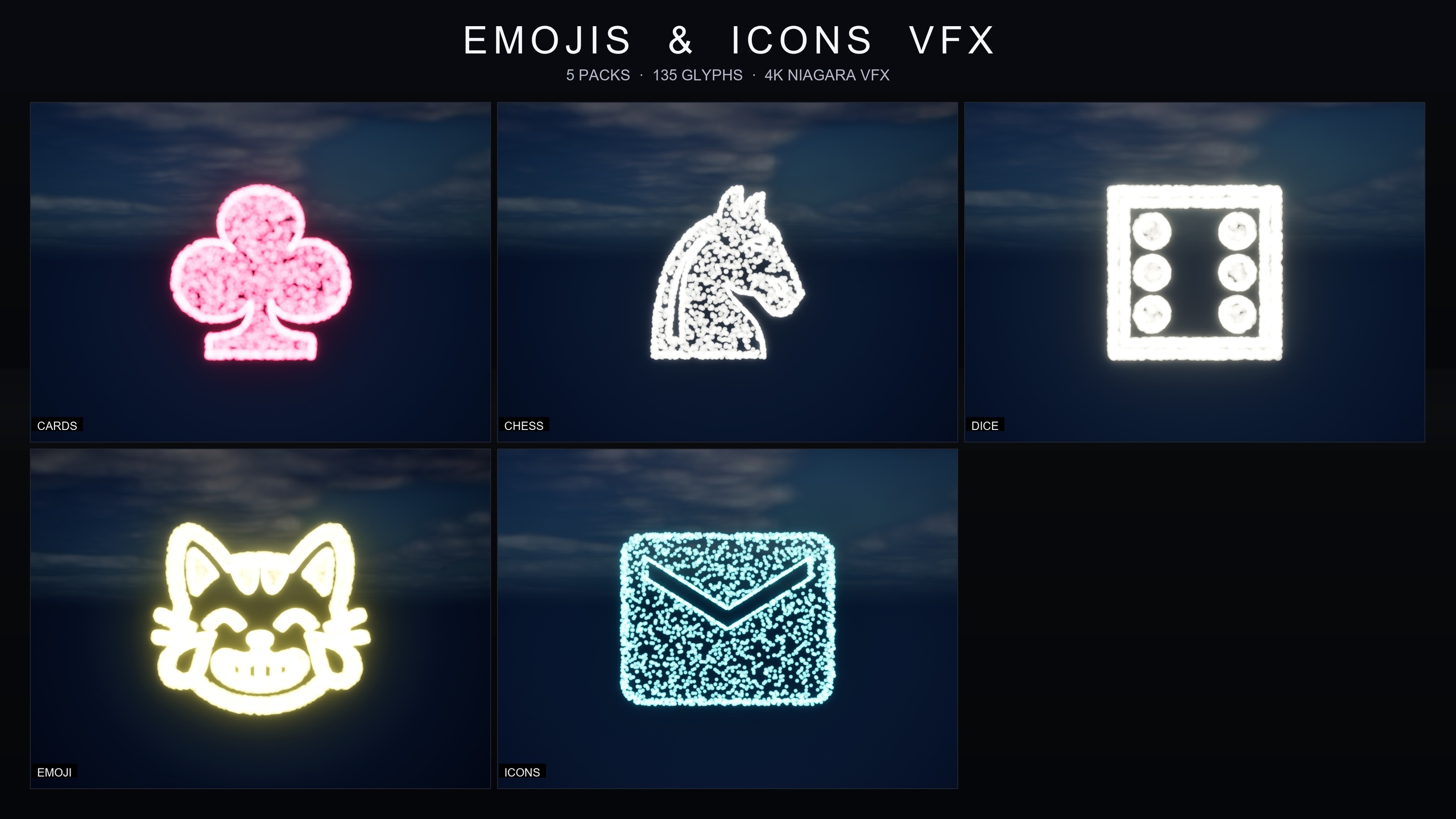
That is exactly the gap the Card Suits effects close. They are part of the Emojis and Icons VFX Bundle, a content-only Niagara library that draws symbols out of particles: each effect is a Niagara CPU sprite renderer that samples particle positions across a baked 3D glyph mesh, so a spade or a heart is literally spelled out in glowing points of light rather than printed as a sprite. Drop one onto a card as it turns and the suit blooms into existence in particles — a small touch that reads as polish in casino apps, magic-card reveals, tarot-style draws and solitaire alike.
Because the whole bundle is content-only with zero third-party dependencies, there is nothing to compile and no plugin to enable. You add the pack, find the effect, and spawn it. The rest of this tutorial walks through the eight suit variants, how to fire one on a flip, and how to reskin them to match your table felt and card backs.
The eight Card Suits effects: black and white variants
The Card Suits pack ships eight Niagara systems: the four suits — spades, hearts, diamonds and clubs — each in a pure black and a pure white variant. They follow the bundle's naming convention, so you will find them as NS_CardsSuits_SpadeBlack and NS_CardsSuits_SpadeWhite, then HeartBlack and HeartWhite, DiamondBlack and DiamondWhite, and ClubBlack and ClubWhite.
Two colourways for each suit is a practical choice rather than a cosmetic one. A pure white suit burst reads cleanly against a dark table or a saturated background, while the pure black variant holds its shape against a bright, light-coloured card face or a pale UI panel. In a standard deck you will typically wire spades and clubs to one variant and hearts and diamonds to the other to mirror the conventional black-and-red split, but the choice is yours and is governed by contrast against whatever sits behind the card.
All eight effects live under a single, flat content folder. After you add the bundle, browse to Content/EmojisAndIconsVFX/Niagara/CardsSuits to see the suit systems gathered in one place, with the bundle's other packs — Chess Pieces, Dice Pips, Emoji and Material Design Icons — sitting in sibling folders alongside.
Triggering a reveal flourish on the flip
The fastest way to see a suit effect is to drag the system you want straight from the Content Browser into your level or UI context and press play — these are drop-in systems with no setup and no missing references. That is fine for a preview, but for an actual reveal you want the effect to fire at the instant a card turns, so spawn it from your card's flip logic instead.
1. Open the Blueprint that controls a card actor, and find the point in your flip logic where the face becomes visible — typically the end of your flip timeline or animation, the same moment you swap to the face-up state.
2. From that point, add a 'Spawn System at Location' node (or 'Spawn System Attached' if you want the burst to ride with the card as it moves across the table).
3. Set the node's 'System Template' to the suit variant for the card being revealed, for example NS_CardsSuits_HeartWhite for a hearts card on a dark table. If the rank and suit are data-driven, drive this from a map or select node so each card picks its own suit effect.
4. Wire the spawn 'Location' (or the attach target) to the card face, nudging it slightly toward the camera so the particles read in front of the card rather than behind it.
5. Play the flip. The suit draws itself out of particles as the card lands face-up. Because the systems use a CPU sim and play nicely with bloom, leaving a little bloom in your post-process makes the glyph glow without any extra material work.
If you deal a whole hand at once, stagger the spawns by a few frames per card so the table reveals as a ripple of flourishes rather than one simultaneous flash — a small timing detail that does a lot for the feel of a deal.
Theming the suits with the parameter collection
Out of the box the Card Suits pack carries a signature colour of pink-red, which suits a vibrant deck but will not match every table. Rather than editing eight systems by hand, the pack ships its own Niagara Parameter Collection, NPC_CardsSuitsStyle, and editing that single asset retunes the whole suit set at once.
Open NPC_CardsSuitsStyle and you can adjust the controls the pack exposes across all eight effects together: spawn rate to move from a delicate dusting of particles up to a dense hero burst, particle size to scale the effect from a HUD-corner accent to a screen-filling reveal, glyph colour to re-theme every suit from one place, and lifetime to choose between a one-shot pop on the flip and a persistent ambient glow. Change a value and the look updates in real time.
This shared architecture is the reason the bundle is quick to live with: every pack in it — Card Suits, Chess Pieces, Dice Pips, Emoji and Material Design Icons — follows the same NPC_ pattern, so once you have themed your suits you already know how to retune any of the others. If you are building a casino app today and a tabletop title tomorrow, the dice and chess effects in the same bundle will feel immediately familiar.
To set this up in your own project, add the Emojis and Icons VFX Bundle, open the CardsSuits Niagara folder, wire the suit you need into your flip logic, then dial the whole set to your table with NPC_CardsSuitsStyle. From there, the same one-asset workflow scales straight across the rest of the bundle.
The eight Card Suits Niagara systems
| Suit | Black variant | White variant |
|---|---|---|
| Spades | NS_CardsSuits_SpadeBlack | NS_CardsSuits_SpadeWhite |
| Hearts | NS_CardsSuits_HeartBlack | NS_CardsSuits_HeartWhite |
| Diamonds | NS_CardsSuits_DiamondBlack | NS_CardsSuits_DiamondWhite |
| Clubs | NS_CardsSuits_ClubBlack | NS_CardsSuits_ClubWhite |
Pick the variant by contrast against the card face and table behind it.
FAQ
How do I add a UE5 card game reveal effect with particle flair?
Add the Emojis and Icons VFX Bundle, browse to Content/EmojisAndIconsVFX/Niagara/CardsSuits, and spawn the matching suit system from your card's flip logic with a 'Spawn System at Location' or 'Spawn System Attached' node at the moment the face becomes visible. The suit draws itself out of particles as the card turns.
Do the suit effects come in colours that suit my table?
Each suit ships in a pure black and a pure white variant so you can pick the one that holds contrast against your card face and background. The pack's default signature colour is pink-red, but you can re-theme all eight effects to any colour by editing the NPC_CardsSuitsStyle Niagara Parameter Collection.
Do I need C++ or any plugins to use these?
No. The bundle is content-only with zero third-party dependencies, so there is nothing to compile and no plugin to enable. You add the pack, drag a system into your level or UI context, and it plays.
Can I reuse the same workflow for dice and chess effects?
Yes. Card Suits is one of five packs in the bundle alongside Chess Pieces, Dice Pips, Emoji and Material Design Icons — 135 effects in total. Every pack uses the same NS_ systems and a per-pack NPC_ parameter collection, so once you have wired and themed the suits you already know how to drive the rest.
What engine version does the bundle target?
The product is listed for Unreal Engine 5.4 and up, and was built clean in 5.4. As a content-only Niagara pack it has no plugin prerequisites.
Emojis and Icons VFX Bundle
Five themed Niagara packs in one bundle — Card Suits, Chess Pieces, Dice Pips, 80 Emoji and Material Design Icons — 135 effects in total. Each pack ships a Niagara Parameter Collection so spawn rate, size, colour and lifetime retune across a whole set from a single asset.