article · 2026-04-22
Sci-Fi & Cyberpunk World-Building in UE5 With Niagara VFX
How to layer glyph rain, neon signage and diegetic HUDs into a believable future using particle-driven Niagara packs.
The look of a believable future
A convincing sci-fi or cyberpunk scene rarely lives or dies on its hero prop. It lives in the noise around the edges: the alien text scrolling past a viewport, the neon kanji buzzing over a ramen stall, the green code raining down a server-room wall, the little glowing icon that confirms a door unlocked. These are the details that tell the player they are somewhere with its own history, its own writing systems and its own machines. Building cyberpunk sci-fi VFX in Unreal Engine Niagara is largely the craft of producing that ambient density quickly and consistently.
The trap is treating each of those moments as a bespoke, hand-tuned effect. You end up with twenty one-off systems that all need recolouring by hand the moment your art direction shifts from cool cyan to blood amber. The approach this guide takes instead is to lean on packs where each symbol is an independently spawnable Niagara system rather than a baked shader decal, so you can spell with the effect, react to gameplay events, and retune a whole script from a single asset.
This is a roundup of the particle-glyph tooling MythicLemon ships for the genre. The anchor is the Niagara SciFi Glyphs Bundle, which pulls together five futuristic writing systems; around it sit the standalone Niagara Matrix Pack for code rain, the Emojis and Icons VFX Bundle for diegetic UI flair, and Cosmic Bloom VFX for the softer astral end of the spectrum. We will compare what each actually contains, then walk through assembling them into layered scenes.
Neon signage & holograms
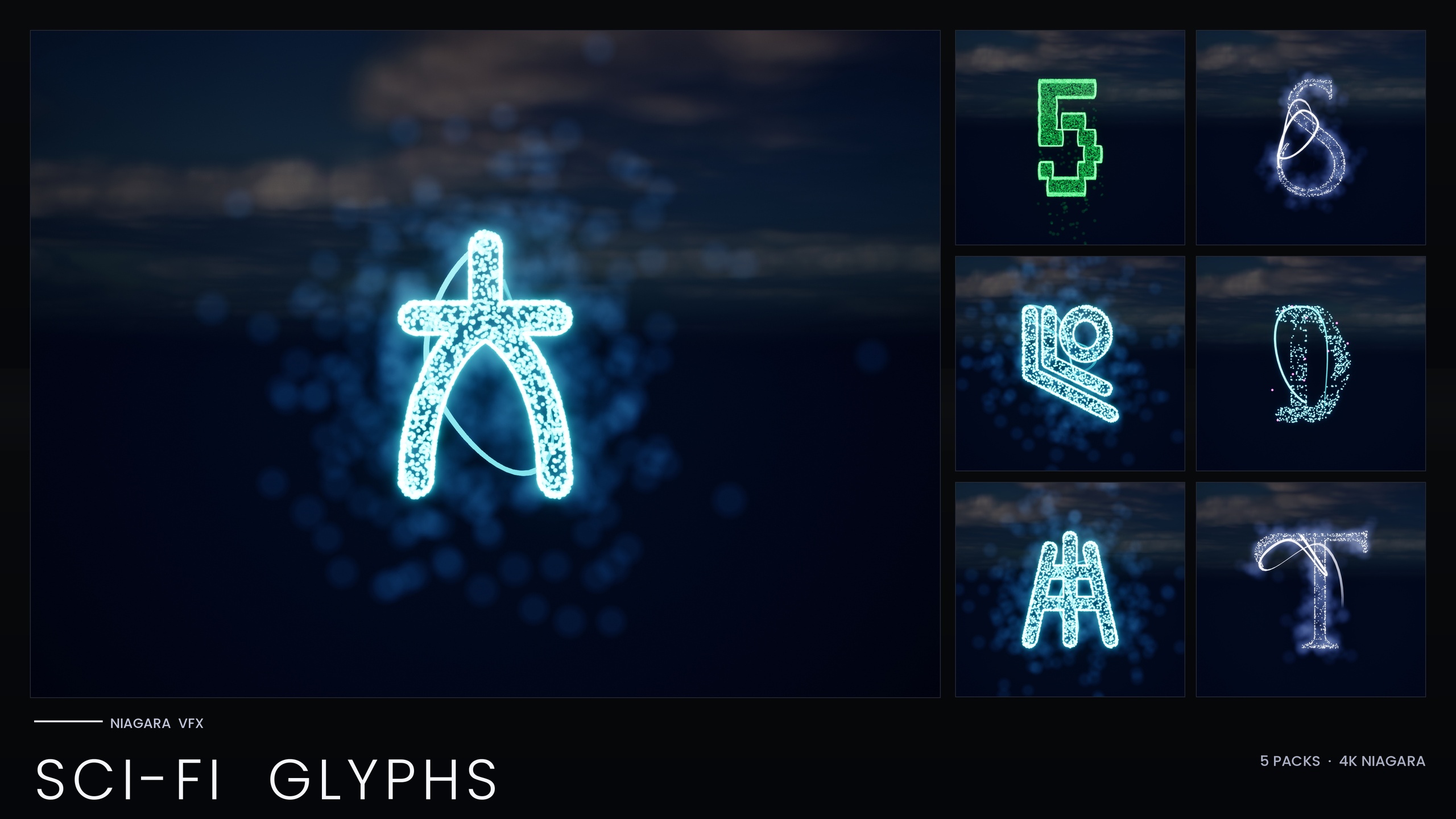
Signage is where a cyberpunk skyline reads as inhabited rather than dressed. The SciFi Glyphs Bundle ships a Cyberpunk script styled after the Audiowide typeface, intended for neon street signage, ramen-shop type and megacity holograms, alongside an Alien first-contact script, a Starforged spacefaring script and a Circuit PCB-trace set. Every glyph is both a spawnable CPU Niagara system and a matching static mesh, so you can light a sign with particles or carve the same character into a hull panel as geometry.
Building a sign is a matter of arranging several glyph systems in sequence. Drag the relevant NS_ systems into the level, space them to spell your word, then treat the line as a single dressing element you can duplicate across the district. Because four of the five scripts read their style from the pack's Niagara Parameter Collection, you can recolour and re-time an entire alphabet from one asset, which is how you keep a thousand neon signs coherent without touching them individually.
The Circuit script is the bundle's holographic specialist: it carries a cyan and magenta neon identity and uses very short, sub-0.2-second particle lifetimes to produce a stuttering flicker that reads as an unstable hologram or an AI manifestation. If you want a steadier projection instead of a glitching one, lengthen the particle lifetime and raise the spawn rate so the glyph stays lit. Across all of these, keep bloom enabled in your post-process volume: the systems use engine-default materials with no textures, so the neon glow is doing the heavy lifting and HDR bloom is what sells it.
Code rain & terminals
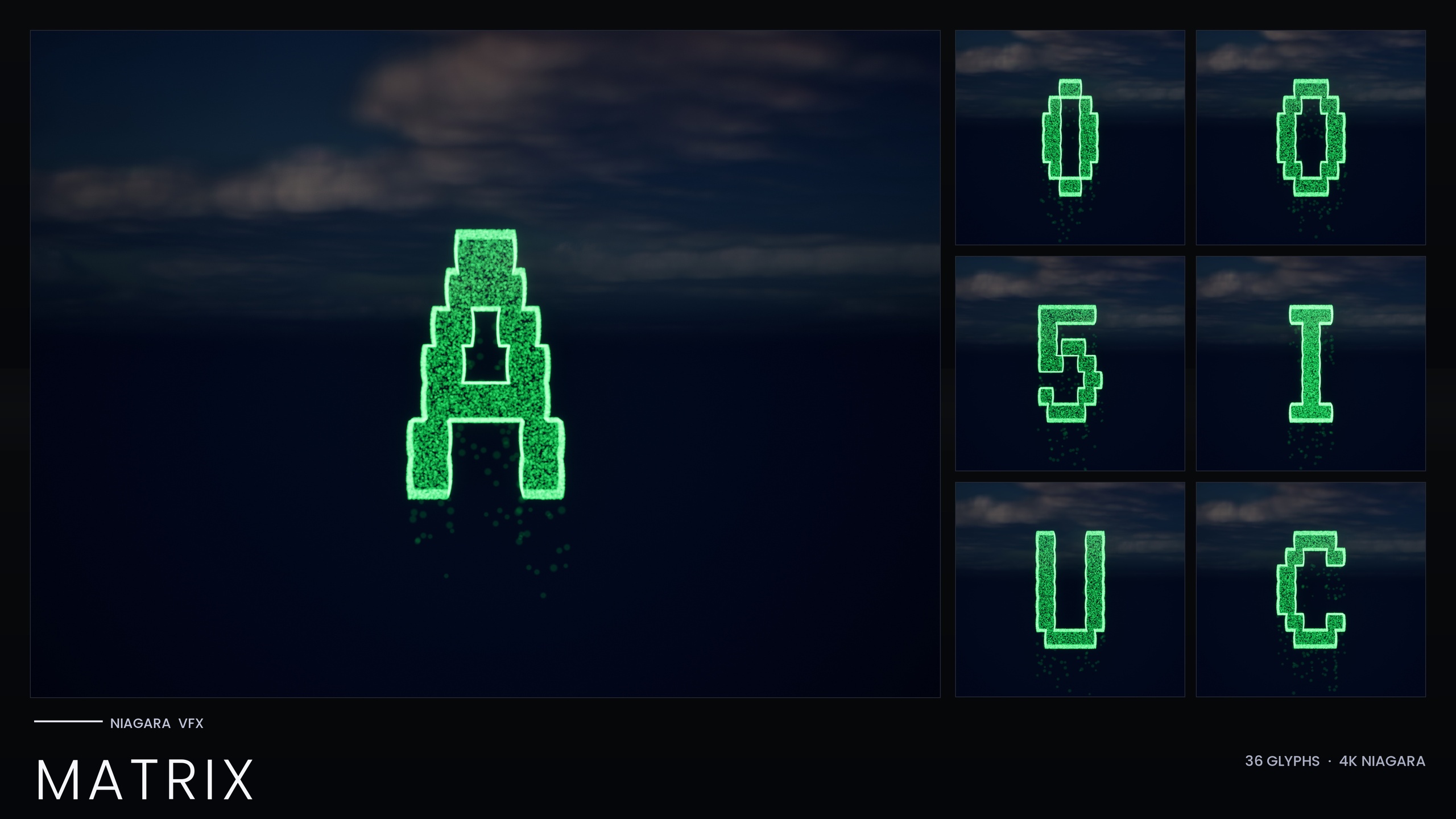
The falling-code wall is the single most recognisable sci-fi VFX motif, and it is worth understanding how the dedicated Niagara Matrix Pack builds it. The pack covers the full A-Z and 0-9 set as 36 independently spawnable Niagara systems plus 36 matching static meshes. Each glyph is built from two emitters that sample the extruded glyph mesh: a Spark emitter of tiny bright pixels that sells the character flicker, and a Rain emitter of dim grain that falls straight down to sell the cascade. The result reads as a shape made of falling digital grain rather than a solid silhouette wrapped in a halo.
Crucially, because each character is its own system you can spell with the rain. That is what makes the terminal reveals possible: a hacker-terminal sequence where the cascade resolves into a name, or an AI-awakening scene where the code reorganises into a message. Drop the systems into the level or spawn them from Blueprint in response to a gameplay event, and arrange them to spell whatever the moment needs.
One important workflow difference: the standalone Matrix pack bakes its style as inline constants and ships with no Niagara Parameter Collection, so it works immediately on import with zero one-time setup, but recolouring is per-system rather than from one central asset. To shift the iconic green to amber or blood-red, edit the Spark and Rain sprite colour on the emitters, or duplicate the system with a new tint. Keep the HDR green values modest, in the region the pack ships them, so bloom tints the rain rather than blowing it out to white, and render at a resolution where the sub-pixel grain still reads. The Matrix script is also included inside the SciFi Glyphs Bundle, so if you own the bundle you already have code rain alongside the other four scripts.
Diegetic HUDs & UI flair
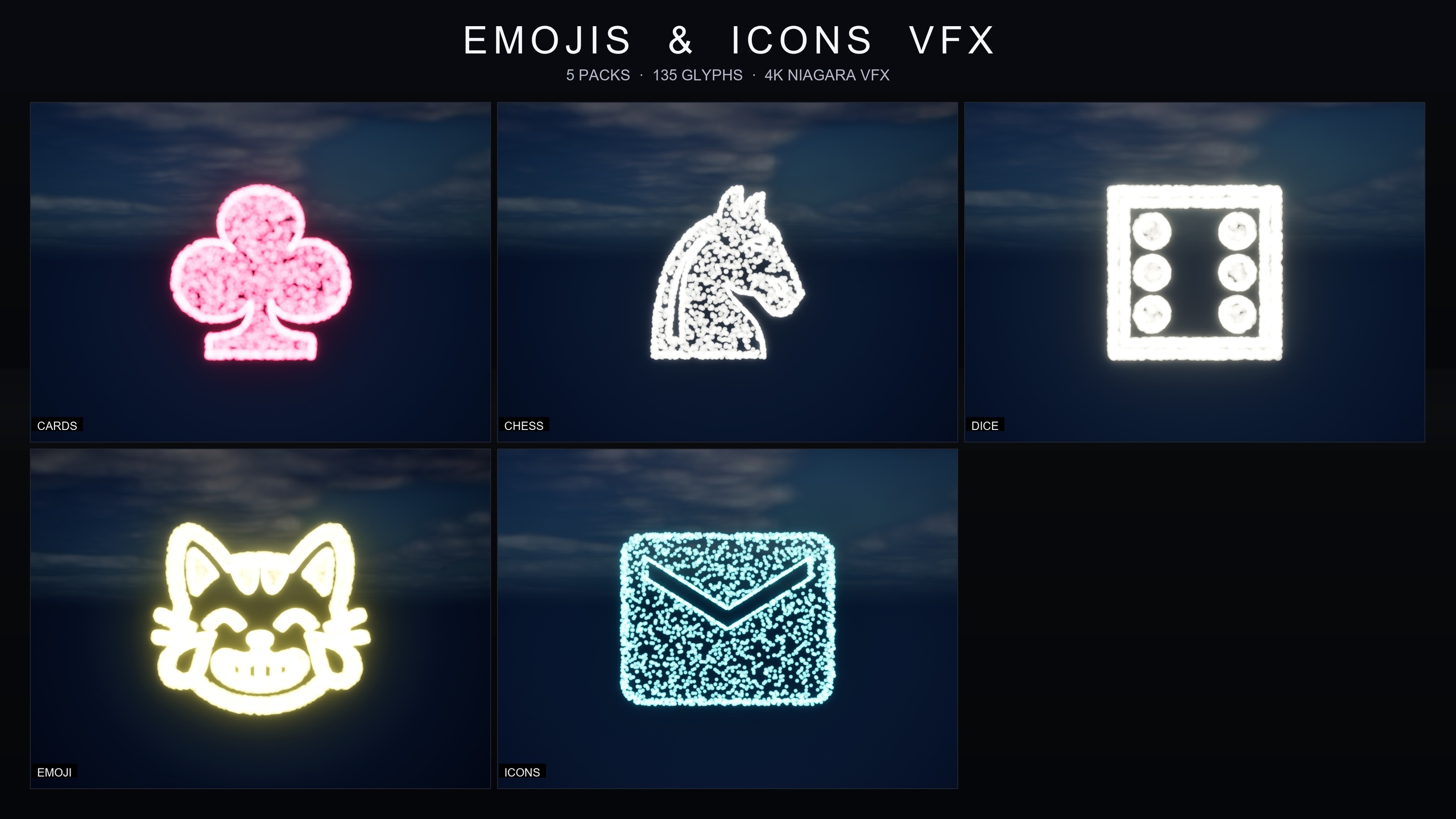
Once the environment reads as futuristic, the interface has to match. The Emojis and Icons VFX Bundle is a symbol and UI-flair library of 135 Niagara effects across five themed packs, and the Material Design Icons set of 29 effects is the one that earns its place in a sci-fi HUD: home, menu, search, favourite, add, settings, camera and arrow glyphs, each drawn out of particles. Each effect is a Niagara CPU sprite renderer that samples particle positions across a baked 3D glyph mesh, so the icon is built from particles rather than blitted as a flat sprite, which lets it glow, scatter and reassemble in a way a static UI texture cannot.
The bundle's other four packs, Card Suits, Chess Pieces, Dice Pips and the 80-strong Noto Emoji set, are aimed more at card, board and social experiences, but they share the same architecture, so anything you learn on the icons transfers. Each of the five packs ships its own Niagara Parameter Collection, so you can open NPC_IconsMaterialStyle and edit a single value to retune spawn rate, particle size, glyph colour and lifetime across the whole icon set in real time. That is how you move an icon from a delicate HUD-corner accent to a screen-filling confirmation burst without rebuilding anything.
For sci-fi UI specifically, the icons ship with a cool cyan signature colour out of the box, which sits naturally next to the Circuit script's cyan-magenta holograms. Use them for button-press feedback, notification flair, save-confirmation flourishes and onboarding pointers. The bundle is content-only with zero third-party dependencies, plays nicely with bloom under any post-process setup, and is CPU-simulated and mobile-friendly, so the same flair works on a phone build.
Layering effects for depth
Depth in these scenes comes from running several of these systems at once at different scales. A worked megacity composition might place Cyberpunk-script signage at building scale in the background, a Circuit-script hologram flickering at a kiosk in the mid-ground, a Matrix-style code wall behind a terminal, and a cyan Material icon confirming the player's interaction in the foreground HUD. Because the SciFi Glyphs Bundle bills itself as combining glyphs to build signage, transmissions and HUD text, and explicitly supports layered cyberpunk-meets-alien scenes, you can mix scripts within one shot without them fighting.
Keep your art direction coherent by leaning on the Parameter Collections. For the four NPC-driven scripts in the SciFi Glyphs Bundle, and for each pack in the Emojis and Icons bundle, a single colour edit rethemes the whole set, so committing to a palette is one asset change, not twenty. The exception to remember is the Matrix pack, whose inline-constant style means you recolour its rain per system. Plan your hero colour first, set it once where you can, then add the per-system Matrix tint to match.
Not every sci-fi scene is hard-edged neon. For the softer, astral end of the genre, the Cosmic Bloom VFX pack wraps stylised flower meshes in celestial energy through two families, a Constellation family that traces a silhouette in star-points connected by line segments, and a LumenLight family of soft warm-white volumetric puffs that orbit each bloom, reading as bio-luminescence or astral resonance. The two families are designed to be layered on the same mesh, and while it is built around flowers rather than glyphs, it is the right tool for dream sequences, observatory props and divine-glow plant life in a space-opera setting where pure cyberpunk grit would be wrong.
Across all four packs the underlying discipline is the same: spawnable particle systems instead of baked decals, one style asset instead of manual recolouring where it exists, and bloom doing the work the textureless engine-default materials leave for it. Build your density out of many small spawnable effects and your future will read as lived-in rather than decorated.
Sci-fi Niagara packs at a glance
| Pack | Effects | Style control | Best for |
|---|---|---|---|
| Niagara SciFi Glyphs Bundle | 147 systems / 147 meshes, 5 scripts | 1 Niagara Parameter Collection (4 scripts; Matrix is inline) | Neon signage, holograms, alien transmissions, terminals, HUD text |
| Niagara Matrix Pack | 36 systems / 36 meshes (A-Z, 0-9) | Inline constants, recolour per system | Code rain you can spell with; hacker-terminal and AI-awakening reveals |
| Emojis and Icons VFX Bundle | 135 effects across 5 packs (29 Material icons) | One Parameter Collection per pack | Diegetic HUDs, button feedback, notifications, social and board-game flair |
| Cosmic Bloom VFX | 100 systems (Constellation + LumenLight x 51 flowers) | Pre-tuned; twinkle baked per particle | Astral and dream sequences, observatory props, bio-luminescent flora |
Counts and engine ranges are from each product listing. Engine ranges are as published; the bundles were authored in UE5.4.
FAQ
Which pack should I start with for cyberpunk sci-fi VFX in Unreal Engine Niagara?
Start with the Niagara SciFi Glyphs Bundle. It includes five futuristic writing systems, the Cyberpunk neon script, the Alien first-contact script, the Matrix code-rain script, the Starforged spacefaring script and the Circuit holographic script, so it covers signage, transmissions, code rain and HUD text in one purchase. Add the Emojis and Icons VFX Bundle when you need diegetic UI flair on top.
Do I need the standalone Matrix pack if I own the SciFi Glyphs Bundle?
No. The Matrix code-rain script is included inside the SciFi Glyphs Bundle. The standalone Niagara Matrix Pack is the same 36-glyph A-Z and 0-9 set on its own, for projects that only want the code rain and not the other four scripts.
Can I recolour a whole script from one asset?
For four of the five scripts in the SciFi Glyphs Bundle, yes: they read their style from the pack's Niagara Parameter Collection, so editing that one asset recolours and re-times the whole script. The exception is Matrix, which bakes its style as inline constants and has no Parameter Collection, so you recolour its rain on a per-system basis by editing the Spark and Rain sprite colour.
Are these effects heavy to run?
All four packs use CPU-simulated Niagara emitters and the Emojis and Icons bundle is described as mobile-friendly with zero third-party dependencies. We do not publish benchmark or frame-rate figures, so profile in your own scene, but the systems are built from engine-default materials with no textures and are designed to be spawned in numbers.
Do these packs require custom materials or plugins?
No. The glyph packs ship with engine-default materials and no textures, no custom Blueprints and no plugin dependencies, and the Emojis and Icons bundle is content-only with zero third-party prerequisites. Keep bloom enabled in your post-process volume so the neon and HDR glow reads correctly.
Niagara SciFi Glyphs Bundle
147 Niagara glyph systems across five sci-fi themes — Alien, Cyberpunk, Matrix, Starforged and Circuit — for futuristic UI, terminals and FX. CPU-simulated with a Parameter Collection and demo map.