
article · 2026-02-16
How to Make Custom Magic Alphabet Runes in Unreal Engine from a Glyph Library
Stop reusing one hero rune. Build a real in-game writing system in UE5 by treating glyphs as a vocabulary you can compose, recolour and animate.

Why a vocabulary beats a single hero effect
Most magic systems in games are built backwards. You make one gorgeous glowing rune, drop it on every spell, every door, every ancient tablet, and within an hour of play the illusion collapses: the player notices that the dwarven curse and the elven enchantment are the same swirling shape in two different colours. The fiction promised a language. What you actually shipped was a logo.
If you are searching for how to make custom magic alphabet runes in Unreal Engine, the real answer is not a better single effect. It is a vocabulary. A believable writing system needs many distinct marks that obey shared rules of style, so that any string of them reads as the same script even though no two glyphs repeat. That is exactly the difference between a single Niagara System you instance everywhere and a library of independently spawnable glyphs that share one visual grammar.
The Niagara Alphabet & Symbols Bundle is built on that premise. It ships 687 individual Niagara particle systems, one per glyph, drawn from 26 source fonts and grouped into 25 themed writing systems and symbol sets. Every glyph is its own spawnable system, and every glyph also ships as a matching static mesh you can carve into the world. You are not buying an effect; you are buying an alphabet.
What is actually in the library
The 25 themed sets cover far more ground than fantasy runes alone. You get Runes (Elder Futhark), Theban, Enochian and Siddham for spellcraft; Alchemy, Arcana Tarot, Seals of Solomon and Sigils of the Zodiac for occult ritual; Hieroglyphics, Cuneiform, Mayan, Ogham and Phoenician for ancient inscriptions; and Matrix, Cyberpunk, Circuit, Alien and Starforged for science-fiction signage and UI. Living scripts are represented too, with English, Greek, Chinese, Hangul, Hebrew, Devanagari and Kanji Elements rounding out the catalogue.
Crucially, every glyph in every one of those sets is a separate asset. The bundle contains 687 Niagara Systems and 688 matching static meshes baked from the same fonts, so you can spell out an actual word, not gesture at one. That is the structural feature that makes a writing system possible rather than a decorative loop.
The footprint stays deliberately small. Everything is CPU-simulated, uses only Unreal's default material (the engine's BasicShapeMaterial), and ships with zero custom materials, zero material instances and zero textures. The glow you see is not a texture trick: each glyph's CPU sprite emitter samples the extruded-glyph mesh surface, and HDR sprite colour above 1.0 drives the engine's bloom to make the mark luminesce. Keep bloom enabled in your project or the glyphs will look flat.
Composing incantations from individual glyph systems
Because each glyph is its own system, an incantation is just a sequence of systems arranged in space and time. Here is the basic workflow to get a floating spell line on screen.
1. Add the content pack to your project's Content folder. This is a content/asset pack, not a code plugin, so there is nothing to compile or enable in your .uproject beyond the import.
2. Open one of the two demo maps that ship with the bundle, 'L_Demo_AllPacks' or 'L_Demo_PackRows'. They lay the entire catalogue out for instant preview so you can find the script you want before you write a line of code.
3. Drag the glyphs you need straight into the level. Each glyph is an 'NS_' Niagara System asset; placing several side by side in the order you want gives you a static incantation immediately.
4. To spawn an incantation at runtime, do it from Blueprint. Use the 'Spawn System at Location' node to place a glyph in world space, or 'Spawn System Attached' to bind it to a socket on a staff, a hand or a moving prop. Drive a short timeline that fires each glyph in turn and you get the classic letter-by-letter chant reveal.
5. For a curved binding circle or an arc of runes over a doorway, compute the transform for each glyph in a loop and spawn them around the radius. Because the systems are independent, you control the cadence, spacing and per-glyph timing yourself rather than fighting one baked animation.
Giving each faction or culture its own script and palette
A writing system earns its keep when factions stop sharing one. With 25 distinct sets you can assign a different script to each culture in your world and the player will read the difference instantly: the dwarves carve Elder Futhark, the priesthood chants in Enochian, the witches use the Theban alphabet, the lost empire left Cuneiform behind. Same engine, same performance profile, completely different visual languages.
Re-skinning a whole script is a one-asset edit. Each writing system reads its colour, sprite size and spawn rate from its theme's Niagara Parameter Collection, and four of these collections ship in the bundle, for example 'NPC_HieroglyphicsStyle', 'NPC_AlphabetChineseStyle', 'NPC_AlphabetCyberpunkStyle' and 'NPC_AlphabetEnglishStyle'. Editing one of those collections recolours and re-times every glyph in that set at once, so you can take a neutral amber inscription and turn it curse-blue across the entire alphabet from a single asset.
Per-glyph overrides still work where you need them. Most marks inherit the faction style from the Parameter Collection, but you can pin an individual system's colour or size when a specific glyph needs to stand out, for instance the one true name in an otherwise uniform ward. That two-tier setup, a collection for the script and overrides for the exceptions, is what lets a small team keep dozens of distinct cultures visually coherent.
Pair the Niagara systems with their matching static meshes for permanent world-building. Every glyph also exists as an 'SM_Glyph_' static mesh you can place to carve inscriptions into walls, emboss props, or light with emissive materials, so a faction's living spell VFX and its dead stone carvings come from the same source and read as one consistent script.
Diegetic HUDs, lore puzzles and ritual environments
The same vocabulary feeds your interface and your narrative, not just your combat VFX. The listed use cases for the bundle include floating spell incantations, animated summoning circles, diegetic HUDs and lore puzzles, and the breadth of the catalogue is what makes that range achievable from one library.
For diegetic UI, spawn glyph systems attached to in-world surfaces, a glowing console, a rune-lock, a hovering grimoire page, so the interface lives in the fiction rather than floating in screen space. Cyberpunk, Circuit and Matrix sets give you starship and console aesthetics; the arcane sets give you spellbook and altar aesthetics, all driven the same way.
Lore puzzles fall out almost for free once you have a real script. Because each glyph is a discrete, identifiable asset rather than noise, you can map glyphs to meaning and ask the player to read, match or translate them. A door that only opens to the correct three Theban marks, or a tomb wall whose Hieroglyphics spell a clue, becomes a content authoring task rather than a bespoke VFX commission.
Ritual environments benefit most. Compose a summoning circle from real Seals of Solomon, lay a zodiac wheel from the Sigils of the Zodiac, or stage an alchemical transmutation from genuine alchemy sigils, then animate the whole arrangement by re-timing its Parameter Collection. The scene reads as authentic esoterica because the symbols are drawn from real source fonts rather than invented squiggles.
Keeping it performant when many glyphs are on screen
A writing system implies density, and density is where naive VFX setups fall over. The good news is that the bundle is engineered to be light: CPU simulation, the engine's default material, no textures and no Blueprints mean each system carries very little fixed cost, and broad device support comes for free because there are no exotic material features to fall back from.
The cost that does scale is instance count. Every glyph you spawn is a live CPU system, and they stack per instance, so a hundred-glyph inscription is a hundred simulations. The bundle's own guidance is to spawn a manageable number of systems per scene rather than carpet a level with them. In practice that means budgeting: show a chant of a dozen glyphs, not a wall of three hundred simultaneously animating marks.
Lean on the static meshes to carry the bulk. For inscriptions that are part of the set dressing rather than the action, place the matching 'SM_Glyph_' static meshes and light them with emissive materials instead of spawning live systems. Reserve the animated Niagara glyphs for the marks the player is meant to watch, the active spell, the glowing answer, the rune that just lit up, and let cheap lit geometry handle the rest of the wall.
Finally, lifecycle the systems you do spawn. Destroy an incantation's systems once the chant resolves rather than leaving dozens running off-screen, and spawn ritual circles on approach rather than at level load. Treating glyphs as a vocabulary you speak and then fall silent, rather than a permanent ambient effect, keeps frame time stable even in scenes built around heavy on-screen text.
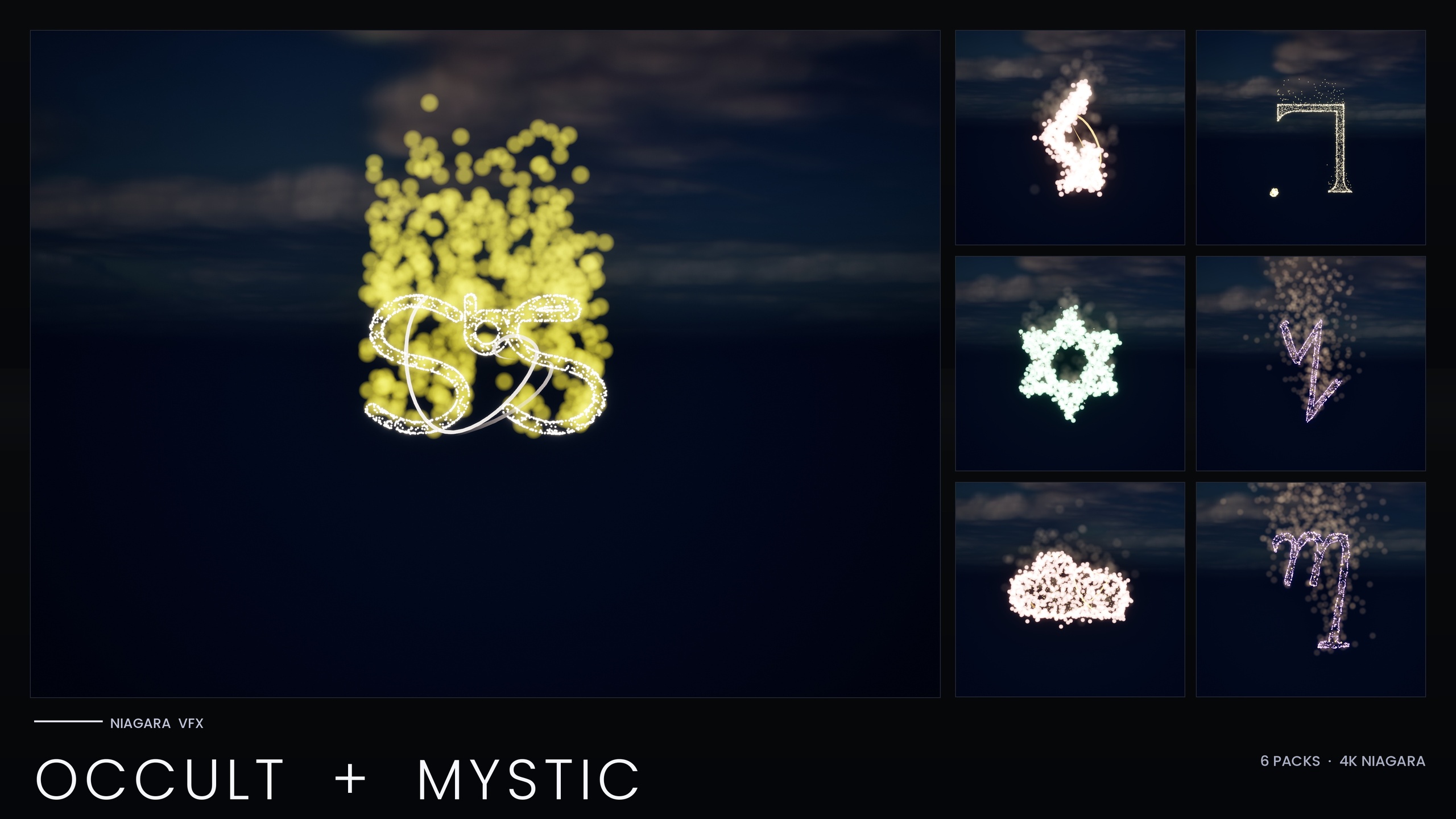
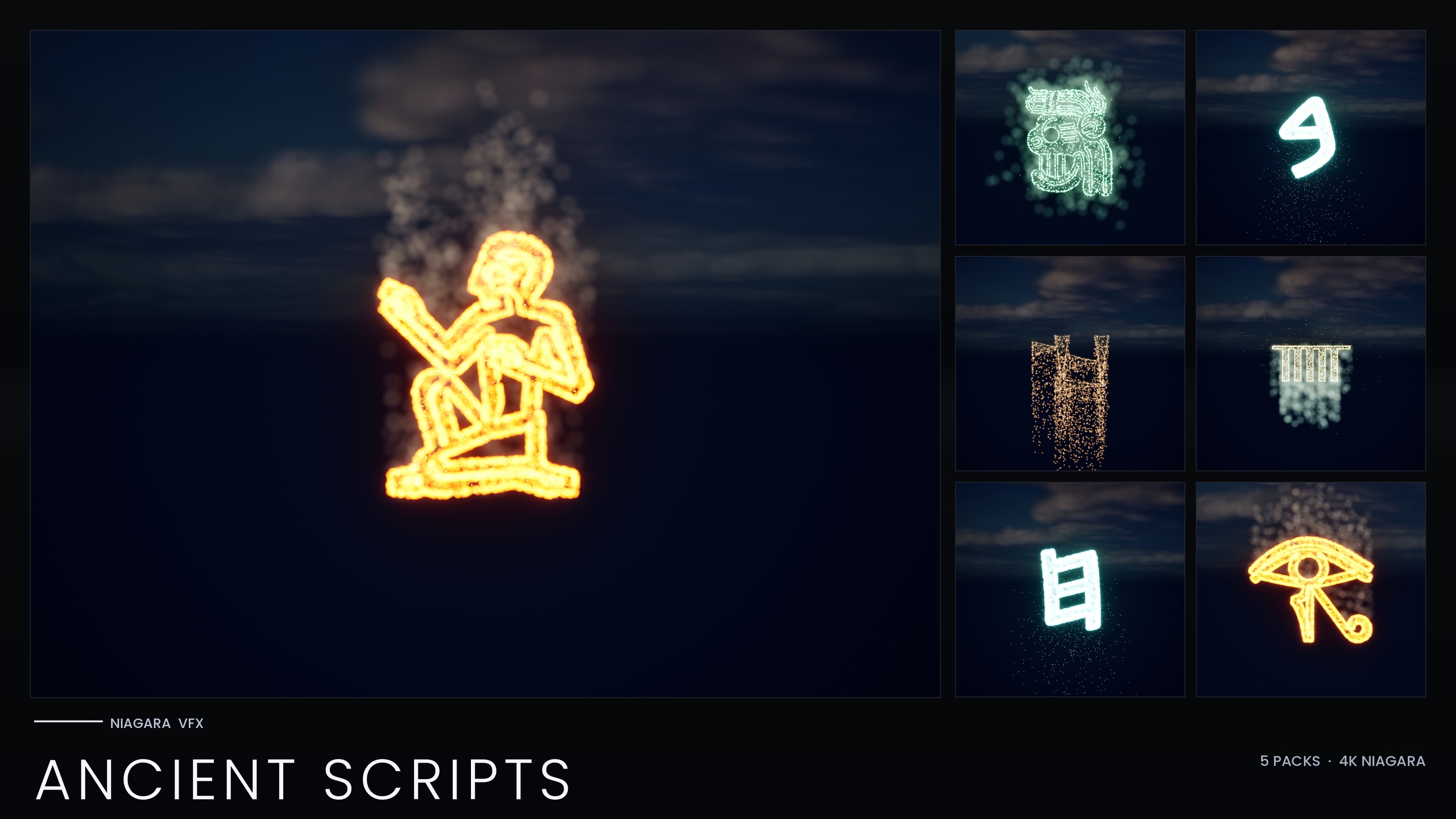
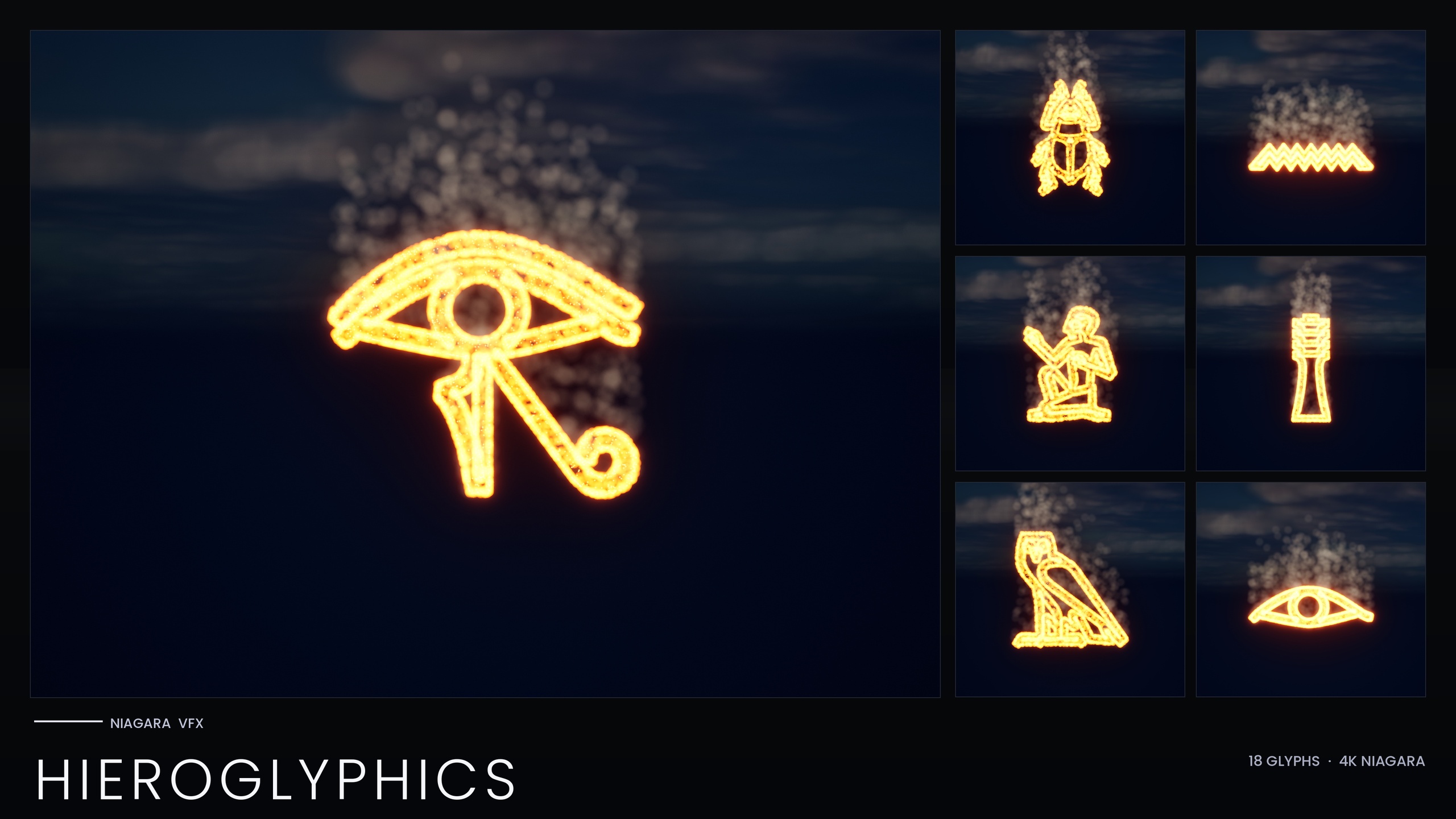
If your project only needs one corner of this language, the bundle has focused subsets that contain the same assets at a smaller scope: the Occult & Mystic Bundle for esoteric ritual symbols, the Ancient Scripts Pack for real historical writing, and the Hieroglyphics Pack as the smallest entry point for Egyptian tomb work. Start where your game lives, and reach for the full Alphabet & Symbols Bundle when you want every script in one place.
Which glyph pack fits your project
| Pack | Niagara systems | Coverage | Best for |
|---|---|---|---|
| Alphabet & Symbols Bundle | 687 | 25 themed sets across 26 fonts | A complete in-game writing system spanning many factions and genres |
| Occult & Mystic Bundle | 115 | Alchemy, Tarot, Enochian, Seals of Solomon, Zodiac, Theban | Summoning circles, tarot reveals and ritual scenes |
| Ancient Scripts Pack | 114 | Hieroglyphics, Cuneiform, Mayan, Ogham, Phoenician | Real historical inscriptions and archaeology cinematics |
| Hieroglyphics Pack | 18 | Egyptian hieroglyphs only | The smallest entry point for tomb, temple and cartouche VFX |
All packs share the same CPU-simulated, engine-default-material approach. The standalone packs are thematic subsets of the full Alphabet & Symbols Bundle. Counts are from each product's listing.
FAQ
How do I make custom magic alphabet runes in Unreal Engine?
Treat runes as a vocabulary rather than one reused effect. Import a glyph library such as the Niagara Alphabet & Symbols Bundle, where each of the 687 glyphs is its own spawnable Niagara System. Drag the glyphs you need into a level in order, or spawn them from Blueprint with the 'Spawn System at Location' or 'Spawn System Attached' nodes to assemble incantations letter by letter. Style the whole script at once by editing its Niagara Parameter Collection.
Can I give each faction in my game its own script?
Yes. The bundle ships 25 distinct themed writing systems, so you can assign a different real script to each culture, for example Elder Futhark for one faction and Theban or Enochian for another. Each set recolours and re-times from its own Niagara Parameter Collection, so re-skinning an entire faction's alphabet is a single-asset edit, with per-glyph overrides available for exceptions.
Will hundreds of glyphs on screen tank performance?
The systems are CPU-simulated with no custom materials or textures, so each carries little fixed cost, but instances stack, so spawn a manageable number per scene as the bundle advises. Use the matching static meshes for set-dressing inscriptions and reserve live Niagara glyphs for the marks the player is meant to watch, then destroy them once a chant resolves.
Do I get static meshes as well as the particle effects?
Yes. Every glyph ships twice: as a spawnable Niagara System for animated, glowing, reactive marks, and as a matching static mesh ('SM_Glyph_') you can carve into walls, emboss onto props and light with emissive materials. The bundle includes 688 static meshes alongside the 687 systems, drawn from the same fonts so your living VFX and carved stone read as one consistent script.
Do I need custom materials or textures to get the glow?
No. The bundle uses only Unreal's default BasicShapeMaterial with zero custom materials and zero textures. The glow comes from HDR sprite colour above 1.0 driving the engine's bloom post-process, so the effect depends on having bloom enabled in your project rather than on any imported texture.
Niagara Alphabet & Symbols Bundle
The complete glyph VFX bundle — 687 Niagara systems built from 26 alphabets and symbol sets (Alchemy, Cyberpunk, Matrix, Hieroglyphics, Runes, Zodiac, Tarot and more), with per-theme Parameter Collections and two demo maps. All CPU-simulated for broad device support.
Related on Fab
Related reading