tutorial · 2026-04-11
How to Compose a Focal Point in a UE5 Environment with a Cursed Boulder
Anchor a brooding grove around the free Demonic Wailstone, then build out the lighting, decay and camera framing that make a focal point read.
Start with one silhouette the eye can't ignore
Most cursed-grove scenes fail for the same reason: there is no single thing the eye lands on first. If you want to know how to compose a focal point in an environment in Unreal Engine 5, the answer starts before you touch lighting or post-processing. It starts with a silhouette that is bigger, darker and more legible than everything around it, sitting at the spot you want the player to read as the heart of the space.
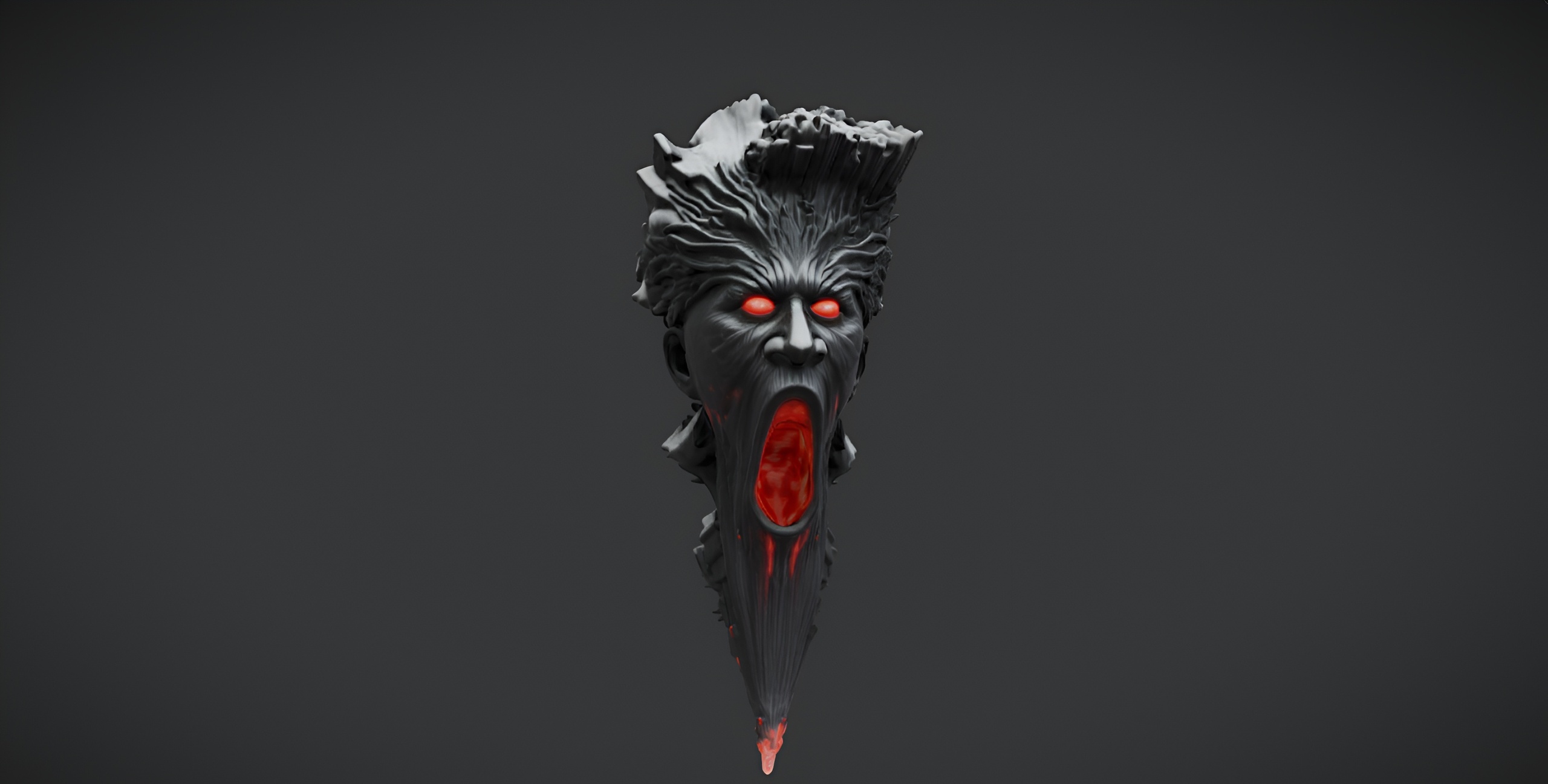
The Demonic Wailstone is built for exactly this job. It is a single brooding dark-fantasy boulder, a free drop-in UE5 static mesh with 2K PBR textures, and because it is one heavy, irregular rock it gives you a strong negative-space outline against trees and sky. Download it from Fab, drag it into an empty level, and place it slightly off the geometric centre of your playable area rather than dead-centre. An asymmetric placement reads as deliberate composition; a centred one reads as a test scene.
Scale it up until it dominates. A focal element only works if there is a clear size hierarchy, so make the wailstone noticeably larger than any nearby prop. Rotate it so its most jagged, characterful profile faces your main approach. The boulder is a static mesh, so just position it once and let everything else in the scene defer to it.
Light the wailstone, not the level
A focal point is as much a lighting decision as a placement one. The goal is to make the boulder the brightest, or the most contrasty, object in frame so the eye is pulled to it even before the player thinks about why.
1. Add a 'Directional Light' for your moonlight key and aim it so it rakes across the wailstone at a low, glancing angle. Raking light catches the rock's surface detail in the 2K normal and roughness maps and throws a long, dramatic shadow that extends the silhouette across the ground.
2. Place a single 'Point Light' or 'Spot Light' low and close to the base of the boulder, tinted a sickly green or cold blue, to suggest the stone is the source of the curse. Keep its radius tight so it pools on the rock and the immediate ground and falls off fast into the surrounding dark.
3. Drop the overall ambient and sky contribution down using a dim 'Sky Light' and a fog or exponential height fog actor. The darker the grove around it, the more the lit wailstone reads as the focal anchor. Contrast, not brightness, is what creates a focal point.
Because this is a free single mesh with no shipped VFX or audio despite its name, the 'wailing' is something you imply entirely through this lighting and through atmosphere. Let the lighting do the storytelling the asset deliberately leaves open.
Surround it with decay so it feels rooted
An isolated boulder looks dropped in. A boulder ringed with creeping growth and a half-toppled marker looks like it has been there for a thousand cursed years. The supporting cast should frame the focal point and lead the eye toward it without ever competing for attention.
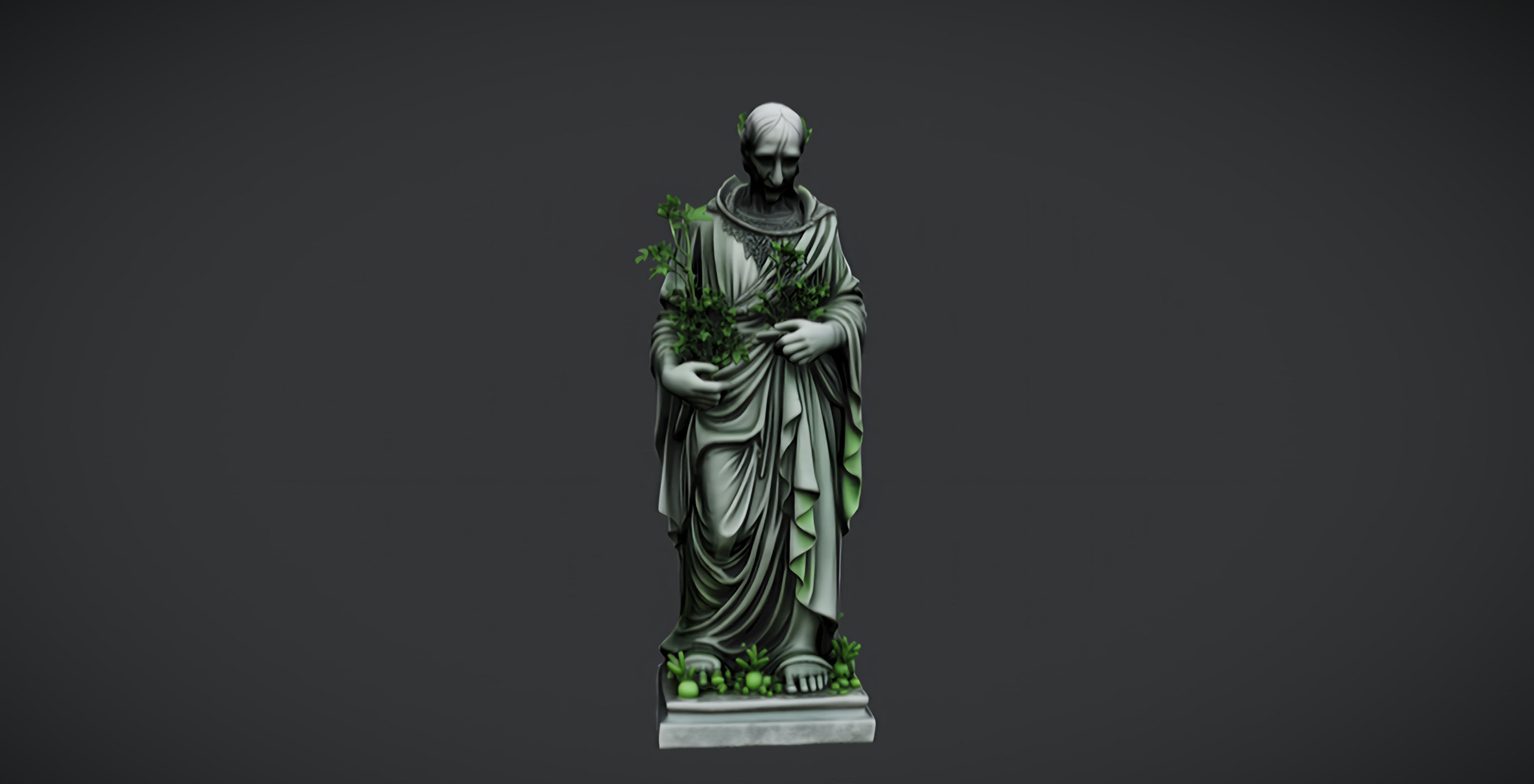
Pair the wailstone with the free Dark Fantasy Nature Statue, a weathered, sinister stone figure that makes a perfect secondary landmark. Place it lower and smaller than the boulder, set back and slightly to one side, so it acts as a companion shrine rather than a rival focal point. The two free meshes together establish the dark-fantasy language of the grove at no cost.
For the ground story, scatter flora from the Fantasy Flower Pack, which ships 51 unique hand-modelled fantasy and gothic plants as Nanite-ready static meshes with automatic collision. Its gothic blooms, nightshade, blood lotus and ember flowers are exactly the palette a cursed grove wants. Drag a few of the SM_FantasyFlower meshes around the base of the wailstone, denser at the boulder and thinning out toward the edges of the scene, so the planting itself funnels the eye inward. Note the pack ships no wind or vertex animation, so treat the flora as static dressing rather than swaying foliage.
If you want to furnish the wider grove with relics, the Dark Fantasy Props Bundle adds 100-plus gothic static meshes, including altars, obelisks, lanterns and cauldrons, all Nanite-enabled in a UE 5.6 content project with a Demo map. Use those props in the mid-ground, never directly beside the wailstone, so the hierarchy you built in step one survives.
Frame the shot so the composition pays off
All of this work is only visible through the camera, so the last step is to frame the focal point on purpose. Add a 'Cine Camera Actor' and position it on your intended approach so the wailstone sits on a rule-of-thirds intersection rather than centred. Let a foreground flower or the edge of the statue intrude into the bottom corner of frame to create depth layers between camera and boulder.
Use the cine camera's depth of field to hold focus on the wailstone and let the background grove fall soft. A focal point separated from its surroundings by focus reads instantly, even in a busy scene. Tilt the camera up very slightly so the boulder looms, reinforcing the size hierarchy you set up at the start.
From here the next step is iteration: orbit the camera, find the angle where the silhouette, the cold rim light and the leading flora all line up, and lock that as your hero shot. Because the wailstone, the nature statue and the flora are all drop-in UE5 assets, you can rebuild and re-dress this composition in minutes, which makes it an ideal way to practise focal-point framing before you commit bespoke hero geometry to a level.
FAQ
How do I compose a focal point in an environment in Unreal Engine 5?
Place one large, high-contrast silhouette off-centre, light it so it is the brightest or most contrasty object in frame, surround it with supporting dressing that leads the eye inward without competing, and frame it with a cine camera on a rule-of-thirds point with depth of field holding focus on it. The free Demonic Wailstone boulder makes a strong, low-effort focal anchor to practise this with.
Is the Demonic Wailstone really free, and what does it include?
Yes. It is a free single dark-fantasy boulder static mesh for Unreal Engine 5 under the Fab Standard licence, with 2K PBR textures (2048x2048 base, metallic, normal and roughness maps). It is one drop-in mesh, not a pack, and despite the name it ships with no audio or VFX.
Does the wailstone come with sound or particle effects?
No. The name is atmospheric, but the asset is a static mesh only with no shipped audio or VFX. Any wailing mood comes from your own lighting, fog and sound design, which is part of why it works so well purely as a visual focal point.
What should I pair the wailstone with for a cursed grove?
The free Dark Fantasy Nature Statue makes an ideal secondary landmark, the Fantasy Flower Pack supplies 51 gothic plants for the ground story, and the Dark Fantasy Props Bundle adds 100-plus relics for the wider scene. Keep the boulder largest and best-lit so it stays the primary focal point.
Demonic Wailstone
A free dark-fantasy boulder prop — a brooding wailstone for cursed groves, ruins and underworlds. Drop-in ready for Unreal Engine 5.
Related on Fab


Related reading