
tutorial · 2026-05-22
How to Make a Creepy Carnival Cult Scene in Unreal Engine 5
Build an uncanny dark-carnival or cult set-piece in UE5 around a watching grinning moon, ritual props and unsettling light.
The problem with creepy: it's a composition job, not an asset hunt
Most attempts at a creepy carnival or cult scene in Unreal Engine fail for the same reason: developers buy a pile of spooky meshes, scatter them on a plane, and wonder why the result reads as cluttered rather than dread-inducing. Dread is not a property of any single asset. It comes from a wrong thing placed in a confident composition, a single focal point that feels like it is aware of the player, and light that refuses to explain itself.
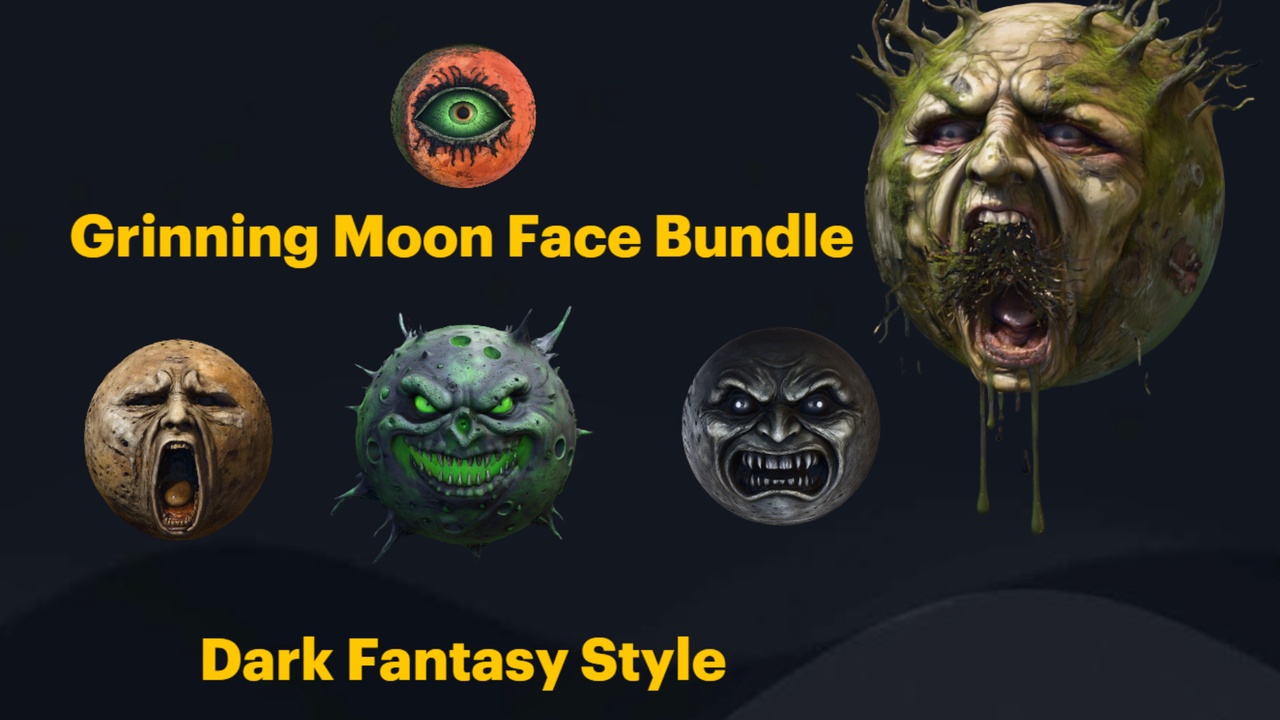
This guide walks through how to make a creepy carnival cult scene in Unreal Engine 5 by treating it as three deliberate decisions: iconography, layout and lighting. The anchor for all three is the Grinning Moon Face Bundle, a set of thirteen surreal grinning-moon face meshes that gives a scene its watching, ceremonial centre. Around it we layer ritual props, dark-fantasy set dressing and a little uncanny flora so the carnival looks like a cult was here first.
Everything below is grounded in what these packs actually ship. No imagined features, no promised frame rates — just placement, materials and light you can reproduce in an afternoon.
Iconography: a grinning moon that watches the congregation
Cults and carnivals both run on symbols, and the strongest symbol you can give an uncanny scene is a face that should not be where it is. The Grinning Moon Face Bundle provides thirteen unique grinning-moon face static meshes, each with its own expression — names in the pack include SM_AllSeeingMoonFace, SM_ScreamingMoonFace, SM_HauntedMoonFace, SM_WinkingMoonFace, SM_PutridMoonFace and SM_ArcaneMoonFace. Pick the expression before you pick the placement, because the expression sets the tone of the whole ritual.
For a cult scene, the 'all-seeing' face is the obvious idol: place it large and distant behind the altar so it reads as a deity presiding over the gathering. For a carnival that has curdled, a winking or putrid face overhead turns a fairground into something that is enjoying the joke at your expense. Each face is a Nanite static mesh with automatic collision and 2K textures, and every mesh already has its own material assigned (thirteen M_*MoonFace materials in total), so dragging one in from the content browser gives you a finished prop with no extra setup.
Place the hero face first and build outward from it. A reliable trick is to drop one SM_*MoonFace huge and far away as a fake moon hanging over the level, then echo the same motif smaller and closer — a moon mask on a pole, a moon carved into the altar face — so the symbol repeats like a cult's insignia. The pack ships a Demo.umap inside the GrinningMoonfaceBundle 5.6 demo project; open it to see arrangement examples before you commit your own layout.
One honest caveat worth knowing up front: these are static meshes, so the mouths and eyes do not animate, and there is no built-in glowing-moon shader. If you want the idol to glow, you add that yourself by raising the emissive on the face's material — covered in the lighting section.
Layout and focal points: stage the ritual
A cult scene is a stage. The player's eye should land on the idol, travel down to whatever is happening beneath it, and only then notice the carnival detritus at the edges. Build that hierarchy deliberately rather than hoping the player finds it.
1. Set the focal point. Drag your chosen SM_*MoonFace into the level and scale it up until it dominates the back of the composition. Push it back along the camera's sightline so it feels distant and looming rather than close and small. If you are framing a fixed-camera or photo-mode shot, lock the camera now and dress everything else to that one view.
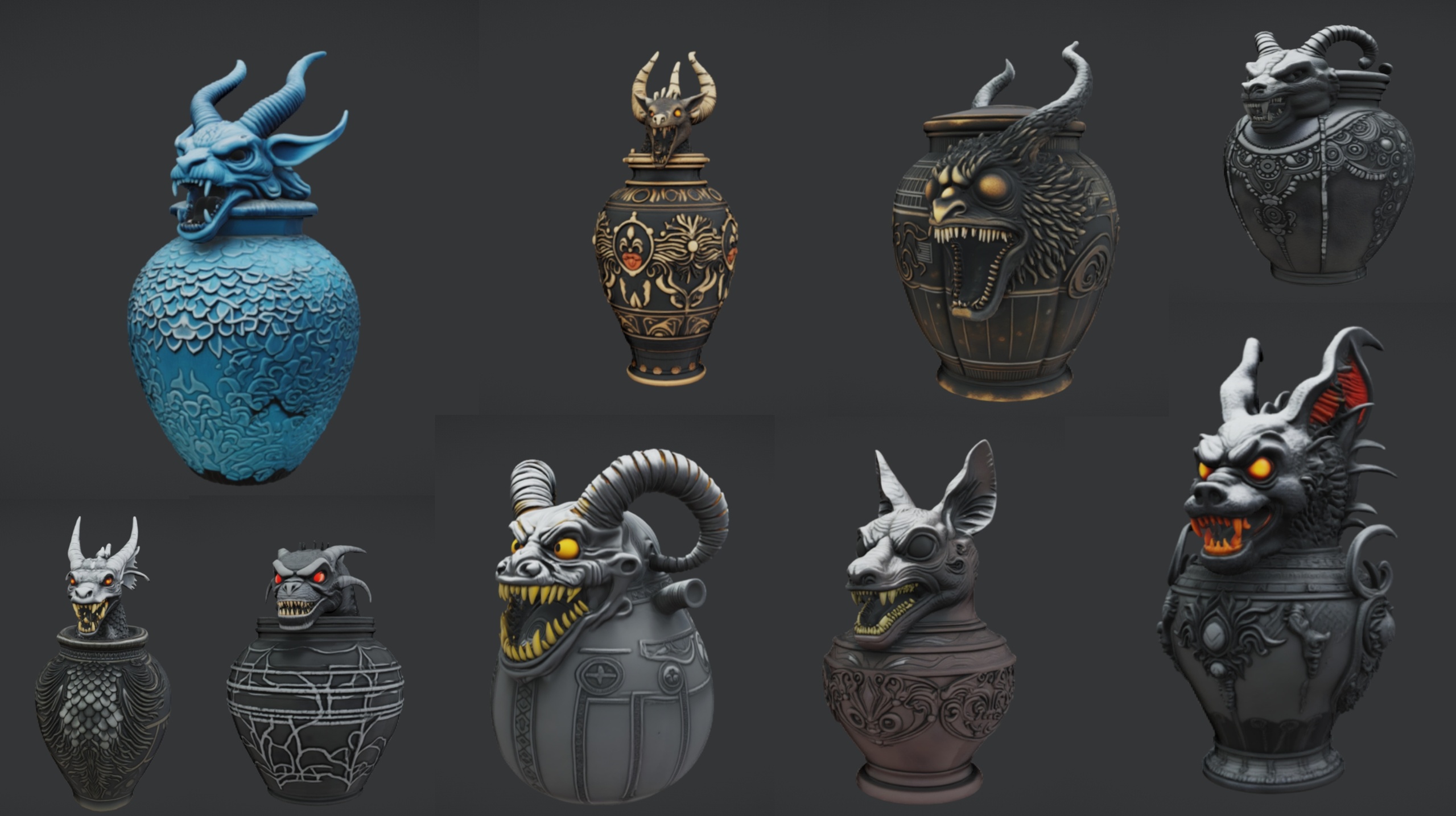
2. Build the altar beneath it. The Ritual Jars pack gives you nine ornate canopic-style ritual jars (SM_RitualJar_1 through SM_RitualJar_9) plus an SM_LargeTable altar prop. Place the table directly under the moon's gaze and arrange the jars across it; the dossier workflow is literally to drag the jars onto the table to assemble the altar. Each jar is a Nanite mesh with its material and automatic collision already applied.
3. Add the cult's furniture. The Dark Fantasy Props Bundle supplies over 100 gothic static meshes — thrones, tomes, lanterns, obelisks, masks, altars and cauldrons among them (the Meshes folder holds 105 SM_* assets, each with its own bespoke material). Flank the altar with obelisks, set a throne or two for the officiants, and ring the space with skull lanterns to mark the boundary of the rite.
4. Make it a carnival, not just a crypt. Carnivals are defined by repetition and bad cheer. Repeat the moon motif on poles, line up identical lanterns in a too-regular row, and let the symmetry feel a touch wrong. The uncanny lives in patterns that are almost, but not quite, festive.
5. Dress the ground last. Scatter the smallest props — fallen masks, a toppled jar, scattered tomes — along the path the eye travels, so the scene rewards a closer look without distracting from the idol.
Lighting for the uncanny
Light is where a competent dressing job becomes genuinely creepy. The rule for the uncanny is restraint: light the idol and the altar, let everything else fall toward darkness, and never give the player a comfortable, even read of the room.
Make the moon the source. Because the grinning-moon meshes ship as plain static meshes with no emissive set up, you create the glow yourself. Select the face, open its assigned M_*MoonFace material, add or raise an Emissive Color value, and tint it a sickly bone-white or a cold cyan. A faint emissive on the idol alone, with the surrounding geometry left dark, sells the 'it is the only light source and it is watching you' effect better than any spotlight.
Underlight the congregation. Place low Point Light or Rect Light actors at the base of the altar pointing upward so the jars and props throw long shadows toward the moon. Underlighting is the oldest trick in horror staging for a reason — it inverts how faces and forms are supposed to read.
Kill the fill light. Drop your directional or sky light's intensity hard, or remove it, so the scene is defined by your placed lights rather than a flat ambient wash. Add an Exponential Height Fog actor and a subtle volumetric setting so the moon's glow catches in the air and the edges of the carnival dissolve into murk.
Bias everything cold, then break it. A single warm light — one cauldron fire, one lantern with a warmer M_*Lantern material in the mix — among an otherwise cold palette reads as a human presence in an inhuman place, which is exactly the discomfort a cult scene wants.
Combining the packs into one cohesive scene
These props are designed to share a stage. All four packs are built as drop-in UE5 content — the Grinning Moon Face Bundle, Dark Fantasy Props Bundle and Fantasy Flower Pack target Unreal Engine 5.6, while Ritual Jars targets the newer 5.7. To pull them into one project, right-click each pack's content folder and choose Asset Actions then Migrate into your scene's project; mind the engine versions, as the Ritual Jars pack may prompt an engine-version upgrade if you open it in an older build.
Consistency comes free here because every pack follows the same construction: Nanite static meshes, automatic collision and 2K (2048x2048) PBR textures, each mesh shipping with its own material already assigned. That means a jar, a throne and a moon face dropped side by side already share a rendering pipeline and a texel density, so nothing looks like it wandered in from a different game.
Soften the edges with the Fantasy Flower Pack. Its 51 unique hand-modelled flowers and plants include gothic blooms — nightshade, blood lotus, ember blooms — that read as cult flora rather than a pretty garden. Scatter them creeping up the altar legs and through the carnival's cracks. The meshes are Nanite-ready with automatic collision and ship raw FBX sources, and you can paint them in as a Foliage type or feed them to a PCG graph for procedural scatter — though note the flowers do not have built-in wind or sway, so treat them as still set dressing.
The combined effect is a watching idol, an altar of ritual jars, gothic furniture marking the rite, and unnatural flowers reclaiming the ground — a carnival that a cult got to first.
Next step: build the focal point first
If you take one thing from this guide, make it the order of operations: place the idol, stage the altar beneath it, ring it with furniture, then light only what matters. The composition does the scaring; the assets just give it vocabulary.
Start with the watching moon. The Grinning Moon Face Bundle is the cheapest, fastest way to give a horror or dark-fantasy scene a centre of gravity, and its included Demo.umap shows you working arrangements the moment you open it. Drop a face in, scale it up, raise its emissive, and you already have the bones of a creepy carnival cult scene in Unreal Engine 5.
The dark-carnival prop kit at a glance
| Pack | Meshes | Engine | Role in the scene |
|---|---|---|---|
| Grinning Moon Face Bundle | 13 grinning-moon faces | UE 5.6 | The watching idol / focal point |
| Ritual Jars | 9 jars + 1 table | UE 5.7 | The altar arrangement |
| Dark Fantasy Props Bundle | 100+ gothic props | UE 5.6 | Thrones, lanterns, obelisks, furniture |
| Fantasy Flower Pack | 51 plants | UE 5.6 | Cult flora and ground detail |
Verified facts from each product listing. All four are Nanite static-mesh content packs with 2K (2048x2048) PBR textures and automatic collision (collision not separately listed for the Dark Fantasy Props Bundle).
FAQ
How do I make a creepy carnival cult scene in Unreal Engine without it looking cluttered?
Treat it as composition, not collection. Place one dominant focal point first — a large, distant grinning-moon face as a watching idol — then stage an altar directly beneath it, ring it with a few pieces of gothic furniture, and let everything else fall into darkness. Dread comes from a confident hierarchy and selective lighting, not from the number of props on screen.
Do the grinning moon faces animate or glow on their own?
No. The Grinning Moon Face Bundle ships thirteen static meshes, so the mouths and eyes do not animate and there is no built-in glowing-moon shader. To make the idol glow you open the face's assigned material and raise its Emissive Color value yourself.
Will these packs work together in one project?
Yes, with one caution about engine versions. The Grinning Moon Face Bundle, Dark Fantasy Props Bundle and Fantasy Flower Pack target UE 5.6, while Ritual Jars targets UE 5.7. Migrate each pack's content folder via Asset Actions then Migrate. Because all four use Nanite meshes with 2K PBR textures and per-mesh materials, they share a consistent look once combined.
What is the fastest way to build the altar?
Use the Ritual Jars pack. It includes an SM_LargeTable altar prop and nine ritual jar meshes (SM_RitualJar_1 to SM_RitualJar_9). Place the table under the moon's gaze and drag the jars onto it; each jar already has its material, Nanite and automatic collision applied.
Can I scatter the fantasy flowers as foliage?
You can add them to a Foliage type and paint them in, or feed them to a PCG graph for procedural scatter. Be aware the flowers have no built-in wind or sway, so they behave as still set dressing rather than animated foliage.
Grinning Moon Face Bundle
Thirteen unique grinning-moon face meshes for surreal, horror and dark-fantasy scenes — automatic collision, 2K textures, drop-in ready. Hang an unsettling lunar grin over your world.
Related on Fab

Related reading
