tutorial · 2026-03-01
How to Make a Creepy Garden or Cursed Forest in Unreal Engine 5
Build a dread-soaked cursed grove in UE5 by pairing sinister fantasy plants with weathered stone statues, fog and low light.

What makes a garden read as cursed
A creepy garden is not just a normal garden with the lights turned down. If you only darken a pretty meadow, the result reads as a pretty meadow at night - not as a place something went wrong. To make a creepy garden or cursed forest in Unreal Engine 5 that genuinely unsettles a player, you need three things working together: plant species that look wrong on their own, a few weathered man-made objects that imply a history of worship and abandonment, and lighting that hides as much as it reveals.
This tutorial builds a cursed grove from those three layers. The flora comes from the Fantasy Flower Pack, a set of 51 unique hand-modelled fantasy, sci-fi and gothic plants delivered as Nanite-ready UE5 static meshes, each with its own mesh, material and 2K PBR texture set and automatic collision. Because every flower drops straight into the level with its material and collision already assigned, you spend your time on composition and mood rather than asset wrangling.
Work in this order: lay down the sinister plants first, plant a weathered focal object among them, then build the fog and light around what you have placed. Mood layered onto an empty plane tends to look flat; mood layered onto real geometry has something to catch on.
Picking sinister plant species from the pack
Not every flower in the Fantasy Flower Pack belongs in a cursed grove - the set deliberately spans bright blossoms, alien sci-fi flora and gothic dark-fantasy plants. For a creepy garden you want the darker end of that range: the pack includes nightshade, a Blood Lotus, ember and coral blooms, crystalline and arbor plants, and mushrooms and fungus, any of which reads as ominous without needing a single tweak. Lean on those rather than the cheerful blossoms.
Build your palette from a small, consistent set. Pick two or three hero plants - say a Blood Lotus and a nightshade - and one or two supporting species such as a low fungus or an ember bloom for ground texture. A cursed place feels more believable when one or two species have clearly taken over, the way a real invasive plant chokes out everything else, so resist the urge to scatter all 51 meshes at once.
1. In the Content Browser, open the FantasyFlowerPack content folder and filter the Meshes by the SM_FantasyFlower_ prefix to see the 51 static meshes.
2. Drag your chosen hero plant, for example a Blood Lotus mesh, into the viewport. It spawns as a Static Mesh Actor with its assigned material and 2K PBR maps already applied.
3. Select the actor and use the 'End' key to drop it onto the ground so it does not float, then nudge its base slightly into the surface in the 'Details' panel so it looks rooted.
4. Repeat with your supporting species, varying rotation on the Z axis and scale by small amounts between copies so the planting does not look stamped from a single instance.
Scattering plants like overgrowth, not a flowerbed
Hand-placing a few hero plants is fine, but a cursed grove should feel overgrown, and placing dozens of meshes by hand is slow. The pack's static meshes are good candidates for Unreal's Foliage tool or a PCG graph: add the SM_FantasyFlower_ meshes you want as ground cover to a foliage type and paint them across the grove floor, or feed them into a Procedural Content Generation graph to scatter them automatically. Treat this as a workflow you set up rather than a shipped feature - the pack does not arrive pre-configured as foliage types, so you assign them yourself.
Vary density deliberately. Real overgrowth is clumpy, not evenly spread, so paint thick mats of fungus around the base of your statue and along a path, then thin the planting out toward the edges so the eye is drawn inward to the focal point. Empty patches of bare, dark ground between clumps do as much work as the plants themselves.
Mix scales as you paint. Setting a randomised scale range on each foliage type, and letting larger nightshade or lotus instances rise above a low carpet of fungus, gives the floor a layered, neglected look. One caveat to respect: these flowers do not animate. No wind, sway or vertex animation ships with the pack, so do not rely on motion to sell the scene - lean on density, composition and lighting instead.
Combining flowers with weathered statues
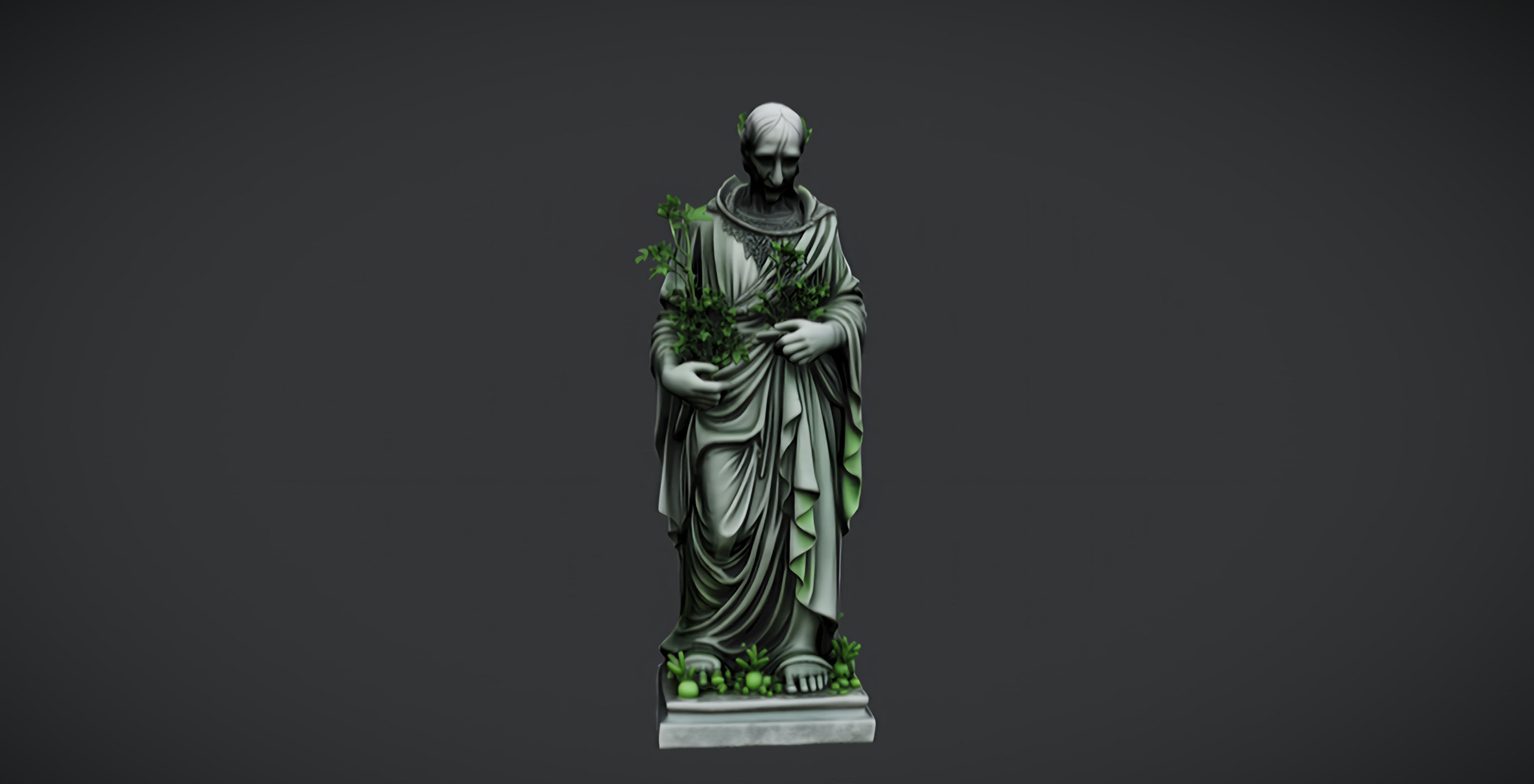
Plants alone make a wild place, not a cursed one. The thing that turns overgrowth into dread is evidence that people were once here and are not any more. A single weathered stone object at the heart of the planting does that instantly, and you can add one for free. The Dark Fantasy Nature Statue is a free, drop-in UE5 static mesh - a weathered stone figure with a darker, more sinister tone, meant for gardens, shrines and ruins - and it imports with its material and 2K PBR maps ready to place.
Set the statue as the focal point and let the flora besiege it. Drop it where the player's eye naturally lands, press 'End' to settle it onto the ground, then paint your thickest planting around its base so the nightshade and fungus look like they are slowly reclaiming it. A relic half-swallowed by sinister flowers tells a whole story with no text.
Add a second piece of weathered stone for rhythm. The free Demonic Wailstone, a single drop-in UE5 boulder prop with 2K PBR textures intended as a brooding atmospheric accent, works well placed off to one side or part-buried in the overgrowth so the grove does not feel symmetrical. Like the statue it is a single free static mesh with no audio or VFX of its own, so treat it purely as a silent landmark. If you later want far more variety - thrones, tombs, lanterns, altars, obelisks and cauldrons - the paid Dark Fantasy Props Bundle adds 100+ gothic static meshes as a UE 5.6 content project, with a Demo map you can open to see them arranged.
Fog and lighting for dread
With the geometry placed, build the atmosphere around it. The single biggest move is to let the scene hide things. Add an 'Exponential Height Fog' actor and raise its density until middle and far distance dissolve into murk, so the player can only ever see a short way into the grove and never quite knows what is past the next clump of nightshade. Concealment is what makes an environment feel threatening.
Keep the key light low, cold and sparse. A dim directional light raked in at a shallow angle throws long shadows from the statue and the taller plants, and a desaturated, slightly blue or sickly-green tint reads as far more wrong than neutral white. Resist the urge to light everything - the dark patches between your planting clumps are doing the work, so light the focal statue and one or two hero plants and let the rest fall away.
Pick out detail with restraint. One small warm point light or spotlight near the base of the statue, picking out a single Blood Lotus or the texture of the weathered stone, gives the eye one place to rest and makes the surrounding gloom feel deeper by contrast. The 2K PBR materials on the flowers and statue hold up to close light, so a single well-placed accent does more than a dozen fill lights.
Sound and screenshot framing
A cursed grove is half audio. Even a single looping ambient bed - low wind, distant creaks, an irregular drip - turns a static image into a place, and because nothing in this scene animates, sound is what supplies the sense of life and threat. Place an 'Ambient Sound' actor near the centre of the grove and keep the bed quiet and sparse so occasional sounds land. The flowers, statue and wailstone are silent assets, so all of the soundscape is yours to design.
Frame your screenshots like a horror still. Get the camera down low among the planting so the nightshade and fungus crowd the foreground and the weathered statue sits framed in the murk behind, partly occluded by fog. Shooting through a clump of plants, rather than at a clean clearing, immediately makes the scene feel found rather than staged. The Fantasy Flower Pack lists these plants specifically as foreground detail and set dressing for cinematics and screenshots, which is exactly the job they do here.
From here you have a repeatable recipe: sinister species first, a weathered focal stone second, then fog, low cold light and a quiet soundscape last. Swap the Blood Lotus for ember blooms, or the statue for a part-buried wailstone, and the same five-layer approach gives you a different cursed grove every time. To start dressing your own, drop the Fantasy Flower Pack's gothic plants into your scene and pair them with the free dark-fantasy statue and wailstone.
Assets used to build the cursed grove
| Asset | What it adds | Meshes | Price |
|---|---|---|---|
| Fantasy Flower Pack | Sinister flora (nightshade, Blood Lotus, ember & coral blooms, fungus) | 51 | 21.99 USD |
| Dark Fantasy Nature Statue | Weathered focal stone figure | 1 | Free |
| Demonic Wailstone | Brooding boulder accent | 1 | Free |
| Dark Fantasy Props Bundle | Gothic set dressing (thrones, lanterns, altars, obelisks) | 100+ | 34.99 USD |
All counts and prices are from each product's Fab listing. The statue and wailstone are free single static meshes.
FAQ
How do I make a creepy garden or cursed forest in Unreal Engine 5?
Layer three things. Place sinister plants first - in the Fantasy Flower Pack use the nightshade, Blood Lotus, ember blooms and fungus rather than the bright blossoms. Add a weathered focal stone such as the free Dark Fantasy Nature Statue and let the planting reclaim it. Then build atmosphere with dense 'Exponential Height Fog', a low cold directional light, one warm accent on the focal point, and a quiet ambient sound bed.
Which flowers in the Fantasy Flower Pack look the most sinister?
The pack spans 51 plants from bright blossoms to alien and gothic flora. For a cursed grove lean on the dark-fantasy end: nightshade, the Blood Lotus, ember and coral blooms, and the mushrooms and fungus. Pick two or three hero species and let one or two appear to have taken over the grove.
Do the Fantasy Flower Pack plants sway or animate in the wind?
No. No wind, sway or vertex animation ships with the pack, so do not rely on motion to sell the scene. The meshes are Nanite-ready with automatic collision and 2K PBR materials; supply movement and life through ambient sound, fog and composition instead.
What free props can I add to a cursed grove scene?
The Dark Fantasy Nature Statue is a free, drop-in weathered stone figure for gardens and ruins, and the Demonic Wailstone is a free single boulder accent. Both import as UE5 static meshes with 2K PBR textures. For far more variety, the paid Dark Fantasy Props Bundle adds 100+ gothic meshes as a UE 5.6 content project with a demo map.
Can I scatter the flowers automatically instead of placing them by hand?
Yes. Add the SM_FantasyFlower_ meshes to a Foliage type and paint them across the grove floor, or feed them to a PCG graph to scatter them procedurally. The pack does not arrive pre-configured as foliage types, so you set this up yourself; vary density and scale so the overgrowth looks clumpy rather than evenly spread.
Fantasy Flower Pack
Fifty hand-modelled fantasy, sci-fi and gothic flowers — 51 unique meshes with automatic collision, 201 textures at 2048² and Nanite-ready geometry. Dress gardens, alien worlds and stylised scenes.
Related on Fab


Related reading