
tutorial · 2026-01-29
How to Make an Egyptian Temple Level in Unreal Engine 5
Build a convincing tomb interior in UE5 with canopic ritual jars, layered sand and stone, and warm torchlight.
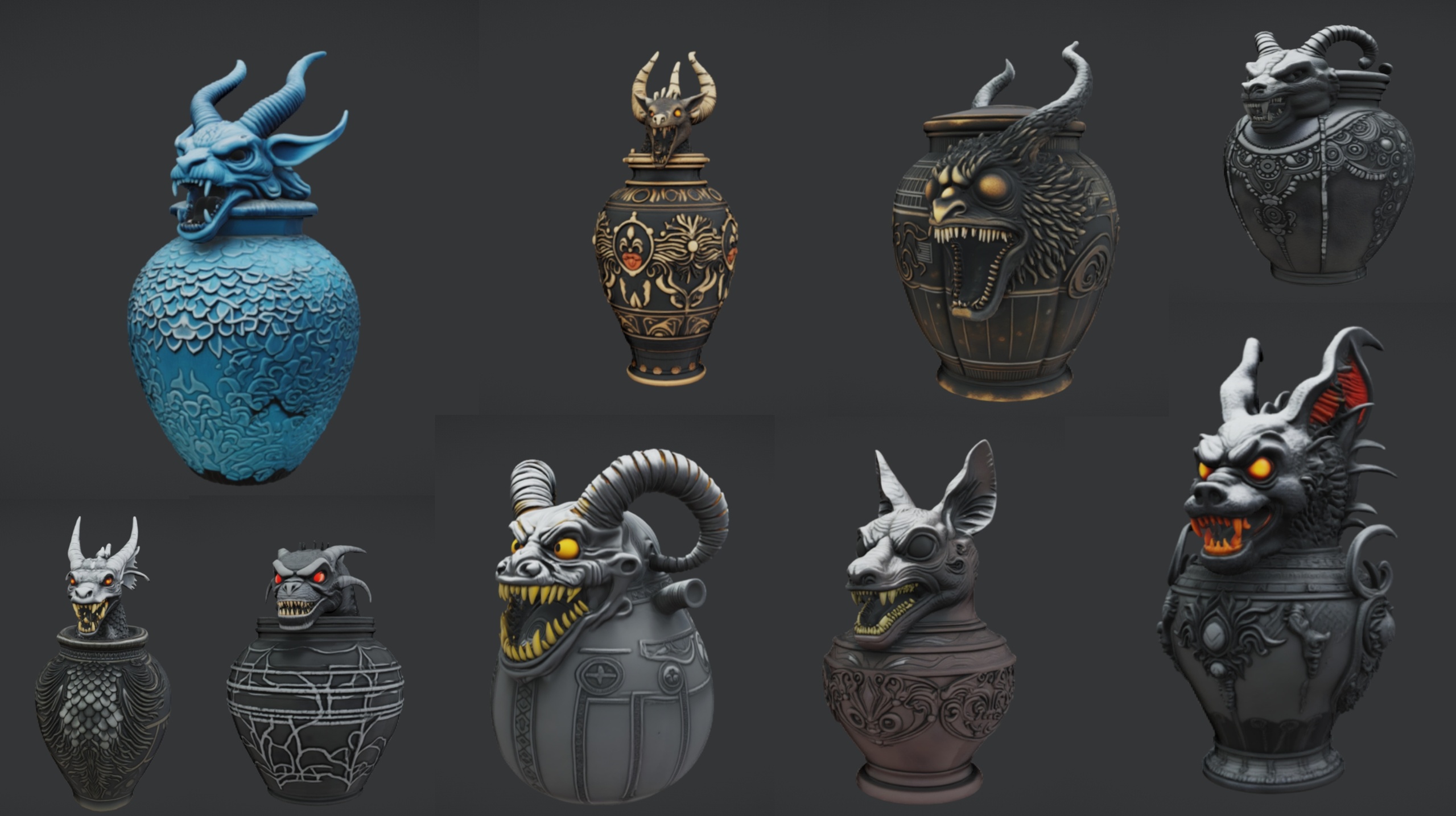
Start with the hero props, not the walls
If you are working out how to make an Egyptian temple level in Unreal Engine, the instinct is to block out walls and floors first and worry about dressing later. That order tends to produce an empty box that reads as generic stone, because the things that actually say 'Egyptian tomb' to a player are the ritual objects: the canopic jars on the altar, the offering vessels in the alcoves, the clustered relics that imply someone once worshipped here. Establish those first and the architecture has something to frame.
The Ritual Jars pack is built for exactly this beat. It is a set of nine ornate canopic-style ritual jars with an Egyptian, gothic and abyssal aesthetic, shipped as Nanite static meshes with automatic collision and 2K PBR textures. The jar meshes are named SM_RitualJar_1 through SM_RitualJar_9, and the pack also includes an SM_LargeTable mesh you can use as the altar they sit on. Everything arrives inside a UE5 demo project, so you can open it and see the assets staged before you migrate anything.
Because the jars are decorative static meshes, treat them as set dressing rather than interactive containers. Each one carries its own material (M_RitualJar_1 through M_RitualJar_9), so you get visual variety across the nine without authoring anything yourself.
Get the jars into your level
1. Open the included RitualJars project, or bring the content into your own scene. To migrate, right-click the RitualJars content folder in the 'Content Browser', choose 'Asset Actions' then 'Migrate', and point it at your project's Content directory.
2. A point worth knowing before you start: this pack is authored for Unreal Engine 5.7, the version its 'EngineAssociation' is set to. If your project is on an older engine you may get an engine-version upgrade prompt when opening or migrating, so plan for that rather than being surprised by it.
3. Drag SM_LargeTable into the level to act as the altar or offering table. Position it where the eye will land first, typically at the far end of the chamber on the central axis.
4. Drag several SM_RitualJar_* meshes onto the table top. Mix the numbered variants so neighbouring jars differ, and rotate each one slightly so the arrangement looks placed by hand rather than stamped. Each jar already has Nanite and automatic collision, so you can walk a character up to the altar immediately without extra collision setup.
5. Scatter a few more jars off the altar, in floor corners and shallow wall alcoves, to suggest the room was used for storage as well as ritual. A tight cluster plus a couple of stragglers reads more lived-in than a perfectly symmetrical row.
Combine the jars with sand and stone
An Egyptian temple lives or dies on its surfaces. The jars give you the focal detail; the walls, floor and a thin layer of drifted sand give you the context. Block the room out of large stone modules, then assign a sandstone or limestone material to the walls and a separate, slightly darker stone to the floor so the two planes read as different materials rather than one continuous texture.
Add a thin sand layer where the floor meets the walls and around the base of the altar. A simple way to do this is a flat sand decal or a low-poly drift mesh tucked into the corners; the goal is to break the hard right angle where floor meets wall so the room looks aged and partly buried. The Ritual Jars pack ships an M_Grass material for its demo ground, which is not what you want for a tomb interior, so swap the ground to your sand or stone material once the jars are placed.
Lean on the warm, ochre end of the palette for the temple stone and let the jars provide the cooler, darker accents. Their gothic and abyssal styling means a few of them carry deeper, more sinister tones than plain pottery, which is useful: it stops the room feeling like a museum display and pushes it toward the occult tomb you are after.
Light it with warm torchlight
Lighting is what turns a dressed room into a tomb. Egyptian interiors should feel close and warm, lit by fire rather than daylight, with deep shadow pooling between the props. Avoid a bright skylight; a sealed temple chamber gets almost no ambient light, and that darkness is what makes a single torch feel meaningful.
1. Place 'Point Light' actors at the positions of your torches or braziers along the walls. Set their colour to a warm orange and keep the intensity modest so the light falls off within a few metres, leaving the corners dark.
2. Add a very low-intensity 'Skylight' or a faint ambient fill if the room reads as completely black, but keep it well below the torch level so the fire remains the dominant source.
3. Animate the torch lights gently. A small sine-driven flicker on intensity, driven from a 'Timeline' in the Level Blueprint or a simple light-function material, makes the warm pools breathe and throws moving shadows across the jars.
4. Aim a torch so its pool of light catches the altar and the jars on it directly. The PBR maps on the jars include metallic, normal and roughness detail at 2048x2048, so warm raking light picks out their ornamentation far better than flat overhead lighting would.
5. Add subtle fog or atmospheric haze with an 'Exponential Height Fog' actor so the torchlight has something to scatter through. Dust motes drifting in the beams sell the sealed, undisturbed feeling of a tomb.
Layer in larger props for depth
Nine jars and an altar are the centrepiece, but a full temple level needs scale variety: large silhouettes a player reads from across the room, mid-sized furniture, and the small ritual objects up close. The Ritual Jars pack covers the small and mid tiers; for the large silhouettes, pull in sibling packs from the same props family.
The Fantasy Statue Bundle is a strong companion here. It is eighteen weathered marble statues across a Nature series and a Tormented Souls series, named SM_NatureStatue_1 through 9 and SM_TormentedStatue_1 through 9, also Nanite with automatic collision. Line a pair of them along the approach to the altar as temple guardians, or set one in a wall niche to mark the chamber as sacred. Note it is authored for UE 5.6, so confirm versions when you combine packs.
For broad set dressing and clutter, the Dark Fantasy Props Bundle adds over a hundred gothic static meshes including obelisks, altars, braziers, cauldrons, tomes and lanterns. Its obelisks and altars in particular suit an Egyptian-leaning occult scene, and it ships its own Demo.umap so you can see the props staged. It targets UE 5.6 as well.
If you want a touch of life among the stone, the Fantasy Flower Pack offers fifty-one hand-modelled plants, including darker blooms like nightshade and blood lotus, that you can tuck into cracks or around a sand drift to imply something still grows in the ruin. With those four layers in place, large statues, mid props, the ritual jars and a little flora, your Egyptian temple level reads as a real place rather than a kit of parts.
Props packs for an Egyptian temple build
| Pack | Best for | Static meshes | Engine | Price (USD) |
|---|---|---|---|---|
| Ritual Jars | Altar jars and small ritual dressing | 9 jars + table | 5.7 | 7.99 |
| Fantasy Statue Bundle | Large guardian statues and niches | 18 statues + table | 5.6 | 7.99 |
| Dark Fantasy Props Bundle | Obelisks, altars, braziers, clutter | 100+ | 5.6 | 34.99 |
| Fantasy Flower Pack | Dark blooms and ground detail | 51 plants | 5.6 | 21.99 |
Engine versions are the authored EngineAssociation for each pack; confirm compatibility before mixing packs in one project.
FAQ
How do I make an Egyptian temple level in Unreal Engine quickly?
Place your hero ritual props first, then build the room around them. Drop the SM_LargeTable as an altar, arrange the nine SM_RitualJar meshes on and around it, swap your ground to sand and stone materials, and light the chamber with warm point lights for torches. Because the jars are Nanite with automatic collision, they drop straight in without extra setup.
What engine version are the Ritual Jars built for?
The Ritual Jars project is authored for Unreal Engine 5.7, which is what its EngineAssociation is set to. Opening or migrating into an older engine may trigger an upgrade prompt, and the pack's compatibility with 5.3 to 5.6 has not been tested, so treat 5.7 as the target version.
How many ritual jars are in the pack and how are they textured?
There are nine ornate canopic-style jars (SM_RitualJar_1 to 9), plus an SM_LargeTable altar prop and an M_Grass demo ground material. Each jar has its own material and 2K PBR textures (2048x2048 with metallic, normal and roughness maps), and all meshes are Nanite with automatic collision.
Can the canopic jars be opened or used as containers?
Treat them as decorative static meshes. Whether the jars have openable lids was not verified, so use them as set dressing rather than functional containers. If you need interactive loot, drive that from your own Blueprint logic layered on top of the meshes.
Which other packs pair well for a full temple scene?
Add the Fantasy Statue Bundle for large guardian statues, the Dark Fantasy Props Bundle for obelisks, altars and clutter, and the Fantasy Flower Pack for dark blooms in the cracks. Those packs target UE 5.6, so confirm engine versions when combining them with the 5.7 Ritual Jars.
Ritual Jars
Nine ornate canopic ritual jars — Nanite meshes with automatic collision and 2K textures. Egyptian, gothic and abyssal props for tombs, altars and occult scenes.
Related on Fab



Related reading