
article · 2026-03-13
How to Make a Horror Scene in Unreal Engine 5: Props, Statues & Dark VFX
A practical scene-dressing guide to building gothic dread in UE5 — architecture, focal statues, creeping VFX and the lighting that ties it together.

The grammar of a scary scene
Knowing how to make a horror scene in Unreal Engine 5 is less about owning frightening assets and more about arranging ordinary ones so the player's eye keeps catching on the wrong details. Dread is a composition problem. A crypt is not scary because it contains a skull; it is scary because the skull sits where a candle should be, the light falls from a direction that makes no sense, and something in the far corner is too still. Before you place a single mesh, decide what the room is hiding and where you want the player to look last.
There is a working grammar to this. You build legibility first with architecture and bulk set dressing, so the space reads as a real place with a history. You plant one focal piece the eye is drawn to — a statue, an altar, a watching face — so attention has somewhere to land. You then break the calm with atmosphere: low ground smoke, a corrupted plant, a draught that should not exist. Finally you light for absence rather than presence, carving most of the frame into darkness and letting the few lit shapes do the talking. Get that order right and even modest assets feel menacing.
This guide walks the MythicLemon dark-fantasy catalogue through that grammar. The packs are deliberately complementary: a broad prop bundle for the bulk, statue and urn sets for focal pieces, a Niagara pack for the dread, and a surreal moon set for the detail that watches back. Everything here is a drop-in UE5 content project, so you can dress a convincing scene in an afternoon rather than modelling for a fortnight.
Architecture and props: building the bulk fast
The bulk of any horror set is the unglamorous middle layer — the thrones, tomes, lanterns, obelisks, altars, cauldrons and scrolls that tell the player people once lived and worked here. This is where the Dark Fantasy Props Bundle earns its place. It ships 100+ unique gothic static meshes (the Meshes folder holds 105 SM_ assets), each with its own bespoke material such as M_BloodTome, M_EbonyThrone, M_CursedSkullLantern and M_DarkCauldron, so nothing looks like a re-tinted clone of its neighbour. The meshes are Nanite-enabled with 2048x2048 PBR textures, which means you drag them in and they look right without you authoring LODs.
It is a content project rather than a plugin, so you either open DarkFantasyPropPack.uproject directly in UE 5.6 or, more usefully, migrate the content folder into your own project: right-click the folder, choose 'Asset Actions', then 'Migrate'. From there, drag any SM_ mesh out of the Meshes folder into your level; the material is already assigned and Nanite is already on. Open the included Demo.umap first to see how the props are meant to sit together.
Dress in passes, not one mesh at a time. First pass, the big silhouettes — a throne, an altar, an obelisk — to establish the room's purpose. Second pass, the clutter that implies use: open tomes, guttered lanterns, scattered scrolls. Third pass, the asymmetry — knock the clutter off the grid, tip one candle, leave a gap where something was clearly taken. The themed prop families (thrones in Ebony, Crimson, Inferno and Crystal variants; tomes from BloodTome to ArcaneChronicle; the lantern and obelisk sets) let you keep a consistent visual language across a whole level without repetition becoming obvious.
Because the meshes are Nanite you can be generous with density on hero props without manual LOD work. Just be honest about scope: a handful of the 105 assets (SM_LargeTable, SM_OrnateTable, the display case) are demo set-dressing rather than star pieces, so treat the count as a deep dressing kit, not 105 hero models.
Statues and focal pieces: giving the eye somewhere to land
Every dread scene needs a piece the eye returns to. Statues are the classic answer because they read as human-adjacent but wrong — a figure that does not move where you expect movement. The Fantasy Statue Bundle is built for exactly this: 18 weathered marble statues split into two themed series of nine, a 'Nature' marble series (SM_NatureStatue_1 to 9) and a 'Tormented Souls' series (SM_TormentedStatue_1 to 9), plus an SM_LargeTable you can use as a plinth or altar base. They are Nanite static meshes with automatic collision and 72 textures at 2048x2048, so the player can walk right up to one and it holds together.
Use the two series for opposite jobs. Line a cathedral nave or a sacred grove with the Nature statues to imply order and ritual, then place a single Tormented Souls figure where that order breaks — the one statue facing the wrong way, half-swallowed by shadow. The contrast is the scare. For repeated landmark placement across an open level, add a statue to an Instanced Static Mesh or Foliage type so you can scatter graveyard markers cheaply, and remember the raw FBX sources ship in the 'FBX Nature' and 'FBX Nature Tormented Souls' folders if you want to edit them in a DCC tool.
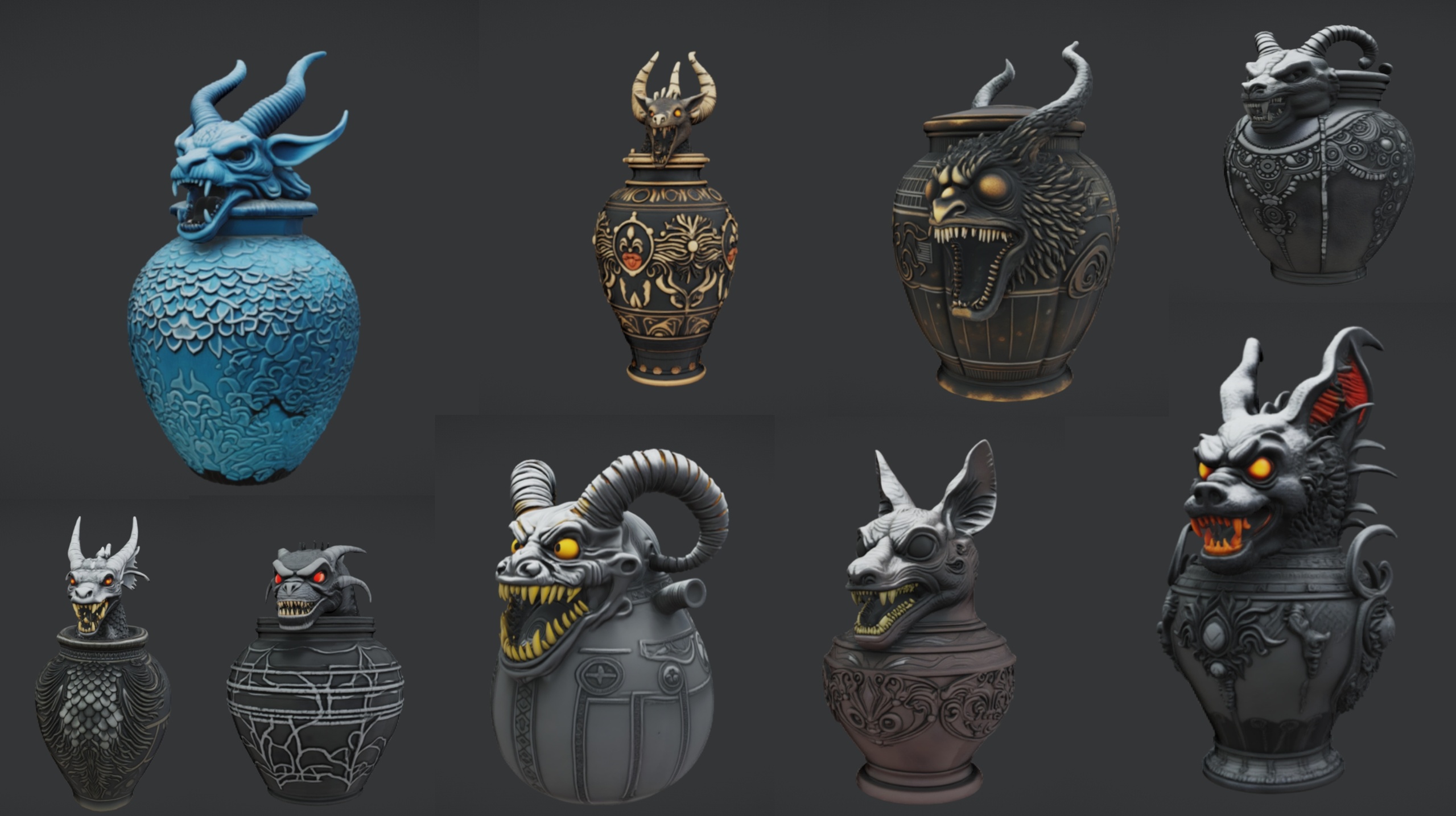
Funerary vessels make excellent secondary focal points, especially clustered on an altar. The Ritual Jars set provides 9 ornate canopic-style jars (SM_RitualJar_1 to 9) with an Egyptian, gothic and abyssal aesthetic, again as Nanite meshes with automatic collision and 2048x2048 PBR textures, and it includes its own SM_LargeTable plus an M_Grass material for the demo ground. Drag the jars straight onto that table to compose an altar arrangement. One thing to plan around: Ritual Jars targets Unreal Engine 5.7 specifically — the newest engine in this cluster — so opening it in an older editor may trigger a version-upgrade prompt.
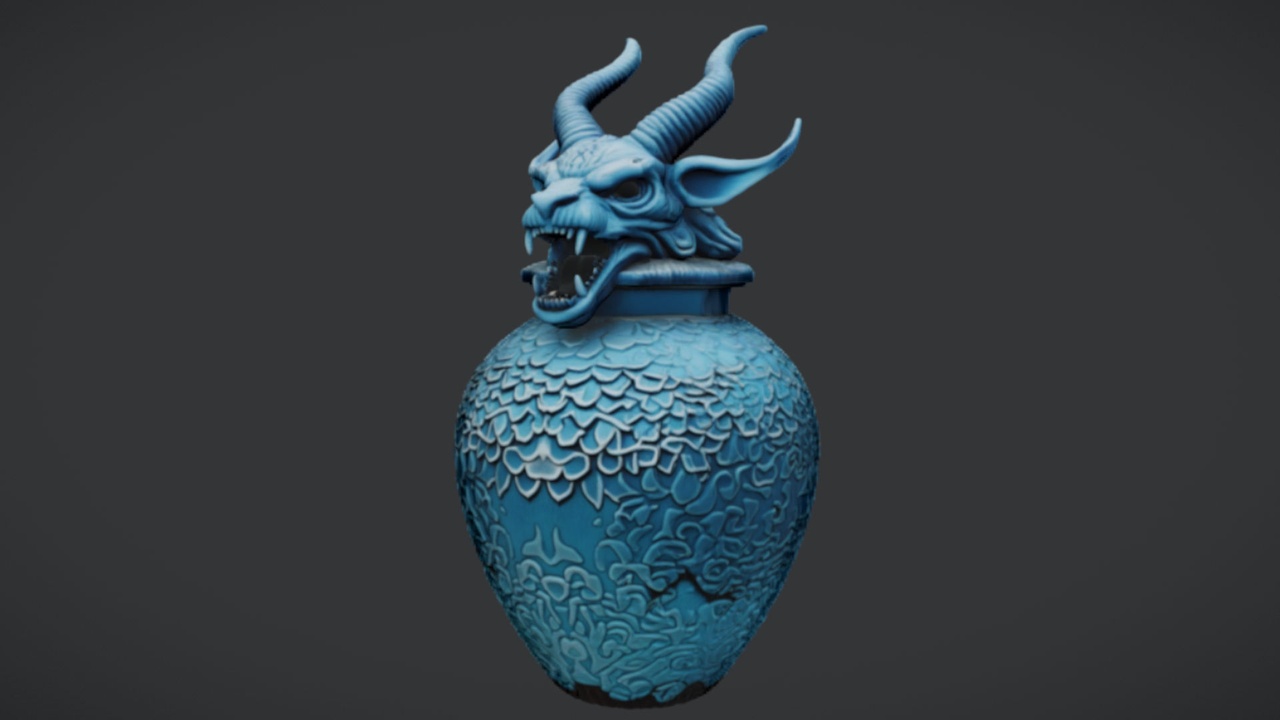
If you want a free accent to seed the scene before committing budget, The Azure Gargoyle Urn is a single ornate funerary vessel with 2048x2048 PBR textures, offered free under the Fab Standard licence. Drop it on a mantel, plinth or shelf in a crypt; it pairs naturally with the Ritual Jars and the Fantasy Statue Bundle for a fuller mausoleum read. Treat it as a static decorative mesh — Nanite and automatic collision are not file-confirmed for the free SKU.
Atmosphere with dark VFX: the moment it stops feeling safe
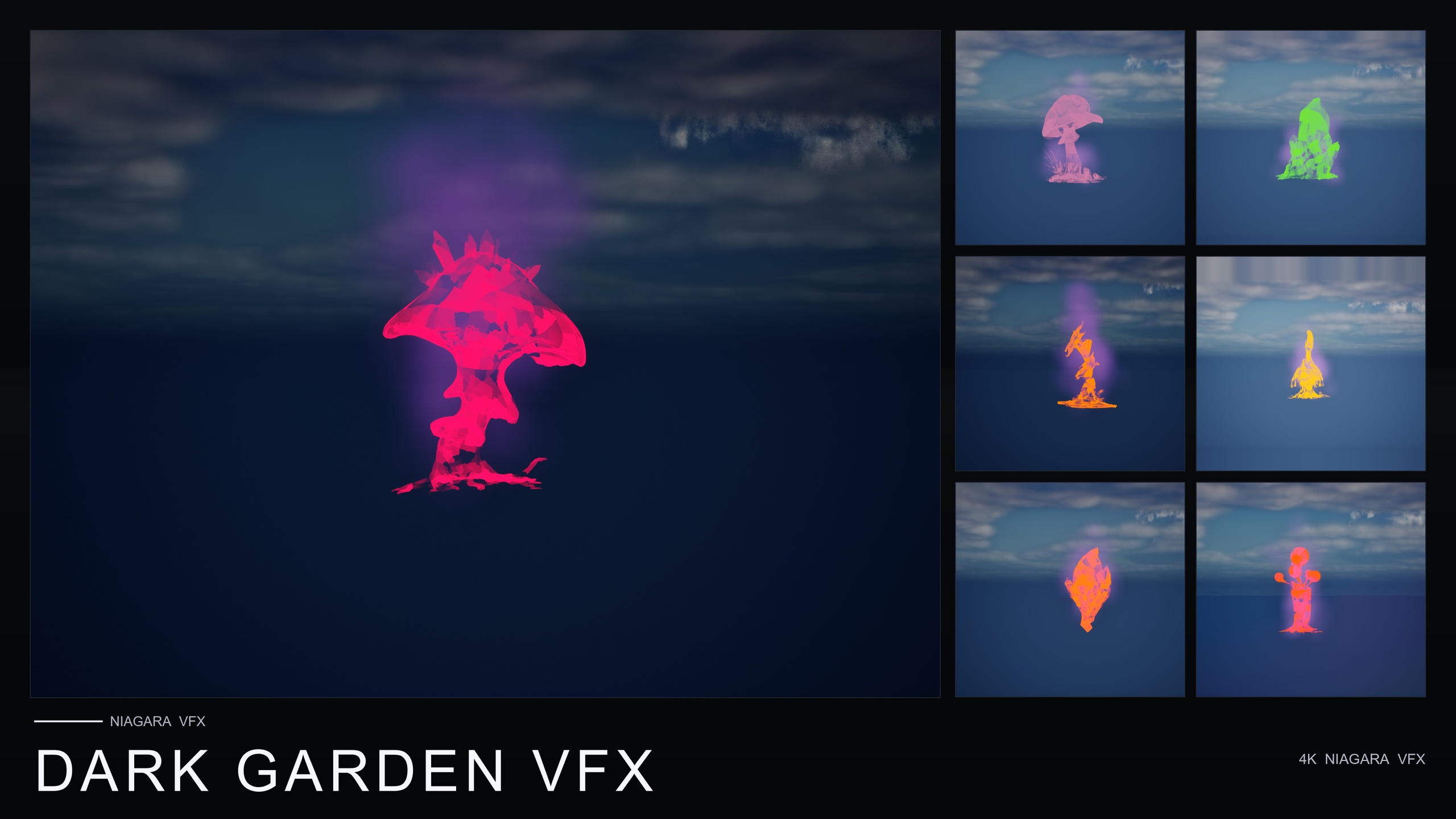
Static dressing can look immaculate and still feel inert. Motion is what flips a pretty gothic room into a place you do not want to stand in, and the cheapest, most reliable motion in horror is low, slow ground smoke. Dark Garden VFX is the catalogue's 'villain' pack for this: a content-only Niagara set whose BlackMist family wraps stylised flower meshes in slow-creeping, ground-hugging dark smoke for curse, corruption, necromancy, plague and blight reads. It ships 50 BlackMist NiagaraSystems, one per flower mesh, across all 51 meshes, so any bloom in a scene can be cursed instantly.
It is genuinely drop-in. Add the pack, open the DarkGardenVFX/Niagara folder, and drag a BlackMist system onto a flower or actor; there is no C++, no Blueprint and no plugin dependency to wire up. The emitters use CPU sim targets, render through the deferred path with dynamic lightmaps, and the pack is compile-clean on UE 5.4 (the product listing spans roughly UE 5.4 to 5.7). It also runs cross-platform on Windows, Mac and Linux, which is unusual for this kind of content kit.
For the strongest read, lean on the seven 'designed-for-dark' hero meshes the demo level showcases: BloodLotus, EbonBloom, EnchantedNightshade, SpiderToadstool, CrimsonCapToadstool, DrippingCapMushroom and MysteriousFungus. The pack is cross-compatible, so you can lay BlackMist over flowers that came from other Fantasy Flower packs too — handy for the classic plot beat where a garden looks normal until the smoke tells you it isn't. Note the dread comes from one well-tuned effect family (BlackMist), not several, so build your variety through placement and density rather than expecting multiple distinct emitters.
Practically: keep the smoke thin and infrequent, hugging the floor around your focal statue and along the edges of the room rather than everywhere at once. Horror VFX works by suggestion. A single creeping tendril near the one statue facing the wrong way does more than a fog bank that drowns the whole frame.
The unsettling detail: the moon that watches
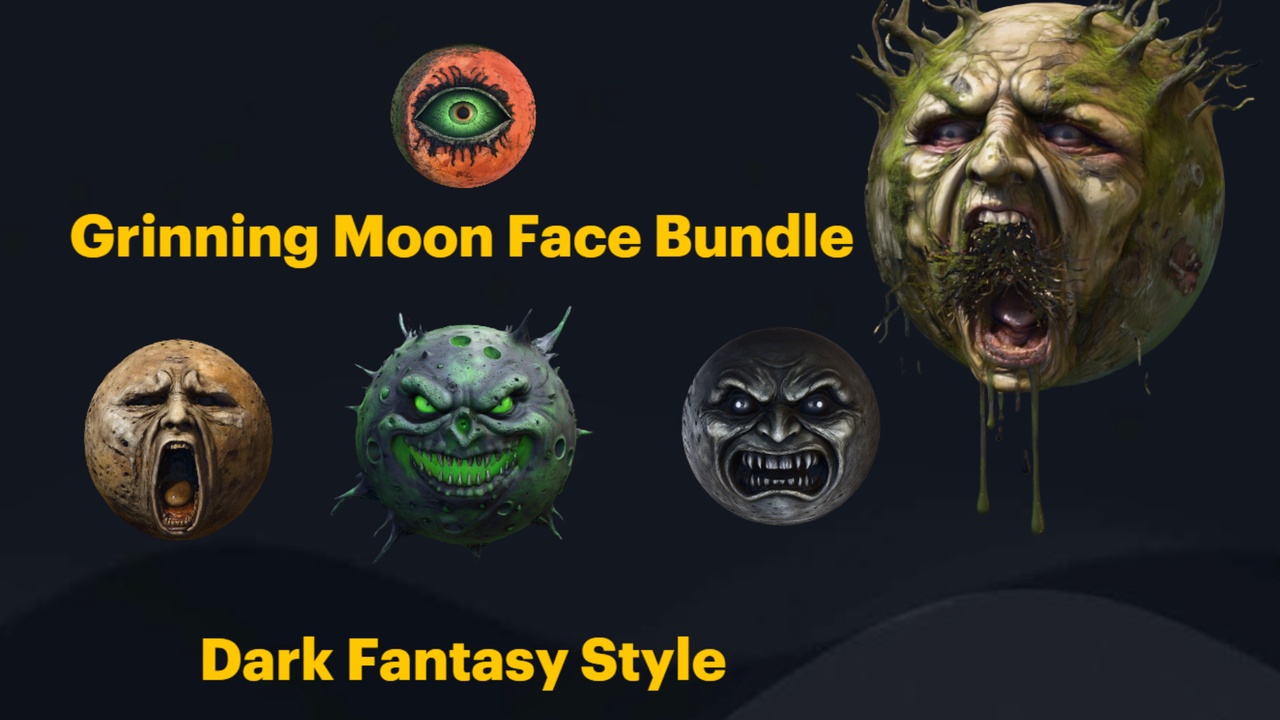
The best scares are often the ones the player notices a beat too late. The Grinning Moon Face Bundle is built for that delayed dread: 13 unique grinning-moon face meshes, each with its own expression — SM_AllSeeingMoonFace, SM_ScreamingMoonFace, SM_HauntedMoonFace, SM_WinkingMoonFace, SM_PutridMoonFace, SM_ArcaneMoonFace and more — each a Nanite static mesh with automatic collision, one material per face and 2K textures, shipped in a demo project with FBX sources.
The signature use is environmental storytelling: place one face large and distant as a fake moon looming over the level so it reads as backdrop, then let the player slowly register that the moon has a face and the face is grinning at them. Because these are static meshes you can also use multiples as a repeated motif — the same expression recurring on banners, in a cult shrine, behind a stained-glass window — to imply a watching presence threaded through the whole space.
One honest caveat to design around: these are static meshes with per-mesh materials, not animated or self-illuminating props. The mouths and eyes do not move, and there is no built-in glow or moon skybox shader in the pack. If you want the classic emissive moon look, push the emissive on the face's material yourself and back it with your own sky and light rig. Used as a fixed-camera set-piece or a distant silhouette, it is one of the most economical scares in the catalogue.
Lighting the dread: carving the frame
Lighting is where a dressed scene becomes a horror scene. The instinct to make things visible is exactly wrong here — you want to hide most of the frame and reveal almost nothing. Work subtractively. Start with the level near-black, then add the fewest lights that will read your focal piece, and stop before the room feels safe.
A reliable rig for these props: one cool, low-intensity key raking across your statue or altar from a steep angle so it throws long, deformed shadows; a dim, warm practical (a lantern from the prop bundle, an emissive you have authored) to give the eye one point of comfort it cannot quite trust; and otherwise darkness. Let the Nanite meshes catch that single key and disappear into black everywhere else. The Dark Garden demo level is tuned with dynamic lighting for exactly this kind of moody, low-key read, so it is worth opening as a reference for how thin the lighting can be.
Tie the layers together with motion and contrast. Position the BlackMist smoke so it drifts through your one shaft of light, where it will catch and shimmer. Sit the grinning moon just outside the lit zone so it is technically visible but easy to miss. Keep the colour palette narrow — cold shadows, a single warm accent — because a restrained palette reads as deliberate and dread thrives on the sense that someone arranged all this on purpose.
The throughline across all of it: dress in passes, give the eye one focal piece, add the smallest amount of motion that unsettles, and light for absence. Do that with a broad prop bundle for bulk, a statue or urn for the focal point, a Niagara pack for the creep and a watching face for the detail, and you have a horror scene that feels authored rather than assembled.
Dark-fantasy dressing packs at a glance
| Pack | Type | Contents | Engine | Nanite / collision | Price |
|---|---|---|---|---|---|
| Dark Fantasy Props Bundle | Prop project | 100+ gothic meshes (105 SM_), 1 material each, Demo map | UE 5.6 | Nanite; collision not listed | $34.99 |
| Fantasy Statue Bundle | Statue set | 18 marble statues (9 Nature + 9 Tormented) + table, 72 2K textures | UE 5.6 | Nanite + automatic collision | $7.99 |
| Ritual Jars | Prop set | 9 canopic jars + table + grass material, 2K PBR | UE 5.7 | Nanite + automatic collision | $7.99 |
| Grinning Moon Face Bundle | Surreal prop set | 13 moon-face meshes, 1 material each, 2K, Demo map + FBX | UE 5.6 | Nanite + automatic collision | $5.99 |
| Dark Garden VFX | Niagara pack | 50 BlackMist systems across 51 flower meshes, content-only | UE 5.4-5.7 | CPU emitters; no plugin deps | $29.99 |
| The Azure Gargoyle Urn | Single prop | 1 funerary urn mesh, 2K PBR | UE5 (generic) | Not file-verified | Free |
Counts, engine targets and prices are from each product's listing. Triangle counts are not quoted because they were not read from source. Prices in USD.
FAQ
How do I make a horror scene in Unreal Engine 5 quickly?
Work in layers. Use a broad prop pack like the Dark Fantasy Props Bundle for bulk set dressing (100+ gothic meshes, drop-in via Asset Actions then Migrate), add one focal piece such as a statue or ritual altar, introduce slow ground smoke with a Niagara pack like Dark Garden VFX, and then light subtractively — keep most of the frame dark and reveal only the focal shape. Because the meshes are Nanite content projects, you can dress a convincing scene in an afternoon rather than modelling from scratch.
Do these packs need C++, Blueprints or plugins to use?
No. They are drop-in UE5 content projects. Dark Garden VFX in particular ships its 50 BlackMist Niagara systems with no C++, no Blueprint and no plugin dependencies — you drag a system onto an actor and it works. The prop and statue packs are static meshes with materials already assigned and Nanite already enabled.
Which engine versions do the packs target?
The Dark Fantasy Props Bundle, Fantasy Statue Bundle and Grinning Moon Face Bundle are authored for UE 5.6. Ritual Jars targets UE 5.7 specifically, so older editors may show a version-upgrade prompt. Dark Garden VFX spans roughly UE 5.4 to 5.7. The free Azure Gargoyle Urn is listed for generic UE5. Always check before mixing versions in one project.
Will the grinning moon faces glow or animate on their own?
No. The Grinning Moon Face Bundle ships 13 static meshes with one material each; the mouths and eyes do not move and there is no built-in emissive glow or moon skybox shader. For a glowing moon look you push the emissive on the face's material yourself and pair it with your own sky and lighting.
What is the cheapest way to start dressing a gothic scene?
Begin with the free Azure Gargoyle Urn to seed a focal funerary prop, then add the Grinning Moon Face Bundle ($5.99), Fantasy Statue Bundle ($7.99) or Ritual Jars ($7.99) for focal pieces before committing to the larger Dark Fantasy Props Bundle ($34.99) for bulk dressing and Dark Garden VFX ($29.99) for atmosphere.
Dark Fantasy Props Bundle
A comprehensive collection of gothic and dark-fantasy props — artefacts, oddities and set dressing for horror, RPG and dungeon environments. Game-ready, atmospheric, and built to fill a scene fast.
Related on Fab

Related reading