
tutorial · 2026-02-07
How to Design a Gothic Throne Room and Boss Arena in Unreal Engine 5
A practical, props-first workflow for building a fantasy throne room or boss arena in UE5 that reads as imposing the moment the player walks in.

What makes a throne room or boss arena actually work
A gothic throne room is one of the hardest spaces to greybox convincingly, because the room has to do a job that has nothing to do with geometry. It has to make the player feel small before a single line of dialogue plays. If you are searching for how to design a throne room or boss arena in Unreal Engine fantasy environments, the trap most people fall into is starting with the walls and the floor, then wondering why the finished space feels like a banquet hall rather than a seat of power.
The reason is that authority in an environment is communicated almost entirely through scale, symmetry and silhouette, not through wall material. A throne is only a throne if everything around it is arranged to point at it. A boss arena only reads as dangerous if the space frames the threat and gives the player nowhere comfortable to stand. Both of those are dressing problems, not architecture problems, which is why this guide starts from the props and works outward.
Throughout this tutorial the worked example uses the Dark Fantasy Props Bundle, a drop-in UE5 content project of 100+ gothic static meshes. It is a useful spine for this kind of scene because it ships the exact prop families a throne room needs in one consistent art style: four distinct thrones, several obelisks, altars, lanterns and tomes, all Nanite-enabled so you can drop high-poly hero pieces without authoring LODs. Everything below is grounded in what that pack actually contains.
Start with the included Demo map for layout ideas
Before you place anything yourself, open the showcase. The bundle is a complete UE project, so the fastest way in is to open DarkFantasyPropPack.uproject directly in Unreal Engine 5.6, then load the included Demo.umap. The demo arranges the props together, which means you can study spacing, relative scale and how the materials read under lighting before you commit to your own composition.
If you are migrating into an existing project rather than working in the pack's project, right-click the DarkFantasyPropsBundle100ArtefactsAndOddities content folder in the Content Browser and choose 'Asset Actions' then 'Migrate' to copy it into your own 5.6 or newer project. Either way, keep the Demo map open in a second level tab as a reference board; it is genuinely faster to copy a prop you like out of the demo than to hunt for it by name.
While you are in there, note which thrones exist so you can choose deliberately later. The pack includes the EbonyThrone, the CrimsonNexus, the InfernoThrone and the CrystalThrone, each with its own bespoke material. They are not recolours of one mesh, so the throne you pick sets the entire tone of the room before you place a single banner.
Establish scale first with obelisks and pillars
Scale is the load-bearing illusion of the whole space, so build it before you build anything pretty. The principle is simple: a room only feels monumental if there is something tall and repeated to measure it against, and the player's eye calibrates the size of everything else from those repeats. Obelisks are the ideal tool here because they are vertical, austere and read clearly from across a room.
1. Drag an obelisk mesh from the Meshes folder into the level. The pack includes several distinct obelisks, including Arcane, Eternal, Infernal and Destroyed variants, so pick one whose silhouette suits the threat the room contains. Each mesh already has its M_ material assigned and Nanite enabled, so no extra setup is needed.
2. Set the obelisk's scale so its top sits well above the player's eyeline. With a roughly 1.8 to 2 metre tall character capsule, an obelisk that towers two or three times that height immediately makes the player feel dwarfed.
3. Duplicate it into a symmetrical run down both sides of the approach to the throne. Hold Alt and drag in the viewport to copy, then use the 'Grid Snapping' and the transform fields to keep the spacing even. An honest, regular colonnade of obelisks does more for the feeling of grandeur than any amount of trim detail.
4. Because these are Nanite static meshes, you can keep the high-poly versions in shot without authoring manual LODs; Nanite handles the geometry budget for you. Drop the props at full fidelity and let the engine manage it.
Resist the urge to fill the gaps yet. A near-empty room with a strong, repeated vertical rhythm already feels powerful. Clutter is what you add last, not first.
Place and frame the hero throne
The throne is the one object every line in the room should point toward, so place it last in the structural pass and treat it as the camera's destination. Pick a single hero throne from the four on offer and raise it. A throne at floor level reads as furniture; a throne at the top of a short flight of steps reads as a seat of judgement. If the bundle's altar or table pieces give you a usable plinth shape, stack the throne onto a raised base to gain that elevation.
Frame it with negative space. The most common throne-room mistake is crowding the throne with props until it disappears into the noise. Do the opposite: leave a clear, empty zone around the throne so the eye has nowhere else to go. The obelisk run you built earlier should funnel the player's gaze straight down the centre line and land it on the throne. That funnel is the entire composition.
Choose the throne to match the boss, not the other way around. The InfernoThrone and CrimsonNexus carry an aggressive, fiery register, while the CrystalThrone reads colder and more arcane and the EbonyThrone reads as austere, old power. Because each throne ships its own material, the choice is doing real storytelling work; let it tell the player who they are about to fight.
Finally, set your gameplay camera or a cinematic shot looking down the approach and check the silhouette. A boss arena is judged in the first second of the reveal, and that reveal is a silhouette read against your lighting. If the throne's outline does not separate cleanly from the background, adjust the lighting and the obelisk spacing until it does, before you add any further dressing.
Reinforce authority with symmetry, altars and banners
Symmetry is shorthand for ceremony, and the brain reads a symmetrical space as deliberate and controlled. Mirror your dressing across the centre line: a matched pair of altars flanking the steps, equal banners on each wall, lanterns at even intervals. The pack includes a NecronAltar and other altar and cauldron pieces that make natural flanking anchors at the foot of the throne dais.
Use the altars to give the player a focal stop on the way in. An altar pair roughly halfway down the approach creates a deliberate pause point, a place the player's eye rests before continuing to the throne. Dress those altars with the smaller artefacts the bundle provides, such as tomes and scrolls; the pack ships tome meshes including the BloodTome, the KinglyTome and the ArcaneChronicle, each with its own material, which are perfect close-detail pieces that reward a player who walks right up to them.
Light the room to serve the silhouette, not to illuminate it evenly. Gothic spaces live on contrast: pools of warm light at the altars and the throne, deep shadow in the colonnade between them. The bundle's lanterns, including Skull, Infernal, Eternal and Ember variants, give you in-world light sources to motivate those pools; place a lantern, then add an actual Point Light or Spot Light beside it so the prop explains where the light comes from.
A note on banners. The pack's strength here is its hard props rather than cloth simulation, so build your symmetry from the obelisks, altars, lanterns and the throne, and treat banners as a place to extend the scene with your own cloth or trim assets if you want hanging fabric. The structural authority of the room comes from the props above, which are all present in the bundle.
Push it further with siblings, then ship it
Once the throne room reads correctly, the same dressing logic extends a fantasy level outward, and a few sibling packs in the same art style and engine version slot in cleanly. The Fantasy Statue Bundle adds 18 weathered marble statues in a Nature series and a Tormented Souls series; lining the approach with a row of Tormented statues instead of, or alongside, obelisks turns a colonnade into a gallery of the boss's victims. The statues ship as Nanite meshes with automatic collision, so the player can walk among them immediately.
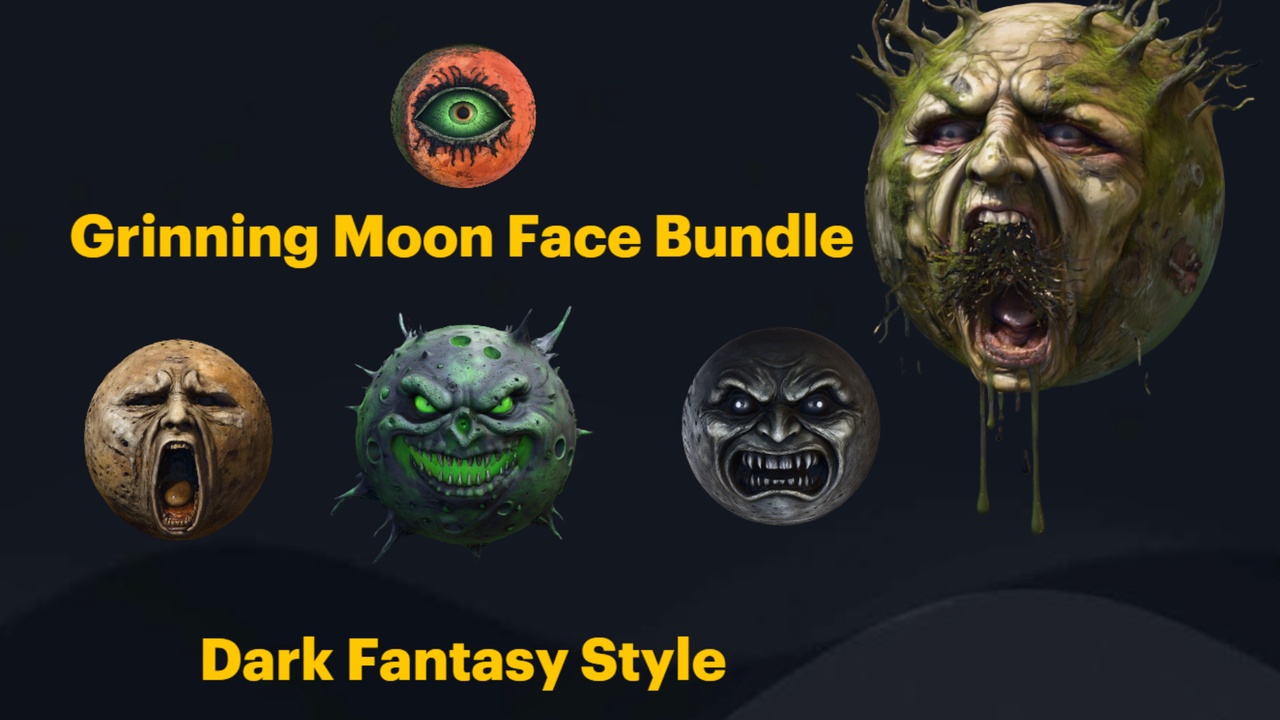
For an exterior or a fixed-camera reveal, the Grinning Moon Face Bundle gives you 13 unique grinning-moon faces; place one large and distant through a window or open roof as an unsettling fake moon that watches the throne. Note that these are static meshes, so for a glowing-moon look you set the material's emissive yourself rather than relying on a built-in glow. To soften an overgrown, ruined throne room, the Fantasy Flower Pack supplies 51 hand-modelled fantasy and gothic plants, including nightshade and blood-lotus blooms, that you can scatter through cracks in the floor with the Foliage or PCG tools.
When the composition holds together in a screenshot, you are done with the design pass. Drag your final props in at full fidelity, trust Nanite to handle the geometry, and move on to lighting polish and gameplay scripting. The point of a props-first throne room is that the hardest part, making the player feel small, is already solved by the time you start the rest of the level.
If you want the prop spine this guide is built on, the Dark Fantasy Props Bundle gives you the thrones, obelisks, altars, lanterns and tomes referenced throughout, as one consistent UE 5.6 content project with a Demo map to copy from.
Choosing a throne to match the boss
| Throne mesh | Tone it sets | Best for |
|---|---|---|
| EbonyThrone | Austere, old power | A long-reigning king or lich ruler |
| CrimsonNexus | Aggressive, blood-red | A violent or cult-leader boss |
| InfernoThrone | Fiery, infernal | A demon or fire-themed boss |
| CrystalThrone | Cold, arcane | A mage, ice or eldritch boss |
All four thrones ship in the Dark Fantasy Props Bundle, each with its own bespoke material. Match the throne to the boss's register.
Dressing props by role in the arena
| Prop family | Examples in pack | Job in the throne room |
|---|---|---|
| Obelisks | Arcane, Eternal, Infernal, Destroyed | Establish vertical scale and frame the approach |
| Altars | NecronAltar and other altar pieces | Flank the dais and create focal stops |
| Lanterns | Skull, Infernal, Eternal, Ember | Motivate in-world pools of light |
| Tomes | BloodTome, KinglyTome, ArcaneChronicle | Close-up detail that rewards approach |
Prop families present in the bundle and the compositional job each one does.
FAQ
How do I design a throne room or boss arena in Unreal Engine for a fantasy game?
Work props-first. Establish scale with a symmetrical run of obelisks down the approach, raise a single hero throne at the end of that run with clear negative space around it, then add flanking altars, lanterns and tomes. Light for contrast rather than even illumination. The Dark Fantasy Props Bundle ships all of those prop families in one consistent UE 5.6 project, plus a Demo map you can copy layouts from.
Do I need to author LODs for these high-poly props?
No. The static meshes in the Dark Fantasy Props Bundle are Nanite-enabled, so you can drop the high-poly hero pieces straight into the level without authoring manual LODs; Nanite manages the geometry budget for you.
Which throne should I pick for my boss?
Match the throne to the boss's character. The pack includes four distinct thrones with their own materials: the EbonyThrone for austere old power, the CrimsonNexus for an aggressive blood register, the InfernoThrone for a fiery or demonic boss, and the CrystalThrone for a colder, arcane one.
Can I use this pack in my existing project instead of its own project?
Yes. It ships as a UE 5.6 content project, but you can right-click the DarkFantasyPropsBundle100ArtefactsAndOddities content folder and choose 'Asset Actions' then 'Migrate' to copy the assets into your own 5.6 or newer project. Each mesh keeps its assigned material and Nanite settings.
Does the bundle include cloth banners and a moon for the scene?
The bundle's strength is hard gothic props: thrones, obelisks, altars, lanterns, tomes and similar set dressing. For hanging cloth banners you would add your own fabric assets, and for a looming moon you can pair it with the Grinning Moon Face Bundle, whose faces are static meshes you make emissive yourself.
Dark Fantasy Props Bundle
A comprehensive collection of gothic and dark-fantasy props — artefacts, oddities and set dressing for horror, RPG and dungeon environments. Game-ready, atmospheric, and built to fill a scene fast.
Related on Fab


Related reading