tutorial · 2026-06-19
Holographic Cyberpunk Plant VFX in UE5: Cyber Flora Niagara
A practical tour of Cyber Flora VFX — 100 CPU Niagara effects of holographic scanlines, pixel voxels and digital reconstruction for sci-fi and cyberpunk Unreal Engine scenes, and the cyberpunk counterpart to the garden VFX line.
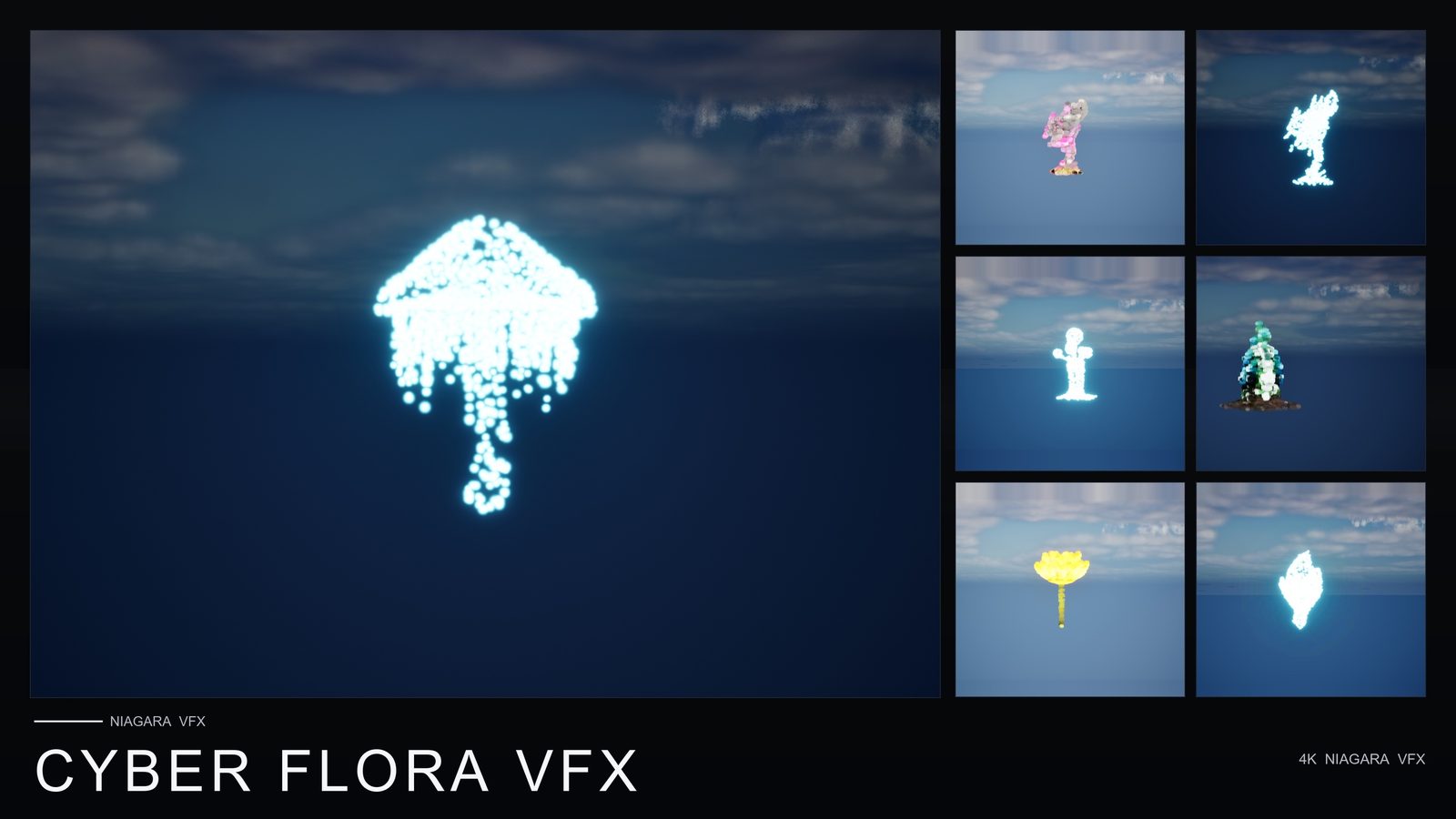
The holographic look, applied to plant life
Cyberpunk environments tend to be built from two opposing materials: hard, lit neon geometry on the one hand, and soft, unstable digital matter on the other. The second kind is the harder one to author well. It is the projection that has not fully resolved, the surface dissolving into a grid of pixel cubes, the scanlines rolling up an object as a sensor sweeps it. Cyber Flora VFX is a content pack aimed squarely at that second category: 100 ready-to-use Niagara effects that wrap stylised plant meshes in holographic scanlines, pixel voxels and digital reconstruction, for a Matrix-flavoured, cyberpunk hologram aesthetic.
The conceit is deliberate. Rather than ship abstract particle systems with nothing to anchor them, the pack applies its effects across 51 stylised meshes, so each effect already has a recognisable silhouette to deconstruct and rebuild. A flower made of drifting voxels reads very differently from a generic cube of particles — the eye has a shape to hold onto while the digital matter does its work. That is what makes the look land as a hologram of something rather than as undifferentiated noise.
This guide walks through what is actually in the pack, how the holographic scanline, pixel-voxel and reconstruction motifs are built in Niagara, where to place them in a scene, and how Cyber Flora sits alongside the garden VFX line as its sci-fi counterpart. Everything claimed about the pack below comes from its listing; the wider technique notes are general Unreal Engine Niagara craft you can apply to any project.
What is in the pack
Cyber Flora VFX is a content-only Niagara pack. It contains 100 unique, ready-to-use effects, all built on CPU emitters, applied across 51 meshes. The material side is substantial for a VFX pack: 22 master materials, 81 material instances and 51 textures, authored at 2048x2048 and 1024x512. The meshes ship with a single level of detail (LOD0).
Being content-only is the defining practical fact here. There is no C++, there are no Blueprints, and there are no plugin dependencies. You add the pack to a project, drag a NiagaraSystem into your level, and it plays — no module to compile, no plugin to enable, no engine modification. That keeps the pack easy to drop into an existing project and easy to move between projects, because nothing has to be rebuilt per target. The flip side of a single LOD0 is that distance scaling is on you: there is no built-in LOD chain, so manage cost at range with visibility and significance settings rather than expecting the meshes to simplify themselves.
The pack includes two demo levels. These are the fastest way to understand the intended look: open a demo map and you see the effects laid out and lit the way they were authored, rather than judging a system in isolation in the preview viewport. Treat the demo levels as your reference scenes and your shopping list — find the effect that fits your shot there first, then take it into your own level.
Scanlines, pixel voxels and reconstruction
The three motifs in the pack's name describe three distinct holographic behaviours, and it is worth understanding what each is doing so you can choose between them by intent rather than by trial and error.
Holographic scanlines are the rolling horizontal bands you see when a projection refreshes or a scanner sweeps an object. In Niagara terms this reads as brightness that moves along one axis of the mesh over time, so the surface appears to be redrawn line by line. It is the motif that most strongly says 'this is a projection, not a solid thing', and it pairs naturally with a scan or reveal beat in gameplay.
Pixel voxels are the look of a surface breaking into a lattice of small cubes — matter quantised into a grid, hovering and shimmering. This is the most overtly digital of the three: it abandons the smooth silhouette in favour of discrete blocks, and it is the right choice when you want something to read as data rather than as a physical object. Digital reconstruction is the temporal counterpart: the object assembling or dissolving, voxels and scanlines resolving into the full mesh or scattering back out of it. Reconstruction is what you reach for when the effect needs a clear start and end — a spawn-in, a teleport materialise, a despawn — rather than a steady ambient state.
Because each of the 100 effects is its own CPU NiagaraSystem, you choose the behaviour by picking the system, not by reconfiguring a monolith. That granularity is what lets you place a steadily-shimmering voxel plant in the background and a one-shot reconstruction on a hero prop in the same scene without the two interfering.
Why CPU emitters suit this pack
Every effect in Cyber Flora uses CPU Niagara emitters, and that is a sensible default for the job the pack does. Holographic dressing is usually about a moderate number of particles forming a legible shape — a flower's worth of voxels, a sweep of scanline brightness — rather than tens of thousands of particles in a single dense volume. CPU simulation handles that profile comfortably and exposes the full Niagara module set without feature-level caveats.
CPU sim also computes proper per-emitter bounds, which is what lets the engine's visibility and significance systems cull and budget these systems cleanly when you scatter several across a scene. And because CPU emitters do not depend on a particular GPU feature level or compute-shader path, they behave consistently across targets. The pack lists Windows, macOS and Linux support, and a CPU-simulated, content-only effect is exactly the kind of thing that ports across those without a per-platform branch.
A note on honesty: the case for CPU here is a structural one — moderate counts, full module support, clean bounds, portable behaviour — not a benchmark. The listing does not publish frame-rate figures or particle budgets, and neither do we. Profile in your own scene on your own target hardware; the architecture is sound, but only your project can tell you the cost.
Dropping Cyber Flora into a cyberpunk scene
The workflow is deliberately undramatic, which is what you want from a dressing layer. Here is the practical flow.
1. Add the pack to your project and open its Niagara folder in the Content Browser. Browse the systems by the effect look you are after — scanline, voxel or reconstruction — and by which of the 51 meshes fits the silhouette you need.
2. Open one of the two demo levels first. Seeing the effects under their authored lighting tells you far more than the thumbnail does, and it is where you decide which systems are worth taking into your own scene.
3. Drag the chosen NiagaraSystem into your level, or attach it to an actor so it travels with a moving object. As a content-only asset with no Blueprint or plugin requirement, it plays on drop with nothing to wire up.
4. Keep bloom enabled in your post-process volume. Holographic looks live on glow: the scanline highlight, the voxel shimmer and the reconstruction edge all read more convincingly when HDR bloom is doing its part, and a flat tonemap will undersell them.
5. Layer for depth. Place a steady voxel or scanline system in the background, run a reconstruction one-shot on a foreground hero element, and let the moderate per-system counts and clean CPU bounds keep the scene manageable. Scatter as the shot needs and rely on visibility and significance culling for the systems out of frame.
The cyberpunk counterpart to the garden line
Cyber Flora is described as the sci-fi counterpart to MythicLemon's garden VFX line, and the relationship is more than thematic. The garden line applies stylised Niagara effects across the same kind of plant meshes for a naturalistic, organic look; Cyber Flora takes that established 'effects wrapped around plant meshes' structure and swaps that vocabulary for a digital, Matrix-flavoured one. The shape of the product is the same — Niagara effects authored around recognisable plant silhouettes — and only the aesthetic register changes.
That shared lineage is a genuine convenience. Cyber Flora is CPU-simulated, content-only, drop-in NiagaraSystems with demo levels for reference and no plugin or code prerequisites, so the mental model is the same one you would use anywhere in this style of pack: choose a system by effect and mesh, drag it into a scene, and light it with bloom. Only the look changes, from organic glow to holographic deconstruction.
Practically, that means a single project can span moods without changing tooling. Reach for the organic, overgrown, magical look for the living parts of a world, and Cyber Flora for the parts that have been scanned, projected or digitised — a holographic plant in a corporate atrium, a voxel garden inside a simulation, a reconstructing flower as a teleporter materialises a prop. Same drop-in pipeline, opposite aesthetic. Cyber Flora VFX is priced at 29.99 USD, targets Unreal Engine 5.4 and upgrades on open through 5.8, and runs on Windows, macOS and Linux.
Cyber Flora VFX at a glance
| Attribute | Detail |
|---|---|
| Effects | 100 unique, ready-to-use Niagara effects |
| Simulation | CPU emitters |
| Theme | Holographic scanlines, pixel voxels, digital reconstruction (Matrix/cyberpunk hologram look) |
| Meshes / LODs | 51 meshes, 1 LOD (LOD0) |
| Materials | 22 master materials, 81 material instances |
| Textures | 51 textures, 2048x2048 and 1024x512 |
| Content type | Content-only — no C++, no Blueprints, no plugin dependencies |
| Demo content | 2 demo levels |
| Engine | UE 5.4+ (opens in 5.4, upgrades on open through 5.8) |
| Platforms | Windows, macOS, Linux |
| Price | 29.99 USD |
All figures are from the Fab product listing and technical details. No performance, frame-rate or sales figures are claimed.
Which motif to reach for
| Motif | Reads as | Best for |
|---|---|---|
| Holographic scanlines | A projection being redrawn line by line | Scanner sweeps, projection refresh, 'this is a hologram' cues |
| Pixel voxels | Matter quantised into a hovering grid of cubes | Data made visible, digital materialisation, simulation interiors |
| Digital reconstruction | An object assembling or dissolving | Spawn-in, teleport materialise, despawn — effects with a clear start and end |
General guidance on matching the three holographic behaviours to a use case; the motifs are those named in the product listing.
FAQ
What is Cyber Flora VFX?
It is a content-only UE5 Niagara pack of 100 ready-to-use effects built on CPU emitters, themed around holographic scanlines, pixel voxels and digital reconstruction for a Matrix-style cyberpunk hologram look. The effects are applied across 51 stylised meshes, and the pack ships with 22 master materials, 81 material instances, 51 textures and two demo levels.
Does it require Blueprints, C++ or any plugins?
No. Cyber Flora VFX is content-only: there is no C++, there are no Blueprints, and there are no plugin dependencies. You add the pack, drag a NiagaraSystem into your level and it plays, with nothing to compile or enable.
Which Unreal Engine versions and platforms does it support?
The pack opens in Unreal Engine 5.4 and upgrades on open through 5.8, so UE 5.4 and later. It lists support for Windows, macOS and Linux. As a CPU-simulated, content-only pack, it has no GPU-feature-level or plugin prerequisites that would complicate moving it between those platforms.
How does Cyber Flora relate to the garden VFX packs?
It is described as the cyberpunk, sci-fi counterpart to MythicLemon's garden VFX line. It shares the same structure — CPU-simulated Niagara effects applied across stylised plant meshes, shipped as content-only drop-in systems with demo levels — but swaps the naturalistic look of the garden packs for a holographic, digitised one. The workflow is the same drop-in pipeline; only the aesthetic changes.
Are these effects expensive to run?
The pack uses CPU Niagara emitters, which suit moderate-count effects that form a legible shape and give clean per-emitter bounds for culling. No frame-rate figures or particle budgets are published for the pack, so treat the CPU choice as a structural strength rather than a benchmark and profile in your own scene on your target hardware. Note also that the meshes ship with a single LOD (LOD0), so manage cost at distance with visibility and significance settings.
Cyber Flora VFX
100 ready-to-use Niagara systems of holographic scanlines, pixel voxels and digital reconstruction — applied across 51 stylised flower meshes with 81 material instances. A cyberpunk, Matrix-flavoured counterpart to the garden VFX line. CPU-simulated for Windows, Mac and Linux, with two demo levels included. Content-only: no C++, no Blueprints, no plugin dependencies.
Related reading