
article · 2026-01-17
Horror Environmental Storytelling in Unreal Engine: Making the Moon Watch the Player
How a single grinning face hung in the sky turns a quiet level into a place that knows you are there.
Why a face in the sky creates unease
The hardest thing to manufacture in a horror level is the feeling of being observed. Scripted jump scares fire once and are spent. An enemy patrol gives players something concrete to outwit. What you actually want, in the long quiet stretches between scares, is a low and constant pressure: the sense that the place itself is paying attention. Horror environmental storytelling in Unreal Engine is largely the craft of building that pressure out of geometry, light and framing rather than out of triggers.
A human face is the most efficient tool you have for this, because players are wired to find faces and to read intent into them. Hang one in the sky and you get a presence with no health bar, no AI and no animation budget, that nonetheless feels like it is looking down at the player. It cannot chase anyone, which is exactly why it works: the threat is implied, never resolved, and implied threats outlast real ones.
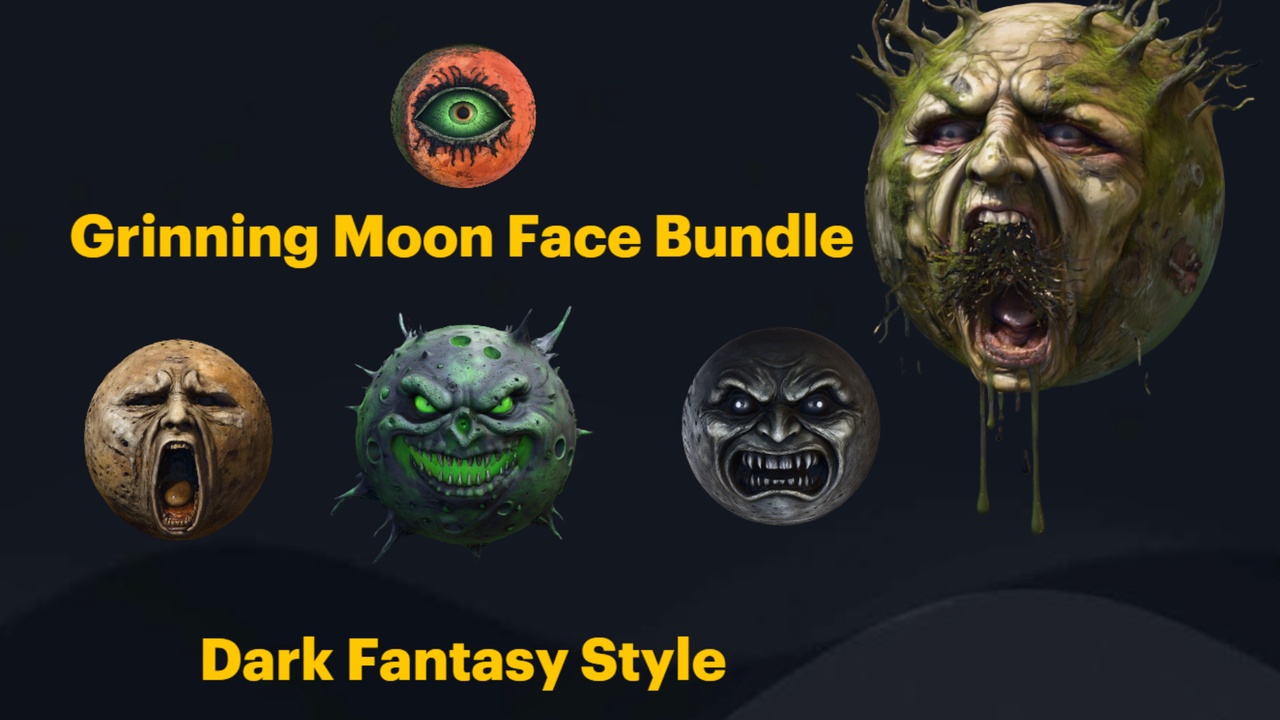
The Grinning Moon Face Bundle exists for precisely this set piece. It is a set of 13 unique grinning-moon face meshes, each with its own expression, built to loom over a scene as a surreal, watching moon. Because the faces are static meshes there is nothing to animate and nothing to break at runtime; the unease comes entirely from placement, scale and the expression you choose. The rest of this guide is about wringing the most dread out of those three levers.
Choosing the right expression for the scene
The bundle gives you 13 distinct faces, and the difference between them is the difference between tones of horror. The expressions span an all-seeing face, a screaming face, a haunted face and a winking face, through to putrid and arcane variants. Each is a separate mesh with its own material, so the choice you make is a single drag-and-drop, but it sets the emotional register of the whole level.
Match the face to the beat you are writing. An all-seeing face is your default watcher: serene, wide-eyed, indifferent, perfect for a level that should feel surveilled rather than hunted. The screaming face raises the temperature and reads as an omen, so save it for a climax or a moment the player is meant to dread approaching. A haunted face suits grief and decay; a putrid one suits rot and disease. The winking face is the cruelest of the set, because a wink implies the moon is in on something the player is not.
A useful trick is to change the face the player sees as the level escalates. Place an all-seeing moon in the opening area, then swap to a screaming or putrid face for the final stretch, so returning players register that the sky itself has turned against them. Because each variant is a self-contained mesh and material, you can stage this as separate placed actors revealed by your existing level streaming or trigger logic, with no extra art required.
One honesty note worth respecting: these are static meshes, so do not plan around mouths that move or eyes that track the player. The expression is fixed once you place it. The faces also do not ship with a built-in glowing-moon material, so if you want the moon to read as a light source rather than a lit object, that emissive look is something you set up yourself on the material — covered below.
Placing and scaling the moon so it reads as the sky
The single most common mistake is treating the face like a normal prop and dropping it at human scale near the player. A watching moon has to live at the back of the scene, vast and unreachable, so that the player can never close the distance and rob it of its menace. The goal is for the face to feel painted onto the sky, not standing in the field.
1. Drag your chosen mesh, for example 'SM_AllSeeingMoonFace', from the bundle's Meshes folder into the level. Each face already has its material assigned, plus Nanite and automatic collision, so it appears finished on drop.
2. In the 'Details' panel, scale the actor up dramatically and push it far back along the horizon, well beyond any geometry the player can reach. Distance plus size is what sells 'celestial body' rather than 'large prop'.
3. Because the mesh ships with automatic collision, place it far enough out, or disable its collision on that placed instance, so a wandering player or projectile never bumps an invisible wall where the sky should be.
4. Position it relative to your camera flow, not your floor plan. The moon only does its job from the angles players actually look, so move it while watching through a representative viewpoint rather than from the top-down editor view.
If you want the moon to glow rather than merely catch your scene's lighting, open its 'M_*MoonFace' material and drive an emissive output yourself; the pack does not include a separate sky or glowing-moon shader, so this is a deliberate edit on the per-mesh material. The included Demo.umap, which ships inside the GrinningMoonfaceBundle demo project, shows arrangement examples and is the fastest way to calibrate a believable size and distance before you commit.
Camera framing so players actually notice
A watcher the player never looks at is wasted work. The cruelest version of this motif is one the player discovers on their own and then cannot un-see, so your job is to compose the level's sightlines until the moon is unavoidable without ever pointing a tutorial arrow at it.
In a fixed or semi-fixed camera scene this is straightforward: frame a key shot with the face occupying the upper third of the composition, partly veiled by a tree line, a ruin or a rooftop, so it reads first as silhouette and resolves into a face on the second look. The delay between seeing a shape and recognising a face is where the dread lives.
In free-look first or third person, use the architecture to do the aiming. Place doorways, broken walls and gaps in the canopy so that the natural exit from each space lines the player up with the moon. A long corridor that opens onto a courtyard should put the face dead centre of the opening. You are not forcing the camera; you are arranging the world so the camera arrives at the face on its own.
Reinforce it with your scene's existing lighting. Angle a directional or rim light so the moon catches more contrast than its surroundings, and let foreground elements fall into shadow, so the eye is drawn upward and outward to the brightest, most face-shaped thing in frame. Avoid a fully even ambient pass, which flattens the silhouette and lets players' eyes slide right past the very thing you built the level around.
Reusing the motif across a level without wearing it out
A single watching moon is a strong beat, but a motif repeated with variation is what turns a level into a place with a point of view. The 13 faces let you run the same idea at different intensities so the recurrence feels intentional rather than like you ran out of assets.
Echo the face at small scale inside the world. The same expression that looms in the sky can reappear as a carved relief, a cult banner motif or a half-buried idol the player stumbles past, quietly telling them the thing in the sky has worshippers down here. Because every face is a discrete static mesh you can place it at any scale, so the giant moon and the hand-sized icon are literally the same artwork at two distances.
This is where the motif benefits from dressing it into a wider scene. A grinning moon over a graveyard of weathered statues reads as a cult's holy site; a putrid moon above rotting flora reads as a plague. The Grinning Moon Face Bundle is built for Unreal Engine 5.6 and so are its sibling props-3d packs, which makes them drop straight into the same 5.6 project as the moon, with no version juggling.
Finally, ration the reveals. Show the moon, hide it behind cloud or architecture, then bring it back larger or with a worse expression at the next story beat. The motif stays frightening as long as the player is never quite sure when they will be made to look at it again. That uncertainty, far more than any single scare, is the payload of good horror environmental storytelling in Unreal Engine.
Building the surrounding scene
The moon is the watcher, but a watcher needs something to watch over, and the props around it decide what kind of horror the player is standing in. The bundle is one piece of a small props-3d family on Fab, all built for UE 5.6, so you can assemble a coherent set piece without leaving the era of your project or fighting mismatched scales.
For a cult or sacred-site reading, the Fantasy Statue Bundle gives you 18 weathered marble statues across a Nature series and a Tormented Souls series; lining an approach with the Tormented statues under a screaming moon stages a place of punishment before a single line of dialogue. To furnish interiors and shrines beneath that sky, the Dark Fantasy Props Bundle brings 100-plus gothic artefacts, from thrones and altars to lanterns and tomes, for dressing a crypt or temple in a single pass.
For contrast and corruption, the Fantasy Flower Pack supplies 51 hand-modelled fantasy and gothic plants, including nightshade, blood lotus and ember blooms, which let a putrid moon preside over flora that is clearly diseased rather than merely overgrown. All four packs share the same Nanite static-mesh, automatic-collision, 2K-texture approach, so they behave consistently once placed and need no per-asset setup before they earn their place in the frame.
Start with the moon, decide the tone, then pull only the props that serve that one reading. A restrained scene where every object agrees with the face in the sky will frighten players far more reliably than a crowded one that hedges. Open the bundle's Demo.umap, pick your expression, and build the level outward from the thing that is watching.
Matching a moon expression to the scene
| Expression | Reads as | Best used for |
|---|---|---|
| All-seeing | Calm, indifferent surveillance | A default watcher over an explorable area |
| Screaming | An omen or alarm | A climax or a place the player should dread |
| Haunted | Grief and decay | Ruins, memorials, abandoned settlements |
| Putrid | Rot and disease | Plague zones and corrupted, diseased flora |
| Winking | Cruel complicity | Moments the moon seems in on a secret |
| Arcane | Occult power | Cult sites, ritual grounds and shrines |
Expressions confirmed from the Grinning Moon Face Bundle; tone notes are authoring guidance, not product claims.
FAQ
How do I use a grinning moon for horror environmental storytelling in Unreal Engine?
Place one of the 13 face meshes far back in the scene and scale it up so it reads as a celestial body rather than a prop, choose an expression that matches the level's tone, then arrange doorways, gaps and lighting so the player's natural sightlines arrive at it. The dread comes from a watcher the player cannot reach and cannot ignore, reinforced quietly across the level.
Do the moon faces animate or track the player?
No. They are static meshes with fixed expressions, so plan around silhouette, scale and framing rather than moving mouths or eyes. You change the mood by swapping to a different face mesh at a later beat, not by animating one face.
Can I make the moon glow like a light source?
Yes, but you set that up yourself. The pack ships one material per face and does not include a separate glowing-moon or sky shader, so to get an emissive look you open the face's material and drive its emissive output.
What engine version is the bundle built for?
Unreal Engine 5.6. You can open the included GrinningMoonfaceBundle demo project directly, or migrate the content folder into your own 5.6 project. Each mesh arrives with its material assigned, Nanite enabled and automatic collision.
Which other packs work alongside it for a full horror scene?
The sibling props-3d packs are also built for UE 5.6: the Fantasy Statue Bundle (18 statues), the Dark Fantasy Props Bundle (100-plus gothic artefacts) and the Fantasy Flower Pack (51 plants). They share the same Nanite static-mesh and automatic-collision approach, so they drop into the same project and dress the world beneath the moon consistently.
Grinning Moon Face Bundle
Thirteen unique grinning-moon face meshes for surreal, horror and dark-fantasy scenes — automatic collision, 2K textures, drop-in ready. Hang an unsettling lunar grin over your world.
Related on Fab



Related reading