tutorial · 2026-04-06
Fixing a UE5 Translucent Iridescent Bubble Material That Won't Show Up
Why soap-film bubbles vanish against your backdrop in Unreal Engine 5, and how to make them read on light and dark scenes alike.
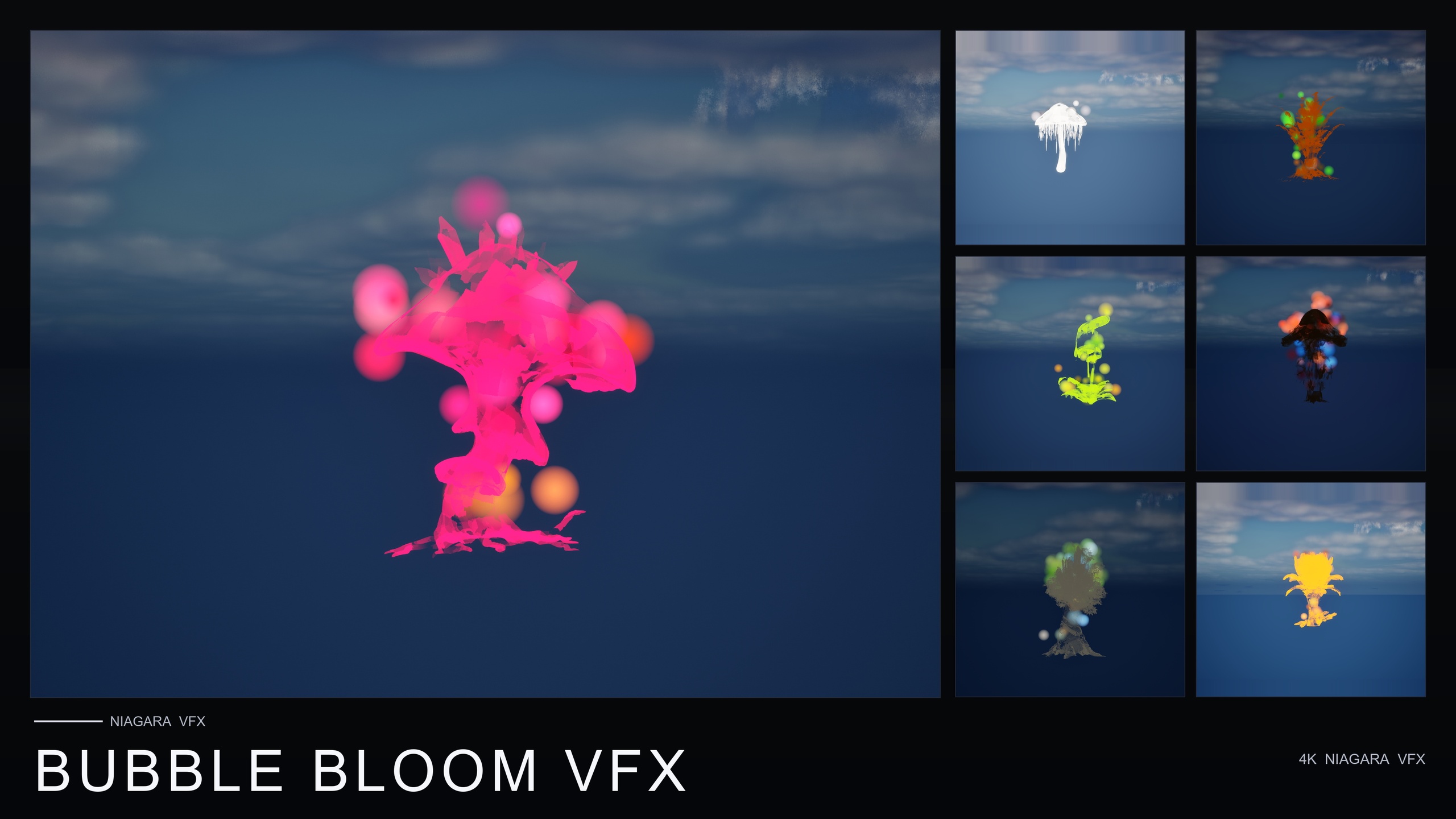
Why translucent particles disappear against your backdrop
You drop a bubble system into the level, it previews perfectly in the Niagara editor, and then in the scene it is gone. This is the classic case of a UE5 translucent iridescent bubble material not showing up, and nine times out of ten the shader is fine. The problem is contrast. A soap-film bubble is mostly empty surface with a thin, near-transparent skin, so it has very little of its own colour to assert. What you actually see is the scene behind it bending through that skin and a faint iridescent sheen picked up from light. When the background and lighting give the surface nothing to grab onto, the bubble reads as nothing at all.
Bubble Bloom VFX leans into this on purpose. Its materials are translucent with a subtle iridescence, built to pick up scene lighting rather than glow on their own. That gives the soap-film look its delicate, believable quality, but it also means the effect is only as visible as the light and contrast you give it. If a system has simply vanished, treat it as a lighting and background problem before you touch the material.
How an iridescent soap-film material picks up scene light
Because the iridescence comes from scene lighting, the single biggest lever you have is the light in the room. A translucent surface with nothing illuminating it has no sheen to show, so it collapses to near-invisible. Make sure a Directional Light or another source is actually reaching where the bubbles spawn, and that the bubbles are not sitting in full shadow or in a flat, evenly-lit void with no highlights to catch.
1. Confirm a moving or static light is hitting the spawn area. The included pre-lit demo level lays the flowers out under dynamic lighting precisely so the bubbles have something to read against, which is why they look right there and may look wrong in an unlit greybox.
2. Add directional contrast. A single key light raking across the bubbles gives the iridescent skin a bright edge and a darker opposite side, which is what sells the soap-film read. Even, ambient-only lighting flattens that out and is the most common reason a bubble looks invisible.
3. Check that nothing in your post-processing is crushing it. An aggressive exposure setting, very high bloom, or a heavy colour grade can wash a faint translucent highlight straight out of the frame. Temporarily reset the Post Process Volume to confirm the bubbles are present before you re-grade.
4. Leave the material translucent. The whole effect depends on you seeing through the surface to the scene behind, so do not switch the blend mode to opaque or masked to force visibility; that destroys the soap-film look you bought the pack for.
Checking the read against light and dark backdrops
The materials in Bubble Bloom VFX are designed to read against both light and dark backgrounds, but reading is not the same as being equally loud everywhere. A bubble against a bright sky shows mostly as subtle refractive distortion and a rim of iridescence, while the same bubble against a dark interior shows more as a glinting, lit-up film. Both are correct, so judge each placement in its actual surroundings rather than against the Niagara preview's neutral grey.
The fastest way to validate a placement is to look at it twice. Frame the bubbles once against the lightest part of your scene and once against the darkest, and confirm you can pick them out in both. If they fail against only one extreme, that is your cue to nudge a light or reposition the system rather than to start editing the shader.
These bubbles rise from the flower base, drift outward in a small radius, and pop on a randomised lifetime, with per-system variance in size, rotation and alpha-fade timing so a scattered field never looks mechanically uniform. The emitter bounds are deliberately tight, which the pack describes as safe to scatter densely, so once one placement reads well you can repeat it across a garden.
A clean drop-in workflow
Bubble Bloom VFX is content-only: no C++, no Blueprints and no plugin dependencies, compile-clean on UE 5.4. The fix above is almost always about your scene rather than the asset. Add the pack, open the BubbleBloomVFX/Niagara folder, and drag one of the 50 Bubbles NiagaraSystems onto a flower, actor or location. Each of the 51 stylised flower meshes in the line has a matching system, so the look stays consistent across a whole bed of blooms.
Preview in the included demo level first to see the intended lighting, then move a system into your own scene and run the light-and-dark check before you scatter the rest. Build your contrast around the bubbles and the iridescence does the rest.
FAQ
Why is my UE5 translucent iridescent bubble material not showing up in the level?
Almost always a lighting and contrast problem rather than a broken shader. The material is translucent and picks up scene lighting, so with no light reaching the spawn area or no contrast behind the bubbles there is nothing for the iridescent skin to show. Add a key light, check your post-processing isn't crushing the highlight, and preview in the included pre-lit demo level to confirm the asset itself is fine.
Should I change the bubble material's blend mode to opaque to make it visible?
No. The soap-film read depends on seeing through the surface to the scene behind it, plus a faint iridescent sheen from scene light. Switching to opaque or masked makes the bubble visible but destroys the look. Fix visibility with lighting and background contrast, not by changing the blend mode.
Will the bubbles read against both light and dark backgrounds?
Yes. Bubble Bloom VFX's materials are designed to read against both light and dark backdrops, though they present differently: more refractive distortion and rim sheen against bright scenes, more of a glinting lit film against dark ones. Frame each placement against the lightest and darkest parts of your scene to confirm it holds up.
Does fixing this require editing the material or any code?
No. Bubble Bloom VFX is content-only with no C++, Blueprints or plugin dependencies and is compile-clean on UE 5.4. The fix is in your scene: lighting, contrast and placement. Drag a Bubbles NiagaraSystem onto a flower or location and adjust the light around it.
Bubble Bloom VFX
Fifty Niagara bubble effects — rising, popping, iridescent soap-film bubbles — with 51 meshes and 81 material instances. CPU-simulated and cross-platform.
Related on Fab


Related reading