tutorial · 2026-01-20
Instant Library Clutter in UE5 From a Single Scroll Mesh
How to dress a believable scriptorium by duplicating, rotating and stacking one free scroll prop instead of buying a dozen.
The cheapest way to fill a shelf
Empty shelves are the giveaway that a fantasy interior is unfinished. A wizard's study, a temple scriptorium, an alchemist's back room: all of them read as lived-in only when the surfaces are loaded with the debris of someone's work. The instinct is to go shopping for a sprawling library kit, but you rarely need one. If you want to know how to make a library scene clutter in Unreal Engine without spending a penny, the honest answer is that a single well-made prop, copied with intent, does most of the job.
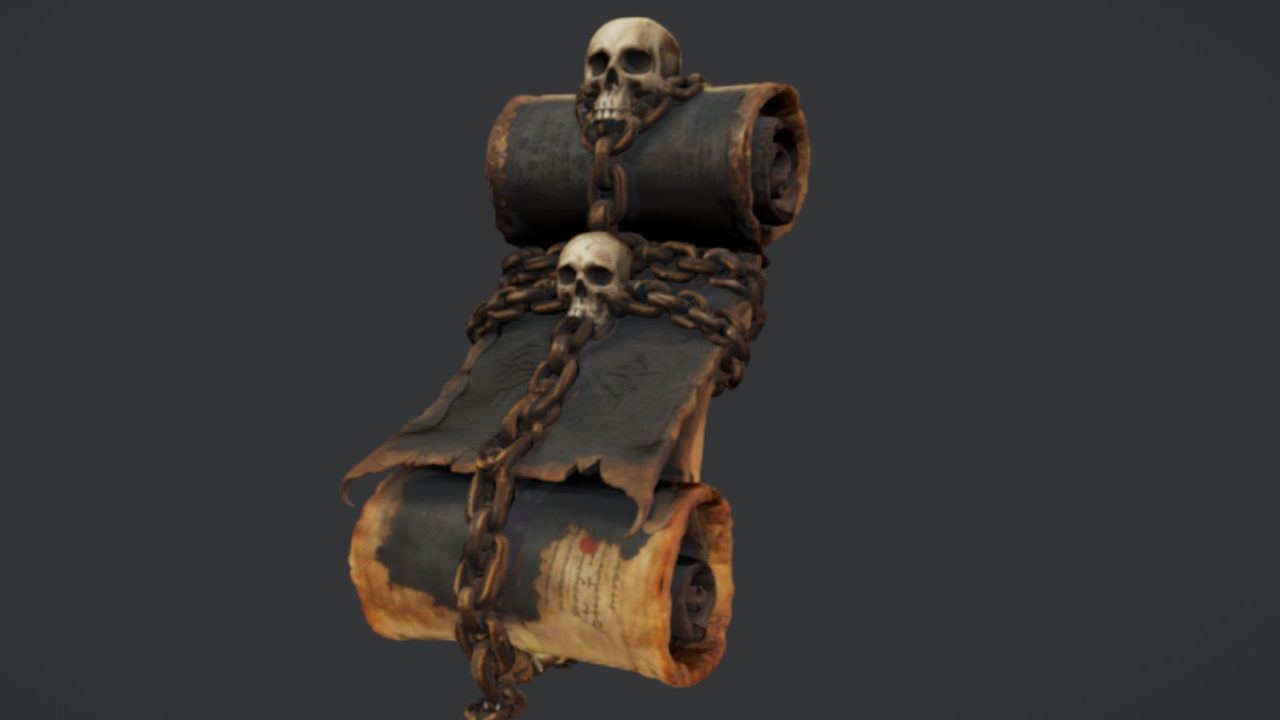
This tutorial uses The Binding Scrolls, a free arcane scroll prop for Unreal Engine 5. It is a drop-in static mesh with 2K PBR textures, mapping to the Ancient Bound Scroll mesh, and it is offered free under the Fab Standard licence. One mesh sounds limiting, and it would be if you simply lined up identical copies. The craft is in breaking that uniformity so the eye never catches the repeat.
A note before you start: this is one scroll mesh, not a set of distinct scrolls. Everything below is about getting variety out of that single asset through transform tricks, then layering in a few companion props so no one ever counts the duplicates.
Step one: duplicate and rotate
Download The Binding Scrolls from Fab and add it to your UE5 project. The Ancient Bound Scroll imports as a static mesh with its 2K PBR material already assigned, so you can drag it straight from the Content Browser into your level.
1. Place the first scroll on a shelf or table and position it where you want the densest cluster to sit.
2. With the actor selected, press Alt and drag the move gizmo to make a duplicate, or use Ctrl+W to copy it in place. Nudge each copy a few centimetres along the shelf.
3. For every duplicate, change the Z rotation in the Details panel by an irregular amount, never a clean 90 degrees. Values like 23, 71, 142 and 198 degrees keep the silhouette different from copy to copy.
4. Vary the uniform scale slightly per copy, roughly 0.9 to 1.1, so no two scrolls read as the same size. The eye reads size variation as 'different objects' even when the mesh is identical.
Lay down six to eight of these across one shelf. Already it looks like a collection rather than a clone stamp, purely from rotation and scale jitter.
Step two: stack and lean for realism
Real scrolls do not all sit flat and parallel. They get piled, propped and abandoned mid-task, and that disorder is what sells the scene.
1. Take two copies and stack one slightly across the other, raising the upper scroll's Z position so it rests on top. A tiny X or Y rotation, two or three degrees, makes the top scroll look like it is balancing rather than floating.
2. Lean a scroll against a wall, a book spine or the back of the shelf by adding a 10 to 20 degree tilt on one axis. A single leaning element among flat ones immediately breaks the grid.
3. Push one or two scrolls so they overhang the shelf edge, just shy of the point where they would obviously fall. Overhang reads as carelessness, and carelessness reads as 'someone lives here'.
4. Group a tight cluster of three or four at one end and leave the rest of the shelf sparse. Uneven density is more convincing than evenly spaced props.
Because the free SKU's collision and Nanite status are not something I can confirm for you, treat placement as hand-driven set dressing rather than physics simulation. Position the scrolls by eye in the viewport; you do not need to drop them with simulated physics to get a natural-looking pile.
Step three: mix in books, tomes and a touch of green
Scrolls alone will eventually betray themselves. The fix is to interrupt them with companion shapes so the scroll silhouette stops being the only thing on the shelf. The dossier for The Binding Scrolls points squarely at this: combine it with tomes from a larger prop bundle for a complete wizard's study.
The Dark Fantasy Props Bundle is the natural partner here. It is a UE 5.6 content project of 100+ unique gothic static meshes, with a whole family of tomes and books, named meshes like Blood Tome, Kingly Tome, the Arcane Chronicle and a Waterlogged Book among them, plus lanterns, cauldrons, altars and its own scrolls. Migrate its content folder into your project, then intersperse a few open and closed tomes between your scroll clusters. Each mesh already carries its bespoke material and Nanite is enabled, so the books drop in with no extra setup.
For a softer scene, scatter a little flora. The Fantasy Flower Pack ships 51 unique Nanite-ready plant meshes with automatic collision, including a Blood Lotus and nightshade blooms that suit a darker study; a single potted bloom on the desk corner adds colour the parchment lacks. And if your library opens onto a hall or shrine, the Fantasy Statue Bundle gives you 18 weathered marble statues across its Nature and Tormented Souls series to frame the doorway. Used sparingly, these companions make the scrolls feel like one detail in a furnished room rather than the whole point of it.
Step four: avoid the obvious repeat
Even with good placement, a single mesh repeated across a large set can start to pattern. A few habits keep it invisible.
Mirror some copies. Setting a negative value on one scale axis flips the mesh, which changes how the texture detail catches the light and doubles your apparent variety for free.
Break sightlines deliberately. Make sure no two scrolls of similar rotation are visible in the same camera frame; if the player's eye can compare two near-identical copies side by side, the illusion collapses, so push duplicates onto different shelves or behind other props.
Let companion props hide the seams. A tome laid across two scrolls, or a flower stem crossing a third, partially occludes each copy. Partial occlusion is the single most effective way to disguise reuse, because the brain stops seeing 'the same object' once the outline is interrupted.
Vary the lighting catch. Because the scroll carries 2K PBR maps, its normal and roughness detail reacts to where the light falls. Angling copies toward and away from your key light gives each one a different read, even though the material is shared.
With those four steps, one free scroll mesh, a handful of tomes and the occasional bloom, you can dress a convincing library or scriptorium in an afternoon. Start by grabbing The Binding Scrolls below, place your first cluster, then widen out into the companion packs only where the scene actually needs them.
Companion props for a fuller library scene
| Pack | What it adds | Count | Price |
|---|---|---|---|
| The Binding Scrolls | Arcane scroll base clutter | 1 scroll mesh | Free |
| Dark Fantasy Props Bundle | Tomes, books, lanterns, cauldrons, scrolls | 100+ meshes | 34.99 USD |
| Fantasy Flower Pack | Plants and blooms for soft detail | 51 meshes | 21.99 USD |
| Fantasy Statue Bundle | Marble statues to frame the room | 18 statues + table | 7.99 USD |
Use The Binding Scrolls as the base clutter, then add these only where the scene needs more variety. Counts and prices are from each product's listing.
FAQ
How do I make a library scene clutter in Unreal Engine with just one mesh?
Duplicate the scroll several times, then give each copy an irregular Z rotation and a slight scale change so no two read as identical. Stack and lean a few, cluster them unevenly, and break the sightlines so the player never sees two matching copies in the same frame. Interrupt the scrolls with a few tomes or a plant to hide the repeat.
Is The Binding Scrolls actually multiple scrolls?
No. Despite the plural name, it is a single free static mesh, the Ancient Bound Scroll, with a 2K PBR material. The variety in your scene comes from how you duplicate, rotate, scale and arrange that one mesh, not from the pack containing several distinct scrolls.
What goes well with the scrolls for a wizard's study?
Tomes and books are the natural pairing. The Dark Fantasy Props Bundle includes a family of book and tome meshes (Blood Tome, Kingly Tome, the Arcane Chronicle and more) alongside lanterns and cauldrons. Add a bloom from the Fantasy Flower Pack for colour, and a statue from the Fantasy Statue Bundle if the room opens onto a hall.
Do I need to set up physics or collision to place the scrolls?
No. Place them by hand in the viewport. The free scroll's collision and Nanite status are not confirmed, so treat placement as manual set dressing rather than simulated physics; positioning by eye gives a natural pile without any physics setup.
Can I use the free scroll in a commercial project?
Yes. It ships under the Fab Standard licence for personal and commercial use, with free updates, at no cost.
The Binding Scrolls
Free binding scrolls — arcane parchment props for libraries, ritual tables and spellcasting scenes. Drop-in ready for Unreal Engine 5.
Related on Fab



Related reading