
comparison · 2026-01-07
Static vs Skeletal Weapon Meshes in UE5: Which Do You Need?
How to choose between a static mesh and a skeletal mesh for a weapon, and how to attach either to a character in Unreal Engine 5.
The choice that decides your whole weapon workflow
Before you import a single asset, every weapon in your game has to answer one question: is it a static mesh or a skeletal mesh? That static mesh vs skeletal mesh weapon decision in Unreal Engine quietly dictates how you attach it, how you animate it, what it costs at runtime, and how much setup work lands on your desk. Get it right and the asset drops in cleanly. Get it wrong and you spend an afternoon fighting the wrong tool.
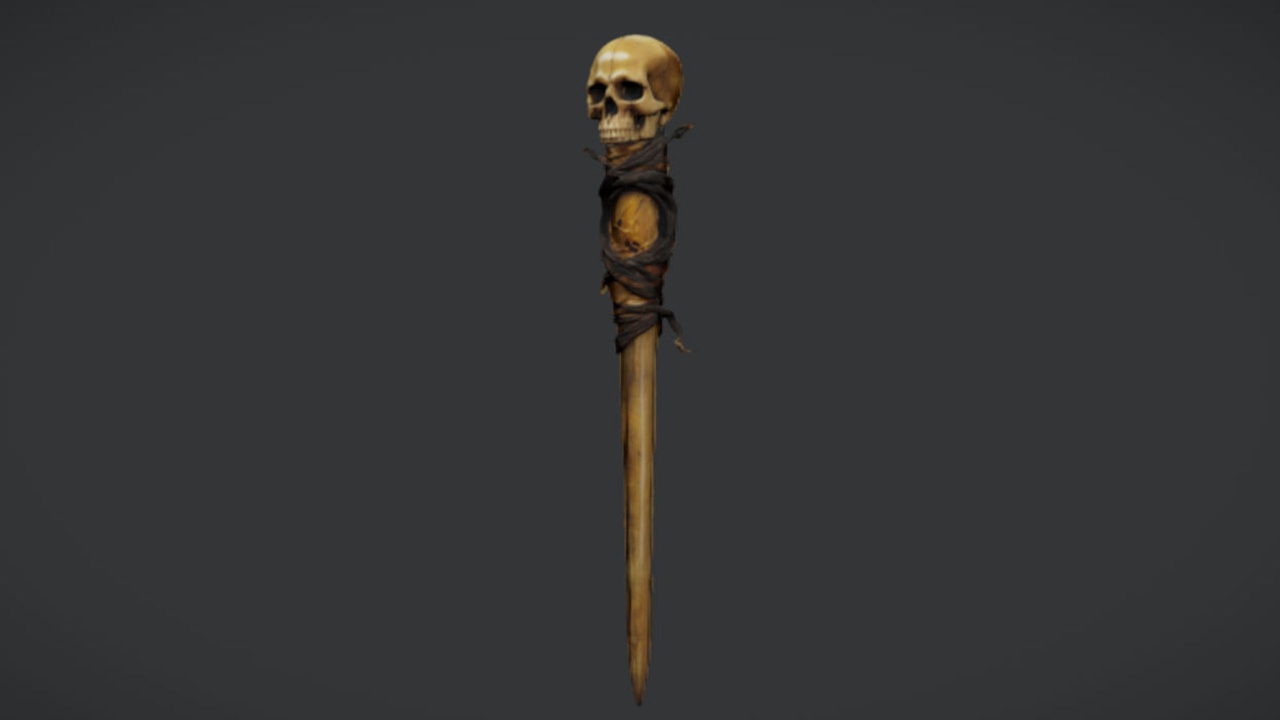
The short version is that most weapons in most games are static meshes. A sword, an axe, a staff, a pistol, a shield — anything that is a single rigid object — wants to be a static mesh attached to the hand. You only reach for a skeletal mesh when the weapon itself has moving parts that need to deform or animate independently. The Necromancer's Staff is a good example of the common case: it ships as a single drop-in UE5 static mesh with 2K PBR textures, built for socket attachment and set dressing rather than for internal animation.
This guide walks through when a static mesh is enough, when you genuinely need a skeletal mesh, how to attach either one to a character, and the performance and workflow trade-offs that should drive the call.
When a static mesh weapon is enough
A static mesh is a single, rigid piece of geometry with no internal skeleton. In Unreal that makes it cheap to render, trivial to attach, and easy to reason about. For the overwhelming majority of weapons, that is exactly what you want. A melee weapon swung by the character's arm does not need its own bones — the character's animation moves the hand, the weapon is attached to the hand, and the weapon comes along for the ride.
Reach for a static mesh whenever the weapon is one solid object whose only movement is being carried, swung, or aimed by the character holding it. Caster staves, swords, daggers, hammers, bows that don't flex, most firearms, torches and wands all fit comfortably here. The Necromancer's Staff is designed for precisely this role: a sinister caster and melee weapon you socket onto a character's hand, or stand against a wall and an altar as set dressing.
Static meshes also double as scenery in a way skeletal meshes never do gracefully. The same staff that a boss wields in combat can be dropped into the level as a quest reward, a lootable pickup, or a hero prop leaning on a necromancer's altar — no rig, no animation graph, no extra cost. That dual life as both equipped weapon and set-dressing prop is one of the quiet advantages of staying static.
When you need a skeletal mesh
A skeletal mesh carries its own skeleton — a hierarchy of bones — and can be deformed and animated independently of the character holding it. You need one when parts of the weapon must move relative to each other rather than as a single rigid lump. That is a narrower set of cases than people assume, but the cases are real.
Typical examples include firearms with a sliding bolt, a rotating cylinder, a recoiling slide, a pump-action fore-end, or a magazine that ejects; bows whose limbs flex as you draw; chain weapons, whips and flails with linked segments; transforming or unfolding weapons; and anything that plays its own contained animation such as a reload, a charge-up, or a mechanical fold-out. If the weapon needs to do something on its own timeline, separate from the character's arm, it wants bones.
There is a clear tell during planning. Ask whether the weapon ever changes shape on its own. If the answer is no — it only ever gets carried and swung — a static mesh is the right tool. If the answer is yes — something on it slides, rotates, flexes or ejects — you are looking at a skeletal mesh, or at least a static mesh broken into animated sub-components. The Necromancer's Staff is a single static mesh and is not a skeletal or animated weapon, which is exactly right for a caster prop that has no moving parts of its own.
Attaching either type to a character
Both static and skeletal weapon meshes attach to a character the same way: through a socket on the character's skeleton. A socket is a named transform you add to a bone, usually the hand or wrist, that gives you a stable place to parent the weapon and a handle to tweak its position and rotation.
1. Open the character's Skeleton asset in the Skeletal Mesh Editor and find the hand bone in the 'Skeleton Tree' panel.
2. Right-click the hand bone and choose 'Add Socket'. Rename it something predictable such as 'WeaponSocket' so your Blueprint can reference it by name.
3. With the socket selected, right-click it and choose 'Add Preview Asset', then pick your weapon mesh. This previews the weapon in the editor so you can dial in the offset before any code runs.
4. Adjust the socket's relative location, rotation and scale until the weapon sits correctly in the hand. The grip should look natural in the character's default pose.
5. In your character Blueprint, attach the weapon at runtime. For a static weapon, add a 'Static Mesh Component'; for a skeletal weapon, add a 'Skeletal Mesh Component'. Then call 'Attach Component To Component' (or set it up in the Components panel) targeting the character mesh, and supply your socket name in the 'Socket Name' field.
Because the Necromancer's Staff is a static mesh, you attach it as a 'Static Mesh Component' on the chosen socket, or wrap it in a small weapon Blueprint if you want equip and drop logic. Note that the staff does not ship with a ready-made attachment Blueprint or FX sockets, so treat the socket setup above as a workflow you build once and reuse for every static weapon in the project. For a skeletal weapon you would instead drive its own animations through an Animation Blueprint on the weapon component, in addition to attaching it to the socket.
Performance and workflow trade-offs
The honest summary is that static meshes are cheaper and simpler, and skeletal meshes buy you independent animation at a cost. A static mesh has no skeleton to evaluate and no skinning to compute each frame, so it is the lighter option to render and the faster one to author. A skeletal mesh adds bone evaluation, skinning, and usually its own Animation Blueprint to maintain — overhead you only want to pay when the weapon's moving parts justify it.
Authoring effort tracks the same line. A static weapon is import-and-go: bring in the mesh, assign the material, drop it on a socket. The Necromancer's Staff arrives as a drop-in UE5 static mesh with its 2K PBR material ready to assign, so the only work left is the socket attachment. A skeletal weapon, by contrast, needs a rig, skin weights, an animation set and an animation graph before it does anything useful — a real project of its own.
Reusability favours static meshes too. The same static weapon can be an equipped item one moment and pure set dressing the next, with no rig dragged along. That is why a sensible default is: model and import every weapon as a static mesh, and only promote a weapon to a skeletal mesh once a concrete feature — a reload, a flexing bow, an ejecting magazine — actually demands it. Build for the rule, not the exception, and your weapon pipeline stays lean.
Static mesh vs skeletal mesh weapons in UE5
| Aspect | Static mesh weapon | Skeletal mesh weapon |
|---|---|---|
| Has its own skeleton | No | Yes |
| Independent animation | No (moves with the hand only) | Yes (slides, rotates, flexes, ejects) |
| Typical use | Swords, staves, axes, most firearms, set dressing | Guns with moving parts, flexing bows, chain weapons, transforming weapons |
| Attachment | Socket on character skeleton | Socket on character skeleton plus its own anim graph |
| Runtime cost | Lower (no skinning) | Higher (bone evaluation and skinning) |
| Authoring effort | Import and go | Rig, skin, animate, then attach |
| Doubles as set dressing | Yes | Awkward |
| The Necromancer's Staff | Yes (ships as a static mesh) | No |
A quick reference for deciding which mesh type a weapon needs.
FAQ
Static mesh vs skeletal mesh weapon in Unreal Engine: which should I use?
Use a static mesh for any weapon that is a single rigid object carried and swung by the character — swords, staves, axes, most firearms. Use a skeletal mesh only when the weapon itself has parts that move independently, such as a sliding slide, a rotating cylinder, an ejecting magazine, or a flexing bow limb. When in doubt, default to a static mesh.
Can I attach a static mesh weapon to a character without a skeleton on the weapon?
Yes. The weapon does not need its own skeleton — it attaches to a socket on the character's skeleton. Add a socket to the hand bone, attach a Static Mesh Component to that socket in your character Blueprint, and the weapon follows the hand through every animation.
Is the Necromancer's Staff a static or skeletal mesh?
It is a single static mesh with 2K PBR textures, built for socket attachment and set dressing. It is not a skeletal or animated weapon and ships no VFX, FX sockets, or attachment Blueprint, so you set up the socket attachment yourself as a one-time workflow.
Do skeletal mesh weapons cost more performance than static ones?
Generally yes. A skeletal mesh adds per-frame bone evaluation and skinning, plus usually its own Animation Blueprint to maintain, whereas a static mesh has none of that. Only pay that cost when the weapon's moving parts genuinely need independent animation.
Can I use the same weapon mesh as both an equipped item and set dressing?
With a static mesh, easily. The Necromancer's Staff can be socket-attached to a caster character or dropped into a level as a lootable pickup, a quest reward, or a prop on an altar, with no rig involved. Skeletal meshes do not double as set dressing nearly as cleanly.
The Necromancer's Staff
A free necromancer's staff — a sinister melee and caster prop for dark-fantasy characters and set dressing. Drop-in ready for Unreal Engine 5.
Related on Fab



Related reading
