
tutorial · 2026-05-10
How to Make a Giant Moon in the Sky in Unreal Engine 5
Place, scale and light a surreal looming moon as a fixed set-piece that watches your level.
The problem with a sky-dome moon
If you want to know how to make a giant moon in the sky in Unreal Engine, the usual advice points you at a billboard texture or a panner-driven sky material. That is fine for a tiny disc on the horizon, but it falls apart the moment you want a moon that looms - one that dominates the frame, casts a presence over the level and reads as a deliberate set-piece rather than a flat sticker pinned to the sky-dome.
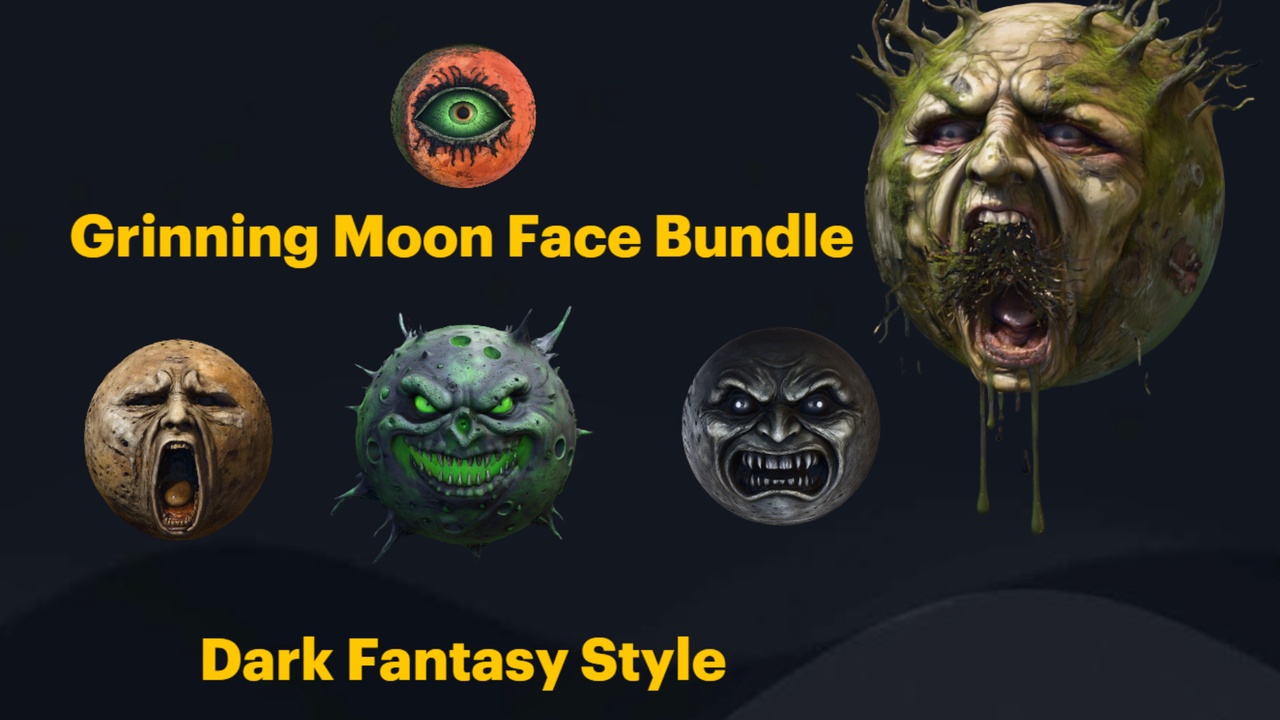
The cleaner approach is to treat the moon as an actual mesh placed far from the camera. A real piece of geometry catches your scene's lighting, sits correctly inside fog and atmosphere, and gives you full control over scale and silhouette. This tutorial uses the Grinning Moon Face Bundle, a surreal prop set of 13 unique grinning-moon face meshes built for exactly this kind of dreamlike, watching-from-above moment.
Each face in the bundle is a Nanite static mesh with automatic collision and its own material, shipped inside a UE 5.6 demo project with a Demo.umap you can open to see the arrangement. Because they are real meshes, you place and scale them the same way you would any other actor - which is what makes the looming moon trick so straightforward.
Placing and scaling a distant moon mesh
Start by getting the content into your project. Open the included GrinningMoonfaceBundle UE 5.6 project to work in it directly, or right-click the GrinningMoonfaceBundle content folder and migrate it into your own 5.6 project. Opening the supplied Demo.umap first is worth a minute - it shows how the faces are arranged and lets you audition expressions before you commit.
1. Drag one of the face meshes into your level, for example SM_AllSeeingMoonFace, SM_HauntedMoonFace or SM_ScreamingMoonFace, depending on the mood you want. There are 13 distinct expressions to choose from, including winking, putrid and arcane variants.
2. With the mesh selected, move it a long way back along the horizon - well behind your playable area, roughly where you want the moon to sit in the sky. Lift it up on the Z axis so it reads as elevated rather than resting on the ground.
3. Scale it up hard. A looming moon is mostly about apparent size versus distance, so push the actor's scale until the face fills the slice of sky you want it to occupy from the player's vantage point. Keep checking through the actual gameplay or cinematic camera, not the perspective viewport, because the framing is everything here.
4. Rotate the face to point at the camera or the player's typical position. The 'all-seeing' read only works if the eyes and grin are aimed at the viewer, so orbit the actor until the expression is staring back down at the scene.
Faking depth and size convincingly
A giant mesh up close and a moderate mesh far away can fill the same number of pixels, but they feel completely different. To sell genuine scale you want the moon to behave like it is genuinely distant, so the eye stops reading it as a nearby prop.
Push the actor far enough back that it sits beyond your fog and atmosphere falloff - this is the single biggest factor in making it look astronomically far rather than just large. Anything between the camera and the moon (silhouetted trees, towers, statues) reinforces the distance, because the brain uses those midground occluders to judge depth.
Disable collision response for the moon actor if it sits inside your navigable space, or simply keep it far outside it. The meshes ship with automatic collision, which is useful for grounded props but unnecessary for an untouchable sky object - you do not want the player bumping an invisible moon-sized wall.
Because the faces are Nanite static meshes, you do not need to build LODs to keep a huge, high-detail mesh cheap at distance. Let Nanite handle the detail budget and concentrate your effort on framing and lighting instead.
An emissive material for the glow
Out of the box each face carries its own material (the bundle includes one material per mesh, the 13 M_*MoonFace materials), but it does not ship a dedicated glowing-moon shader - so the luminous look is something you set up yourself. That is a quick edit.
1. Open the material assigned to the face you placed, for example M_AllSeeingMoonFace, and create a Material Instance from it so you can tweak values without altering the original.
2. In the base material, connect a colour into the Emissive Color input and multiply it by a scalar parameter so you can dial the brightness from the instance. A cold blue-white or a sickly green sells a surreal moon; warmer amber pushes it towards a harvest or blood-moon feel.
3. Raise the emissive multiplier until the face genuinely reads as a light source against the night sky. Because the mesh is far away and large, you usually need a higher value than feels right up close.
4. If you want the moon to actually throw light onto the scene rather than just appear bright, place a Directional Light or a large Point Light to match the moon's direction and colour. The emissive material makes the moon look lit; a real light makes the rest of the level respond to it.
Fog and atmosphere interaction
The reason a mesh moon beats a sky-dome texture is that it lives inside your atmosphere. Add an Exponential Height Fog actor if you do not already have one, and let the moon sit deep in its falloff so the lower edge of the face softens into the haze. That gradient is what convinces the eye the moon is hanging in real air at a real distance.
Tune the fog density and the height falloff so the moon is veiled but still clearly readable - too much fog and the grin disappears, too little and the mesh looks pasted on. If you are using a Sky Atmosphere actor, check the moon against day-to-night transitions so it does not blow out or vanish as the sky colour shifts.
Finally, dress the foreground so the moon has something to loom over. A row of weathered statues on the horizon, a scatter of gothic plants catching the moonlight, or a cluster of dark-fantasy props in the midground all give the scale a reference point. Sibling packs in the same UE 5.6 props family - the Fantasy Statue Bundle, Fantasy Flower Pack and Dark Fantasy Props Bundle - drop into the same project and share the look, so the moon and its world feel cut from one cloth.
FAQ
How do I make a giant moon in the sky in Unreal Engine?
Place a moon mesh as an actor far behind your playable area, lift it on the Z axis, then scale it up until it fills the slice of sky you want through your gameplay camera. Using a real mesh - like one of the 13 faces in the Grinning Moon Face Bundle - lets it sit inside fog and atmosphere, which a flat sky-dome texture cannot do convincingly.
Does the Grinning Moon Face Bundle include a glowing moon material?
No. Each of the 13 faces ships with its own material, but there is no dedicated emissive moon shader. To get the glow you create a material instance, wire a colour into the Emissive Color input with a scalar multiplier, and raise the brightness yourself. Pair it with a matching directional light if you want the moon to actually illuminate the scene.
Do I need to build LODs for such a large moon mesh?
No. The faces are Nanite static meshes, so Unreal manages the detail budget automatically and you do not need to author LODs to keep a large, high-detail moon performant at distance.
Which engine version does the bundle target?
The bundle ships as a UE 5.6 demo project (EngineAssociation 5.6) for Windows, with a Demo.umap and FBX sources. Migrate the content folder into your own 5.6 project, or open the supplied project directly.
Can I use more than one moon face in a scene?
Yes. With 13 unique expressions you can repeat the motif - a haunted face over one area and a screaming or winking one elsewhere - to build an unsettling recurring presence rather than a single static backdrop.
Grinning Moon Face Bundle
Thirteen unique grinning-moon face meshes for surreal, horror and dark-fantasy scenes — automatic collision, 2K textures, drop-in ready. Hang an unsettling lunar grin over your world.
Related on Fab



Related reading