
article · 2026-02-11
Working With UE 5.7 Content Packs: Upgrading and Compatibility
How to open a Unreal Engine 5.7 content pack in an older version, when to migrate instead, and how to sidestep shader and asset-version headaches.
The problem: you bought a 5.7 pack but you're on an older engine
You unzip a content pack, double-click the project, and Unreal either refuses to open it or warns it was made in a newer build. A pack authored against Unreal Engine 5.7 will not silently load into 5.6 or earlier. If you are searching for how to take an Unreal Engine 5.7 content pack and open it in an older version, the honest answer is that you usually do not open the supplied project in place — you migrate the content into a project you control.
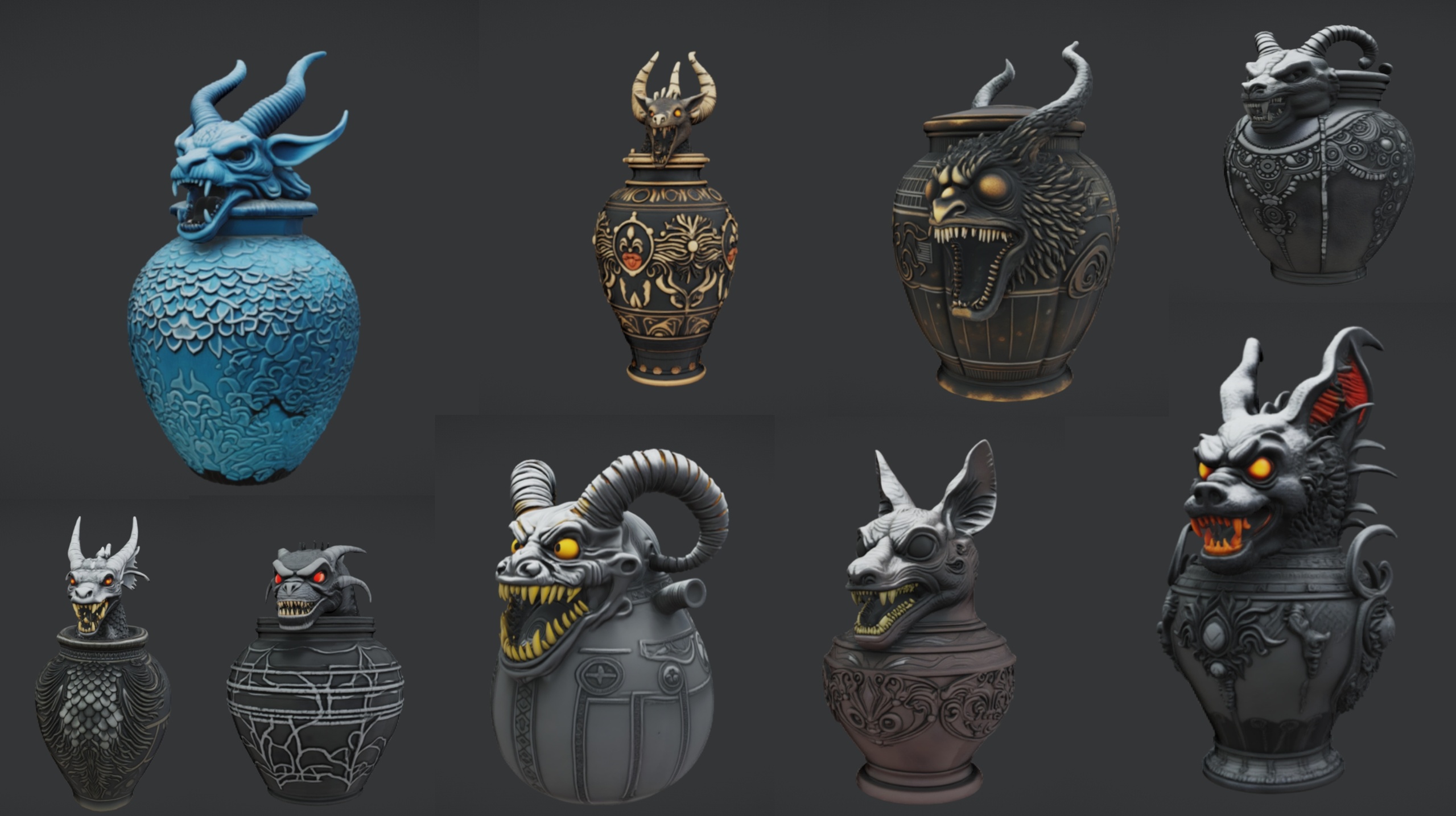
The Ritual Jars pack is a concrete example to reason with. It ships as a UE 5.7 content project (a .uproject), not a plugin, and carries nine ornate canopic-style ritual jars as Nanite static meshes with automatic collision and 2K PBR textures, plus a large table prop and a grass material. Because it targets 5.7 specifically — the newest engine in its family — it makes a clean case study for the upgrade-and-compatibility questions that come up with almost every modern Fab content pack.
The good news is that the assets themselves — meshes, materials and textures — are far more portable than the project wrapper around them. Most of the friction lives in one small text field and in how Unreal cooks shaders.
What the EngineAssociation field actually means
Every .uproject is a small JSON file, and near the top sits a field called 'EngineAssociation'. For the Ritual Jars project that value is 5.7. The Epic Games Launcher and the Windows shell read it to decide which installed engine opens the project when you double-click. It is a routing label, not a hard lock on the assets inside.
Launch a project whose 'EngineAssociation' points at a version you do not have installed and the launcher asks you to pick an installed engine or switch versions. Choose a newer engine than the one the project was made with and Unreal performs an in-place upgrade, rewriting the assets to the newer format. Older to newer is the path the engine is designed for.
The reverse does not work cleanly. You cannot reliably open a 5.7 project in 5.6 by editing 'EngineAssociation' down to 5.6, because the asset files on disk are already serialised in a format a 5.6 build may not understand. Changing the label does not change the bytes of the .uasset files. For downgrading, copy the raw content into a fresh project instead of fighting the project file.
Opening a 5.7 pack in another version
If you are on Unreal Engine 5.7, or happy to move to it, open the supplied project directly. Unzip the pack, double-click RitualJars.uproject, and let 5.7 open it. Everything is configured: each jar has its material, Nanite and automatic collision, and M_Grass is provided for the demo ground.
If you are on a newer engine, let Unreal upgrade the project. Right-click the .uproject, choose 'Switch Unreal Engine version', pick your installed engine, then open it and accept the conversion prompt. Copy the unzipped folder first so you keep the untouched original.
If you are on an older engine — say you are committed to 5.6 — do not force the 5.7 project open. Create or open your own project on the engine you ship on and bring the content across by migration, covered next. The pack was authored in 5.7, so treat anything below that as untested rather than guaranteed.
Whichever route you take, the assets that matter are the meshes SM_RitualJar_1 through SM_RitualJar_9, the SM_LargeTable mesh, and their matching M_RitualJar materials.
Migrate versus open in place
Opening the project in place is fastest when your engine matches or is newer than the pack. Migration is better when you are on an older or different engine, or when you want the jars inside your actual game project rather than a one-off demo.
1. Open the Ritual Jars project once in a compatible engine so the content loads. In the 'Content Browser', right-click the pack's content folder and choose 'Asset Actions', then 'Migrate'. Unreal shows the full dependency list — meshes, materials and the textures they reference — so nothing is left behind.
2. Point the migrate dialog at the 'Content' folder of your destination project and confirm. Unreal copies the assets in and rewrites their internal references so each mesh still finds its materials and textures. Open your project, locate the SM_RitualJar meshes, and drag them into the level.
If your destination project is on a different engine version, the migrated assets are upgraded on first load, exactly as an in-place conversion would do. Migration is usually cleaner because you control the target engine and do not inherit the pack's project settings.
Avoiding shader and asset-version issues
The most common surprise after opening or migrating a pack is a wave of shader compilation. This is expected: Unreal compiles shaders for your specific engine, platform and settings, and freshly imported materials have nothing cached. Let the compile counter in the bottom-right of the editor reach zero before judging how anything looks. The Ritual Jars materials are standard PBR, so once compiled they behave like any native material.
Asset-version warnings almost always trace back to direction. Upgrading to a newer engine is supported and automatic. Loading 5.7-serialised assets into an older 5.6 build is what produces hard failures or missing content, which is exactly why migration into a project on your chosen engine is the recommended downgrade path.
A few habits keep this painless: keep a pristine copy of the unzipped pack before you open anything; decide your target engine version before importing; and let shaders and Nanite finish processing before evaluating. Because these are Nanite meshes with automatic collision, you do not build LODs or author collision by hand — drop the jars onto the included SM_LargeTable to assemble an altar and the scene is ready in minutes.
Choosing your route by engine version
| Your engine | Recommended route | What Unreal does | Risk |
|---|---|---|---|
| UE 5.7 (matches pack) | Open RitualJars.uproject directly | Loads as authored, compiles shaders | Low |
| Newer than 5.7 | Switch engine version, then open | In-place upgrade of assets to your engine | Low — keep a backup copy |
| Older (e.g. 5.6) — your project | Migrate content into your project | Copies assets and rewrites references | Untested below 5.7 — verify in your build |
| Older — editing EngineAssociation down | Not recommended | Label changes, asset bytes do not | High — missing content or load failures |
The pack is authored for UE 5.7. Versions below 5.7 are untested; migrate into a project on your chosen engine rather than forcing the supplied project open.
FAQ
Can I open an Unreal Engine 5.7 content pack in an older version?
Not by opening the supplied 5.7 project in an older engine — the asset files are serialised for 5.7 and editing the EngineAssociation field does not change that. The reliable approach is to migrate the pack's content into a project running on your chosen engine. The Ritual Jars pack is authored for 5.7, so any version below that should be treated as untested rather than guaranteed.
What is the EngineAssociation field and can I just change it?
It is a string in the .uproject file that tells the launcher which installed engine should open the project; for Ritual Jars it is 5.7. You can edit it, but it only changes routing, not the on-disk asset format. Lowering it to open a 5.7 pack in 5.6 will not work because the .uasset files remain 5.7-serialised.
Should I migrate the content or just open the project?
Open the project in place if you are on 5.7 or a newer engine and you are happy to upgrade. Migrate when you are on an older or different engine, or when you want the jars inside your own game project instead of a standalone demo. Migration lets you control the target engine and avoids inheriting the pack's project settings.
Why does Unreal compile shaders when I open the pack, and is that a problem?
No, it is normal. Unreal compiles shaders for your specific engine version, platform and settings, and a freshly imported material set has nothing cached. Wait for the compile counter to reach zero before judging how the assets look. The Ritual Jars materials are standard PBR, so they behave normally once compiled.
Do I need to set up collision or LODs after importing the jars?
No. The meshes are Nanite static meshes with automatic collision, so you do not build LODs or author collision by hand. Drag the SM_RitualJar meshes onto the included SM_LargeTable to assemble an altar arrangement and the scene is ready to use.
Ritual Jars
Nine ornate canopic ritual jars — Nanite meshes with automatic collision and 2K textures. Egyptian, gothic and abyssal props for tombs, altars and occult scenes.
Related on Fab



Related reading