tutorial · 2026-06-24
How to Add a Save System to a UE5 Game Without Code (JustSave)
A practical, end-to-end walkthrough of adding saving and loading to an Unreal Engine 5 game using JustSave — no serialization code, just a component, some marked properties, and a Save/Load call.
The problem: saving in UE5 is more work than it looks
On paper, saving a game in Unreal Engine sounds like a solved problem. There is a SaveGame object, there is a slot system, and there are Save and Load nodes. In practice, the moment you move past saving a single integer you are writing serialization code: deciding which actors to walk, capturing each one's transform, copying out the variables that matter, re-applying them in the right order on load, and somehow re-creating the actors the player spawned and skipping the ones they destroyed. None of that is hard in isolation, but it is fiddly, easy to get subtly wrong, and painful to maintain as your game grows.
This tutorial takes a different route. It walks through adding saving and loading to a UE5 game using JustSave, a code plugin whose whole premise is that you should not have to write that serialization layer yourself. The pattern is small: you add a Saveable Component to the actors you want persisted, you mark the properties you care about, and you call Save or Load. The plugin handles the walking, capturing, writing and re-applying.
Before we install it, a quick frame of what JustSave is. It is a UE5 code plugin — pure C++, shipping no Blueprints and no content — structured as three modules: JustSaveRuntime, which does the saving and loading at runtime, plus JustSaveEditor and JustSaveFeedback, which are editor-only. Under the hood it is roughly 67 C++ classes, five of them Blueprint-exposed, so you can drive the whole thing from Blueprint without touching C++ if you prefer. What it removes is the serialization plumbing; what it does not do is design your save UI or decide what your game considers worth saving — those stay yours.
Step 1 — Install the plugin and enable the modules
JustSave is a code plugin, so it installs the way code plugins do. Add it to your project from the Fab library, then drop it into your project's Plugins folder if it is not already there. Because it ships C++ source, your project needs to be a C++ project (or be willing to become one): the first time you build, Unreal will compile JustSaveRuntime alongside your game, and the editor modules JustSaveEditor and JustSaveFeedback alongside the editor. If your project is currently Blueprint-only, add any trivial C++ class first so the build toolchain is in place, then let the editor compile the plugin.
Open Edit > Plugins, find JustSave, and confirm it is enabled, then restart the editor if prompted. Once it is loaded you should see the JustSave config panel available as an editor window — that panel is where most of this tutorial's configuration happens, and it is the alternative to marking properties by hand in code.
A note on scope before you wire anything up: this is a Windows (Win64) build. If your target is a console or macOS, this is the moment to know that, not after you have built your save flow around it. We will return to that limit honestly at the end.
Step 2 — Add a Saveable Component and mark the properties to save
The unit of saving in JustSave is the actor, and you opt an actor in by giving it a Saveable Component. Open an actor you want to persist — say your player character, a chest, or a door — and in the Components panel add the Saveable Component the same way you would add any component. Do this for each class of actor you care about. You do not need to hand-register every individual instance in the level; the component travels with the class, so every placed and spawned instance of that actor is now in scope for the save. There is no registration list to maintain in code and no bookkeeping when you add a new instance to a level.
By default, a saveable actor captures its transform — location, rotation and scale — which for many world objects is most of what you need. Beyond the transform, you choose which of the actor's own properties get persisted, and there are two equivalent ways to do it. The code-side way is the standard Unreal one: mark a UPROPERTY with the SaveGame specifier. This is the same SaveGame keyword Unreal itself uses for serialization, so it reads familiarly to anyone who has done manual save work.
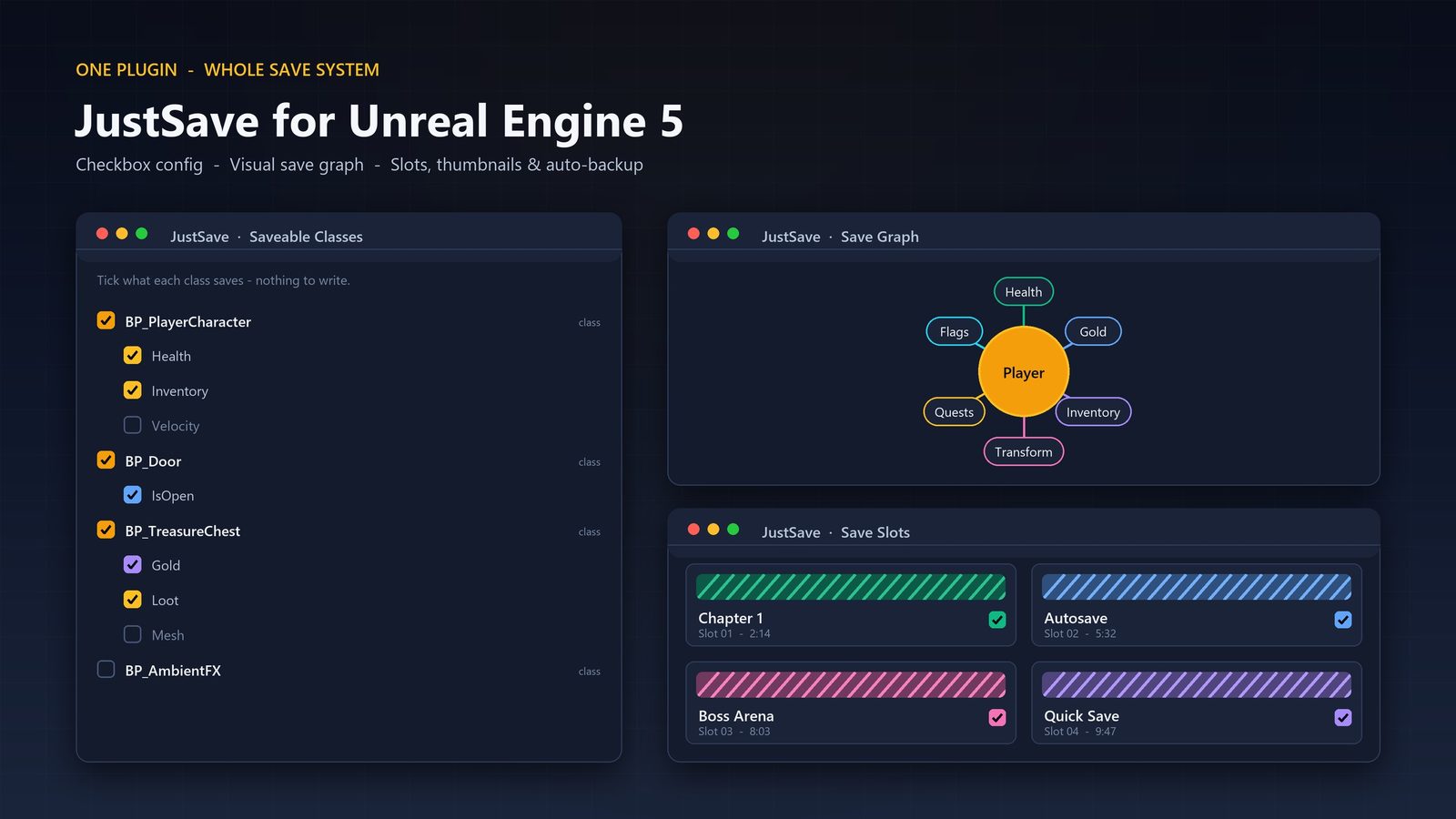
The no-code way is the config panel. JustSave's editor UI presents one panel that lists every saveable class and, under each, the properties you can tick to include. Instead of editing source and recompiling, you open the panel, find your class, and tick the variables you want in the save — health, score, inventory count, an 'is opened' flag on a door, whatever your game tracks. For a Blueprint-driven project this is the path: you never open a source file, you just tick boxes. Both routes converge on the same outcome — a defined set of properties, per class, that the save will carry.
Step 3 — Call Save and Load
With saveable actors marked and their properties chosen, the actual save is a single call. From Blueprint, call Save (one of the plugin's Blueprint-exposed functions) at the point your game decides to persist — a save point, a menu button, a level transition, or on a timer. JustSave walks your saveable actors, captures their transforms and marked properties, and writes a save file. Loading is the mirror image: call Load, and the plugin reads the file back and re-applies the captured state to the world, putting actors where they were and restoring the values you marked.
Because the heavy lifting lives inside the plugin, the call site in your game stays tiny. A pause-menu 'Save Game' button becomes a single Save node; a 'Continue' button becomes a single Load node. There is no per-actor capture code to write at the call site and no restore loop to maintain — that is the entire point of the zero-code framing.
If you want saving to happen without the player asking, JustSave includes an auto-save feature, so you can persist on a cadence or at checkpoints without wiring your own timer-and-save plumbing. And when you build your slot menu, the plugin can attach slot thumbnails, so each save can show a captured image rather than a bare slot number.
What actually gets persisted — and the robustness you get free
It is worth being precise about the scope of a JustSave save, because 'it saves the game' is vague and the details are where save systems usually disappoint. Four things are captured. First, transforms: where saveable actors are in the world. Second, marked properties: the variables you flagged with SaveGame or ticked in the config panel. Third, runtime-spawned and destroyed actors: if the player spawned a pickup, built a structure or destroyed a crate during play, the save records that the world changed, so on load the spawned things come back and the destroyed things stay gone. Fourth, cross-level data: state that needs to survive moving between levels, so a value set in level one is still there in level three. That third point is the one a hand-rolled save most often gets wrong, because it requires tracking deltas against the level's original layout rather than just snapshotting placed actors.
A working save call is only half of a shippable system. The other half is everything that stops a save from corrupting, going stale, or silently breaking after an update. JustSave's files are compressed, with optional AES-256 encryption if you would rather players could not trivially read or edit their saves. Files carry checksums so corruption can be detected, and writes are atomic, so a save interrupted mid-write does not leave you with a half-written, unloadable file. On top of that there are auto-backups with repair, so a bad save has a fallback rather than being a dead end.
The feature that quietly matters most after launch is save-version migration: when you ship an update that changes your data, migration is how a player's existing save still loads instead of breaking. Writing version migration by hand is one of the least glamorous and most error-prone parts of a save system, so having it built in is a genuine saving of effort. The point of listing all of this is not that you need every feature, but that the floor of what a JustSave save is — compressed, checksummed, atomically written, backed up, migratable — is higher than what most teams build before they ship, and you write none of it. The editor config UI rounds it out with a slots browser, spec import and export, and a read-only Save Graph view so you can confirm the save is capturing what you think it is.
Honest limits, and where to take it next
Three limits are worth stating plainly so there are no surprises. First, platform: JustSave is a Windows (Win64) build. If your release target is a console or macOS, this plugin as listed does not cover that, and you should plan accordingly rather than discovering it late. Second, the engine range: it supports Unreal Engine 5.3, 5.4, 5.5, 5.6, 5.7 and 5.8 — if you are on 5.2 or earlier you are outside the supported window. Third, content: JustSave ships no content and zero Blueprints. That is a strength for a systems plugin (nothing to merge into your content, nothing to conflict with your assets) but it means the plugin gives you the save machinery, not a ready-made save/load menu — you build the UI that calls Save and Load. It ships a PDF user guide to walk you through the setup.
One more clarification, because it is a common misread: JustSave is described as network replicated: No. That does not mean multiplayer is off the table — it can capture multiplayer player-state into a save — it means JustSave performs no Unreal network replication of its own. It is a save system, not a networking layer, and keeping that distinction clear helps you reason about what it touches.
With the full loop in place — a Saveable Component on the actors that matter, their properties marked in code or in the panel, and Save and Load wired to your menu — the productive next steps are project-specific: build the save/load menu UI, decide your auto-save cadence, turn on AES-256 encryption if your game warrants it, and plan your save-version migrations early so old saves keep loading. JustSave is one of MythicLemon's developer tools; if you are kitting out a solo or small-team UE5 workflow, it pairs naturally with the other tooling in the range — plugins that remove a chunk of plumbing so you can spend the time on the parts of the game only you can make.
The full add-a-save-system workflow at a glance
| Stage | What you do | What JustSave handles |
|---|---|---|
| Install | Add the code plugin, enable it, build the C++ modules | Compiles JustSaveRuntime into your game, editor modules into the editor |
| Opt actors in | Add a Saveable Component to each actor class you want persisted | Brings every instance of that class into save scope |
| Choose data | Mark properties SaveGame in code, or tick them in the config panel | Captures the actor transform plus your marked properties |
| Persist | Call Save (and Load) from your menu, checkpoint or auto-save | Walks actors, writes a compressed, checksummed, atomic file; restores on load |
Each step is a small, discrete action; the serialization that would normally sit between Save/Load and the disk is handled by the plugin.
Two ways to mark a property for saving
| Method | Where you do it | Best for |
|---|---|---|
| SaveGame specifier | On a UPROPERTY in your C++ source | Projects that already keep gameplay state in C++ |
| Config panel tick | In the JustSave editor panel, per class | Blueprint-driven projects or no-code configuration |
Both produce the same result — a defined set of saved properties per class. Choose by whether your project is code-driven or Blueprint-driven.
What a JustSave save captures
| Captured | Why it matters |
|---|---|
| Transforms | Where saveable actors sit in the world on reload |
| Marked properties | The specific variables you flagged, per class |
| Spawned & destroyed actors | Runtime world changes survive: spawned things return, destroyed things stay gone |
| Cross-level data | State follows the player across maps without a bespoke carrier object |
These four capture types are the scope of a save; the spawned/destroyed and cross-level cases are the ones a hand-rolled save most often gets wrong.
FAQ
Can I really add saving to a UE5 game without writing serialization code?
Yes — that is JustSave's premise. You add a Saveable Component to the actors you want persisted, mark which properties to save (with the SaveGame specifier in code, or by ticking them in the config panel), then call Save or Load. The plugin handles capturing transforms and marked properties, writing the file, and re-applying state on load, so you do not write the serialization layer yourself.
What does a JustSave save actually persist?
Four things: actor transforms, the properties you marked SaveGame or ticked in the config panel, runtime-spawned and destroyed actors (so world changes survive a reload), and cross-level data so state follows the player between maps. The spawned/destroyed-actor and cross-level cases are the parts a hand-written save most often gets wrong, and here they are built in.
Do I need to write C++ to use JustSave?
Not necessarily. It is a C++ plugin, so your project needs to be a C++ project to compile it, but you can configure and drive it without writing save logic. Five of its classes are Blueprint-exposed so you can call Save and Load from Blueprint, and you can mark properties by ticking them in the editor config panel rather than editing source. The SaveGame-in-code route is there if you prefer it.
Is JustSave suitable for a shipped game?
Its save files come with robustness features you would otherwise build yourself: compression, optional AES-256 encryption, checksums, atomic writes, auto-backups with repair, and save-version migration so old player saves still load after you ship an update. Auto-save and slot thumbnails are included too. You still build your own save/load UI on top, since the plugin ships no content. Note that it is a Windows (Win64) build, so confirm your target platform is covered.
What platforms and engine versions does JustSave support?
It is a Windows (Win64) build and supports Unreal Engine 5.3, 5.4, 5.5, 5.6, 5.7 and 5.8. It is not listed for consoles or macOS, so if that is your target you should plan around it. It is pure C++ with zero Blueprints and ships no content, plus a PDF user guide.
JustSave
Save and load your whole game state without writing serialization code. Add a Saveable Component, mark the properties you care about, and call Save or Load — JustSave persists transforms, marked properties, runtime-spawned and destroyed actors, and cross-level data. Robust files come standard: compression, optional AES-256 encryption, checksums, atomic writes, auto-backups with repair, save-version migration, auto-save and slot thumbnails. Pure C++, ships no content.
Related reading