tutorial · 2026-06-20
Hardening UE5 Save Files: Encryption, Backups & Versioning
A practical guide to making UE5 saves survive corruption, tampering and shipped updates — with optional AES-256 encryption, checksums, atomic writes, auto-backup repair and save-version migration via JustSave.
Why a save file is the most fragile thing you ship
A save file is the one artefact in your game the player genuinely owns. They put hours into it, and they expect it to be there tomorrow, intact, after a power cut, an alt-F4, a disk hiccup, or your next patch. Yet for most Unreal Engine projects the save path is the least-tested code in the build: it works on the developer's machine, ships, and then quietly fails in the field when a write is interrupted halfway, or a saved struct no longer matches the class that reads it back.
Hardening a save system is really five separate problems wearing one coat: keeping the bytes confidential if you care about tampering, proving the bytes have not been altered or truncated, never leaving a half-written file where a good one used to be, recovering automatically when a file does go bad, and making sure a save written by version 1.0 still loads under version 1.3. This tutorial walks each one as a general UE5 concern, and shows where JustSave — a zero-code save plugin — provides the capability so you do not have to hand-roll it.
One honesty note before we start. JustSave is a Windows-only (Win64) code plugin for Unreal Engine 5.3 through 5.8, built as pure C++ with no Blueprints of its own and shipping no content. Everything below is grounded in its published technical details; where a capability is not on that list, this guide treats it as something you build yourself in standard UE5, not a feature to assume.
The baseline: zero-code saving before you harden anything
You cannot harden a save path you have not built yet, so start with the capture layer. In stock Unreal you typically subclass USaveGame, copy the fields you care about into it by hand, and call SaveGameToSlot / LoadGameFromSlot — then repeat that boilerplate for every system, and write extra code to handle actors that spawned or were destroyed at runtime, or state that needs to survive a level transition.
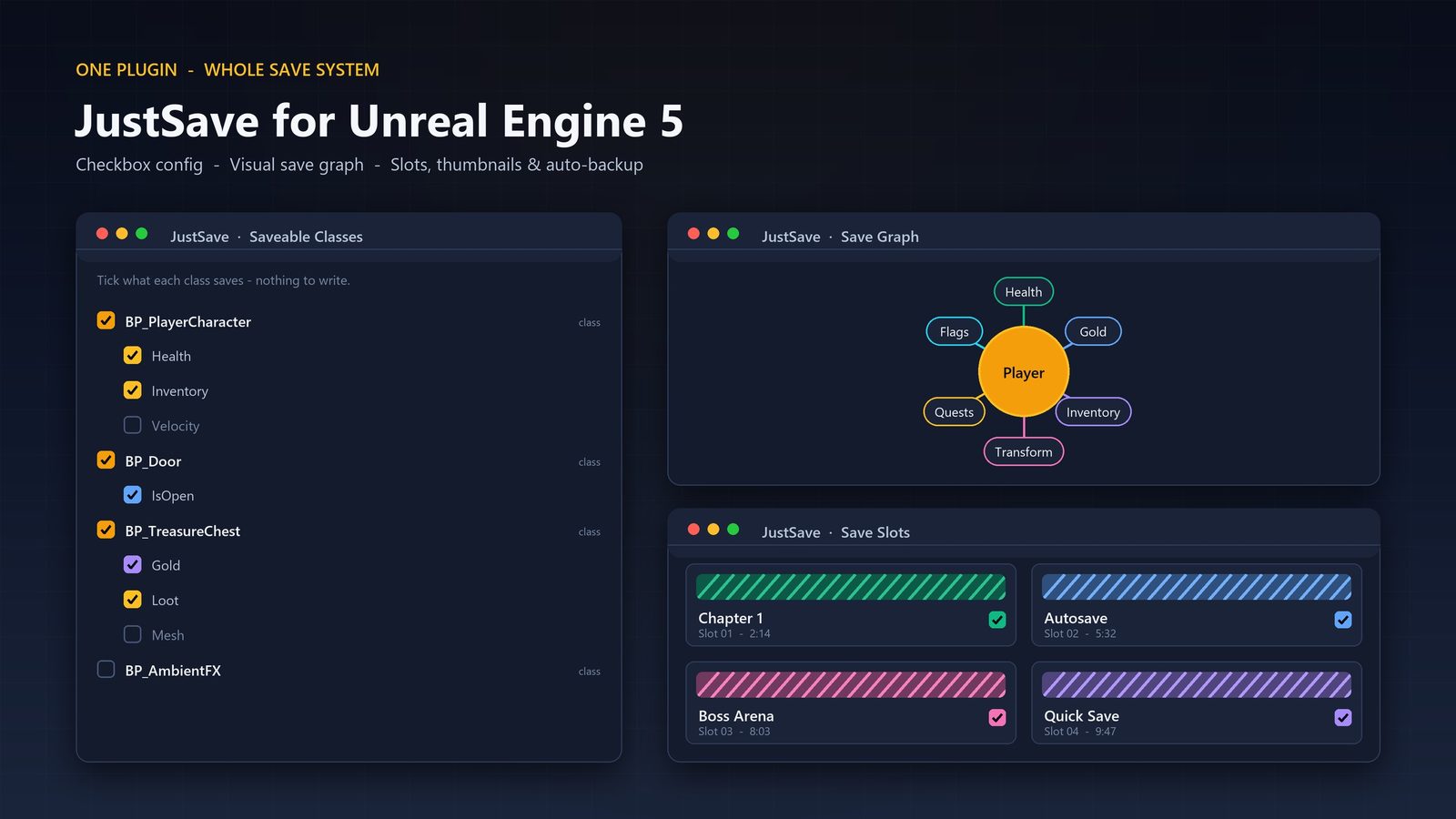
JustSave's model removes that boilerplate. You add a SaveableComponent to an actor, mark the properties you want persisted with the SaveGame flag (or tick them in the config panel), then call Save or Load. From there it persists transforms, your marked properties, runtime-spawned and destroyed actors, and cross-level data, without you writing serialization code per system. This matters for hardening because a consistent, declarative capture surface is far easier to make robust than dozens of bespoke save routines, each with its own chance of a bug.
Configuration lives in one place rather than scattered through your headers: an editor config UI lists every saveable class and the properties to tick, alongside a slots browser for inspecting saved games, spec import/export for moving a configuration between projects, and a read-only Save Graph view of the saved data relationships. A useful habit: decide what is genuinely save-worthy before you tick anything. Transforms and gameplay state, yes; transient effects and anything you can recompute on load, no. A leaner save is faster, smaller, more reliable — and one less surface to migrate when your data model changes.
Confidentiality: optional AES-256 encryption
Encryption answers one specific question — can a player (or anyone with the file) read and edit the save in a hex editor or text editor? For a single-player offline game this is often a non-issue, and you may legitimately choose to ship plaintext saves so players can back them up and tinker. For a game with leaderboards, unlock economies, or anti-cheat expectations, you usually want the bytes opaque.
JustSave offers AES-256 encryption as an optional layer on the save file. The word optional is doing real work: it is a switch, not a mandate, so you can leave it off where transparency is a feature and turn it on where confidentiality matters. AES-256 is a symmetric cipher, which means the same key both encrypts and decrypts; the practical consequence for any UE5 project is that key management is your responsibility — a key baked into a shipped client is, in principle, extractable, so treat encryption as a deterrent against casual editing rather than a guarantee against a determined attacker.
Encryption is not integrity. A file can be perfectly decryptable and still be corrupt or truncated. That is why the next layer — checksums — exists, and why you generally want both. Encryption hides the contents; checksums prove the contents are whole. JustSave also compresses save files, which keeps them small whether or not you encrypt.
Integrity: checksums and atomic writes
Two distinct failure modes attack a save file. The first is alteration: the bytes changed, by tampering or by silent disk corruption. The second is interruption: the write never finished, because the process was killed, the battery died, or the OS dropped the handle mid-flush. You need a defence for each, and they are different defences.
A checksum is the defence against alteration. You compute a fixed-size fingerprint of the data when you write it, store it alongside, and recompute it on load; if the two disagree, the file is not trustworthy and you refuse to load it blindly. JustSave writes checksums into its save files, so a corrupted or altered file is detected rather than loaded as if it were valid — which is the difference between a clean error path and a save that loads into a broken game state.
An atomic write is the defence against interruption. The standard, battle-tested pattern in any robust file system code is write-to-temp-then-rename: you write the new save to a temporary file, flush it fully, and only then atomically replace the old file with it. If the process dies at any point before the swap completes, the original good file is untouched; you never end up in the in-between state where the old save is gone and the new one is incomplete. JustSave performs atomic writes, so an interrupted save does not clobber the last good one. Together, checksums and atomic writes mean a JustSave file is both verifiable and never half-written.
Recovery: auto-backups with repair
Detection is necessary but not sufficient. Telling a player 'your save is corrupt' is better than loading garbage, but what they actually want is their progress back. That is the job of backups, and specifically of backups that the system knows how to fall back to without the player doing anything.
JustSave keeps auto-backups and can repair from them. The mental model is a short rolling history: when the live save fails its checksum or is otherwise unreadable, the system can recover from a known-good backup instead of dead-ending. Combined with the atomic-write guarantee — which ensures the previous file was a complete, valid save and not a half-written one — this gives you a genuine safety net rather than a single point of failure.
If you have only ever shipped a single save file with no backup, this is the upgrade that most changes the player experience of a bad day. The failure stops being 'lost the run' and becomes 'rolled back to a recent autosave', which is the difference between a refund and a shrug. Pair this with auto-save (also included) so the rolling history actually has recent points to fall back to; a backup from three hours ago is far less comforting than one from ninety seconds ago. Slot thumbnails, also included, make those recovery points legible in a load-game menu.
Forward compatibility: save-version migration
The bug that bites after launch, not before, is the schema change. You ship 1.0, players accumulate saves, then in 1.1 you rename a field, add a new system, or restructure a struct. Now every existing save was written against a data model your new code no longer recognises, and a naive loader either crashes, silently drops data, or reads nonsense. This is the single most common reason a patch breaks existing saves.
Save-version migration is the discipline that fixes this: each save records the version it was written under, and on load the system upgrades older formats forward to the current one through defined steps, rather than assuming every file matches today's layout. JustSave provides save-version migration so old saves still load after you ship an update — which is precisely the capability you want the day you change your save schema in a live game.
To make the most of it, treat your save schema as a versioned contract from day one. Decide deliberately what to persist, avoid gratuitous renames, and when you must change the shape of saved data, think in terms of 'how does a 1.0 file become a 1.1 file' rather than 'will the old file happen to still parse'. Two boundaries to keep in mind as you build: JustSave is pure C++ across three modules (JustSaveRuntime, JustSaveEditor, JustSaveFeedback) and ships no content of its own, so it adds capability rather than assets to manage; and it is not network replicated — it can capture multiplayer player-state into a save, but uses no Unreal network replication itself, so it is a persistence layer, not netcode. Targets are Windows (Win64) on UE 5.3 to 5.8, with a PDF user guide; confirm any other platform need separately.
Five save-file failure modes and the layer that defends each
| Failure mode | What goes wrong | Defending layer |
|---|---|---|
| A player reads or edits the save | Bytes are human-readable in a text or hex editor | Optional AES-256 encryption |
| Silent corruption or tampering | Bytes change but the file still 'loads' | Checksums (detected on load) |
| Write interrupted mid-flush | Old save lost, new save incomplete | Atomic writes |
| File ends up unreadable anyway | No valid live save to load | Auto-backups with repair |
| A patch changes the save schema | Old saves crash or drop data after an update | Save-version migration |
Each row pairs a real-world failure with the JustSave capability that addresses it. Capabilities are taken from the published technical details; encryption is optional.
Stock UE5 saving vs. JustSave's hardening surface
| Concern | Stock UE5 baseline | JustSave |
|---|---|---|
| Capturing state | Hand-written USaveGame copy per system | SaveableComponent + SaveGame-marked properties, then Save/Load |
| Runtime-spawned / destroyed actors | You handle it yourself | Persisted |
| Cross-level data | You handle it yourself | Persisted |
| Encryption | Roll your own | Optional AES-256 |
| Integrity check | Roll your own | Checksums |
| Crash-safe writes | Roll your own | Atomic writes |
| Recovery from a bad file | Roll your own | Auto-backups with repair |
| Surviving a schema change | Roll your own | Save-version migration |
The stock-engine column describes the default UE5 USaveGame workflow as a general baseline; it is not a product claim. The JustSave column lists only its published capabilities.
FAQ
Does JustSave encrypt save files?
It can. AES-256 encryption is offered as an optional layer on the save file, so you can turn it on where you want the bytes opaque and leave it off where you would rather ship readable saves. As a symmetric cipher, key management is your responsibility — treat it as a strong deterrent against casual editing rather than a guarantee against a determined attacker. Encryption hides contents but does not prove integrity; that is what the checksums are for.
What stops a save from corrupting if the game crashes mid-write?
Atomic writes. JustSave performs atomic writes, following the standard write-to-temp-then-rename pattern, so an interrupted write never destroys your last good file. On top of that it stores checksums to detect corruption or tampering on load, and keeps auto-backups it can repair from if a file does end up unreadable.
Will old player saves still load after I ship an update?
That is exactly what save-version migration is for. Each save records the version it was written under, and JustSave upgrades older formats forward to the current one on load, so a save written by an earlier build still loads after you patch the game. To get the most from it, treat your save schema as a versioned contract and change its shape deliberately rather than relying on old files happening to still parse.
Do I need to write serialization code to use JustSave?
No. You add a SaveableComponent to an actor, mark the properties you care about with SaveGame (or tick them in the config panel), then call Save or Load. It persists transforms, your marked properties, runtime-spawned and destroyed actors, and cross-level data without per-system serialization code. A config panel lists every saveable class and property so what gets saved is a visible, deliberate choice.
Does JustSave work for multiplayer, and on which platforms?
It can capture multiplayer player-state into a save, but it is not network replicated — it uses no Unreal network replication itself, so it is a persistence layer rather than netcode. It is a pure-C++ code plugin for Unreal Engine 5.3 through 5.8, and the published platform support is Windows (Win64) only. Confirm any other platform need separately rather than assuming it.
JustSave
Save and load your whole game state without writing serialization code. Add a Saveable Component, mark the properties you care about, and call Save or Load — JustSave persists transforms, marked properties, runtime-spawned and destroyed actors, and cross-level data. Robust files come standard: compression, optional AES-256 encryption, checksums, atomic writes, auto-backups with repair, save-version migration, auto-save and slot thumbnails. Pure C++, ships no content.
Related reading